October 19, 2026 was not a universal Windows shutdown date. It was a warning about something enterprises often discover too late: a business-critical application can depend on a certificate name, thumbprint, key size, or signature format that nobody considers part of the application.
Microsoft Windows Production PCA 2011 has now expired, and Microsoft is moving Windows production signing to a replacement certificate authority. Microsoft also plans stronger RSA-3072 and SHA-384 signing configurations later in 2026 and post-quantum signing by default in 2027. The company warns that some applications may fail during these changes even when Windows itself considers the signed file valid and trusted.
For a CIO, the question is not “Did the certificate expire?” It is “Which applications have encoded a temporary cryptographic detail as a permanent business rule?”
That is an application-discovery problem. It belongs beside dependency mapping, business-rule extraction, regression testing, and modernization planning—not only in an endpoint patch queue.
What Changed in Windows Code Signing?
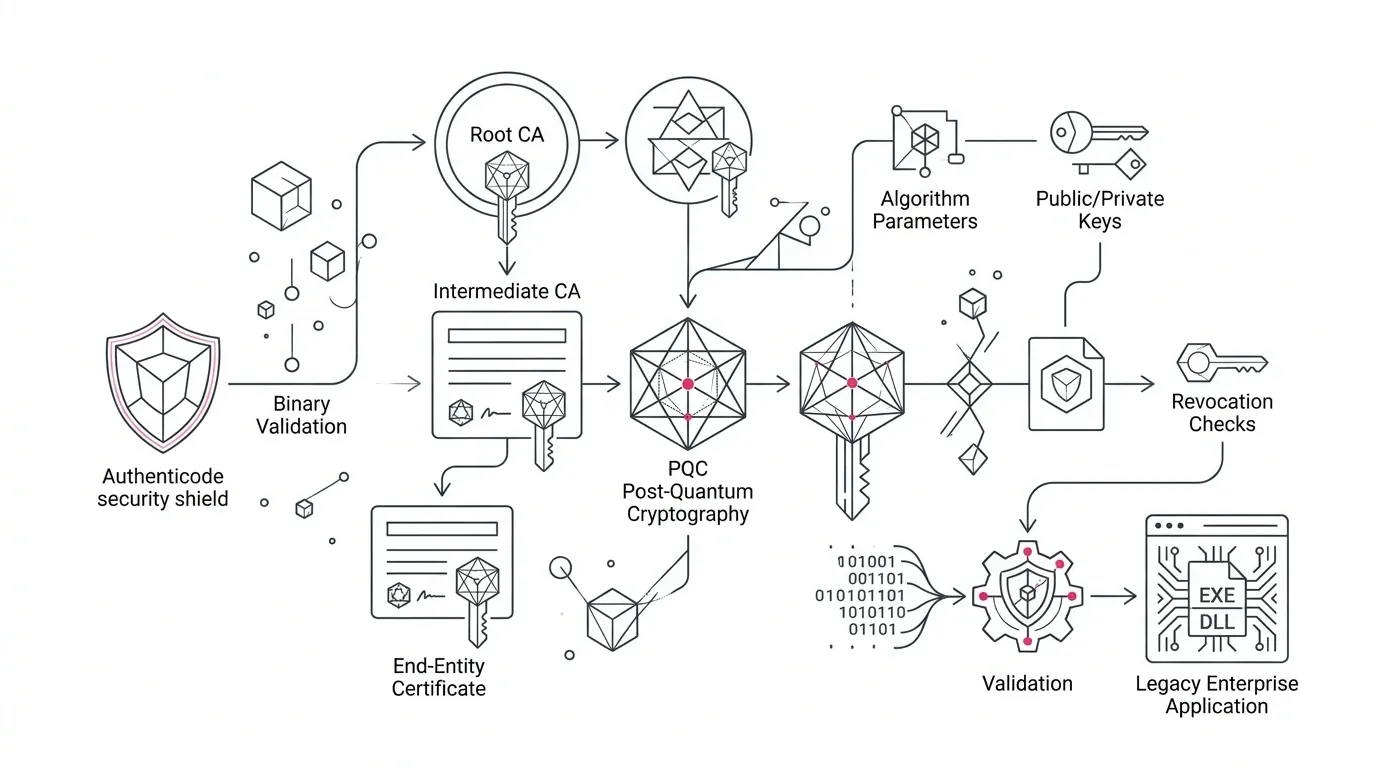
Microsoft’s next-generation code-signing guidance identifies three stages:
- Now: Microsoft Windows Production PCA 2011 expired on October 19, 2026. Replacement with Microsoft Windows Production PCA 2026 is underway.
- Later in 2026: Windows production signing is expected to move toward stronger configurations, including RSA-3072 and SHA-384.
- In 2027: Microsoft expects Windows production signing to move to post-quantum cryptography by default, with consideration for older platforms and legacy systems.
The risk is not that a well-designed application suddenly distrusts Windows. The risk is that software has implemented its own narrower definition of trust.
Microsoft has identified failure-prone patterns such as comparing certificate chains across binaries, pinning a Microsoft certificate subject or thumbprint, requiring RSA-2048 or SHA-256, parsing Authenticode directly, or maintaining a private trust store that does not receive certificate rotations. Those choices can cause an application to reject code that Windows correctly accepts.
Separate Secure Boot Remediation From Application Compatibility
The same expiration date appears in Microsoft’s Secure Boot program, so the two issues are easy to blur. They need related but separate workstreams.
| Workstream | What it protects | Primary question | Typical owner |
|---|---|---|---|
| Secure Boot certificate transition | Trust in boot loaders and other pre-operating-system components | Can every managed device continue receiving current early-boot protections? | Endpoint, server, firmware, and infrastructure teams |
| Application code-signing compatibility | How applications validate signed Microsoft files and components | Will custom trust logic accept legitimate replacement certificates and stronger algorithms? | Application owners, engineering, security architecture, and vendors |
Microsoft’s Secure Boot guidance says devices without the newer certificates may continue to start and receive standard Windows updates. The problem is degraded access to future early-boot protections, not necessarily an immediate boot failure. Managed, older, restricted, or firmware-constrained devices may still require controlled remediation and validation.
That infrastructure work does not prove application readiness. A fully updated device can still host an application whose custom validation logic rejects a legitimate new signature.
Eight Tests for Every Business-Critical Legacy Application
Apply these tests first to systems that control revenue, payments, donor or grant administration, patient or beneficiary services, regulated reporting, manufacturing, identity, or high-volume operations. Each test should produce evidence, an accountable owner, and a disposition—not a verbal assurance.
Find Every Place the Application Makes a Trust Decision
Start with more than the main executable. Inventory installers, launchers, update services, plug-ins, scheduled jobs, drivers, agents, deployment scripts, recovery tools, and integrations that inspect a signature or certificate.
Search source code and configuration for certificate subjects, issuers, thumbprints, serial numbers, intermediate certificate authorities, key sizes, hash names, and custom Authenticode routines. Review security products and packaging systems that may enforce their own rules outside the application repository.
Evidence to require: a trust-decision register linking each check to a component, repository or configuration source, runtime owner, and business service.
Prove That “Pinning” Is Intentional and Supported
Certificate pinning can be appropriate in carefully designed scenarios, but pinning Microsoft’s changing production certificates as if they were permanent application interfaces is brittle. Microsoft explicitly warns against depending on certificate subjects, issuers, thumbprints, serial numbers, or intermediate authorities unless it documents that value as a supported contract.
For every pin, ask:
- What threat was it designed to control?
- Is the pinned value a documented stable interface?
- Who owns its rotation?
- What happens when it changes?
- Is there a safer trust-policy mechanism?
Failure signal: nobody can explain why the pin exists, but removing or changing it is considered too risky to test.
Replace Custom Signature Parsing With Supported Trust APIs
Microsoft recommends validating trust rather than certificate identity. For Windows applications, it points developers to `WinVerifyTrust` or appropriate CryptoAPI/Crypt32 chain and policy interfaces.
The WinVerifyTrust documentation is precise about return handling: zero indicates success; other values are status codes and should not be treated like ordinary `HRESULT` values. That detail illustrates why copied or home-grown validation code deserves review.
Evidence to require: code references or vendor documentation showing the supported trust API, policy used, success criteria, revocation behavior, and error handling.
Test Algorithm Agility, Not Only the New Certificate
Passing a test against Microsoft Windows Production PCA 2026 is necessary, but it is not enough. Software that accepts the new certificate and still assumes RSA-2048 plus SHA-256 may fail again when stronger signing configurations arrive.
NIST defines cryptographic agility as the ability to replace or adapt cryptographic algorithms across applications, software, hardware, firmware, and infrastructure while preserving security and operations. Apply that standard to validation code: a trust policy should not silently depend on one key length, digest, certificate-chain shape, or signature construction.
Evidence to require: a test matrix covering the replacement certificate hierarchy, stronger announced configurations, unsupported-algorithm behavior, and a documented process for future changes.
Audit Private Trust Stores and Restricted Environments
Private trust stores are common in appliances, laboratory systems, manufacturing networks, kiosks, isolated nonprofit service locations, and other controlled environments. They can be defensible. They can also preserve old certificates indefinitely because no team owns the update path.
Document where trust data originates, how it is approved, how it is distributed, how freshness is monitored, and how a failed rotation is recovered. Include systems with limited connectivity and recovery media that may be used only during an outage.
Failure signal: production trust stores are updated manually, but the organization cannot produce the last successful rotation record or a tested recovery procedure.
Validate App Control, Allowlists, and Packaging Rules
An application may trust a file while an enterprise control blocks it. Review Windows App Control policies, endpoint protection, software-distribution tools, package-signing rules, and any control that identifies approved software by certificate metadata.
Microsoft introduced new certificate-authority handling for Application Control for Business to help with Microsoft issuing-CA changes. That does not eliminate the need to inspect organization-specific signer rules, policy exceptions, and private allowlists.
Evidence to require: policy simulation or staged results showing that replacement-signed components are allowed without opening an unnecessarily broad trust path.
Exercise the Full Application Journey
A successful launch test is weak assurance. Test the paths in which signed components actually enter or change the system:
- fresh installation and upgrade;
- service start and restart;
- plug-in or driver loading;
- automatic and offline updating;
- rollback to a known-good release;
- disaster recovery and rebuild from approved media;
- communication with older dependent systems; and
- security monitoring and incident triage when validation fails.
Use representative operating-system versions, server roles, device types, network restrictions, and regional configurations. Include a business transaction or mission workflow so that technical success is tied to an operational outcome.
Evidence to require: signed test results with inputs, environment, component versions, expected behavior, observed behavior, defects, owner, and retest status.
Turn Every Exception Into a Modernization Decision
Do not let a temporary compatibility exception become the new architecture. Classify each finding:
- Repair: replace an unsupported check with a supported trust API and add regression coverage.
- Contain: isolate a vendor-bound component while a supported update is scheduled.
- Rebuild: preserve required business behavior while removing brittle validation, obsolete runtime dependencies, and undocumented deployment logic.
- Retire: remove a low-value component whose business purpose no longer justifies its risk.
This is where certificate readiness becomes portfolio governance. A hard-coded thumbprint is rarely the only hidden dependency in a legacy application. If the team cannot locate the trust decision, identify its owner, reproduce its failure, or test its recovery, fund discovery before funding another exception.
For a broader method, use a legacy application modernization assessment to rank the business value and risk of each system, then preserve business logic during modernization so that security repairs do not erase critical operational behavior.
A 30-Day Executive Response Plan
This is a planning framework, not a universal delivery promise.
| Time | Action | Decision-ready output |
|---|---|---|
| Days 1–3 | Name an executive sponsor; separate Secure Boot and application workstreams; identify critical Windows-dependent services. | Owned scope, incident threshold, and priority list |
| Days 4–10 | Scan code, configurations, packages, trust stores, and policies for the risky patterns Microsoft identifies. Contact third-party vendors. | Trust-decision register with evidence and unknowns |
| Days 11–18 | Test replacement-signed components, stronger-algorithm assumptions, install/update/runtime paths, and controlled failures. | Compatibility matrix, defects, and business impact |
| Days 19–24 | Validate recovery, rollback, restricted-network, and representative business-process scenarios. | Signed acceptance results and residual-risk record |
| Days 25–30 | Choose repair, containment, rebuild, or retirement; fund the next action and set revalidation triggers. | Approved remediation and modernization roadmap |
Boards and executive committees do not need every certificate-chain detail. They do need four answers: which critical services are exposed, what evidence supports the assessment, what temporary risk is being accepted, and when the brittle dependency will be removed.
When the Finding Justifies Modernization
A focused repair is reasonable when the application is supported, the trust logic is isolated, tests are reproducible, and ownership is clear. Modernization becomes the stronger option when several conditions appear together:
- source, configuration, or deployment logic is incomplete;
- the application depends on unsupported Windows versions or vendor components;
- trust rules are spread across installers, services, plug-ins, and scripts;
- private trust stores lack an owned update path;
- the same team cannot test installation, runtime, and recovery;
- business rules are inseparable from obsolete technical assumptions; or
- each certificate or algorithm change requires an emergency exception.
YuniQ’s AI-driven legacy application discovery and modernization approach is relevant at this decision point. YuniQ says its framework can extract workflows, process logic, data structures, functional requirements, user journeys, rules, dependencies, application knowledge, and technical documentation from complex legacy environments. Those artifacts can help define what must be preserved before a purpose-built rebuild.
That is not a claim that every certificate issue requires a rebuild. It is a way to avoid rebuilding blindly when a compatibility investigation reveals that the real problem is undocumented application behavior.
Executive Readiness Checklist
Before closing the issue, require “yes” to each question:
- Have we separated Secure Boot estate remediation from application compatibility testing?
- Do we know every critical service that validates signed Windows or Microsoft components?
- Have we found and justified certificate, issuer, thumbprint, key-size, and algorithm assumptions?
- Does validation use supported Windows trust interfaces?
- Have private trust stores and restricted environments been included?
- Have App Control, allowlists, packaging, and deployment policies been tested?
- Have install, update, runtime, recovery, and rollback paths passed on representative systems?
- Does every exception have an owner, expiry date, funded disposition, and revalidation trigger?
Prepare for the Rotation After This One
The October 19 expiration is useful precisely because it exposes a general weakness: cryptographic details change faster than many enterprise applications do.
Treat the current transition as a rehearsal for stronger algorithms and post-quantum signing. Inventory where trust decisions live. Replace unsupported assumptions. Test operational journeys, not only files. Convert exceptions into explicit modernization choices.
The immediate goal is compatibility. The strategic goal is an application estate that can absorb the next trust change without an emergency program.
CTA: Explore YuniQ’s AI-driven legacy modernization approach and scope a discovery engagement for one business-critical application with undocumented trust logic, dependencies, or recovery paths.
Frequently Asked Questions
Did Windows Production PCA 2011 expiration stop Windows devices from booting?
Not as a universal event. Microsoft says devices without newer Secure Boot certificates may continue to start and receive standard Windows updates, although their access to future early-boot protections can be degraded. Application compatibility is a separate issue: custom software may reject newly signed components if it depends on old certificate details or fixed algorithms.
What is certificate pinning in this context?
It is application or policy logic that accepts only a specific certificate identity or chain detail, such as a subject, issuer, thumbprint, serial number, or intermediate certificate authority. Microsoft warns that pinning its changing production certificates can cause compatibility failures unless the pinned value is documented as a supported contract.
What should Windows applications use to validate signed files?
Microsoft recommends validating Windows trust rather than matching a specific Microsoft certificate. Its guidance points developers to `WinVerifyTrust` or appropriate CryptoAPI/Crypt32 chain and policy interfaces. The correct choice and configuration depend on the application and security requirements.
Why test RSA-3072 and SHA-384 now?
Microsoft says Windows production signing will move toward stronger configurations, including RSA-3072 and SHA-384, later in 2026. Testing only the replacement certificate can leave a fixed-algorithm assumption undiscovered until the next change reaches production.
Does post-quantum signing mean every legacy application must be replaced in 2027?
No. It means organizations should identify where applications assume particular algorithms, key sizes, or signature formats and confirm that supported platforms and vendors have a transition path. Some systems will need a code change, some a vendor update, and some a broader modernization decision.