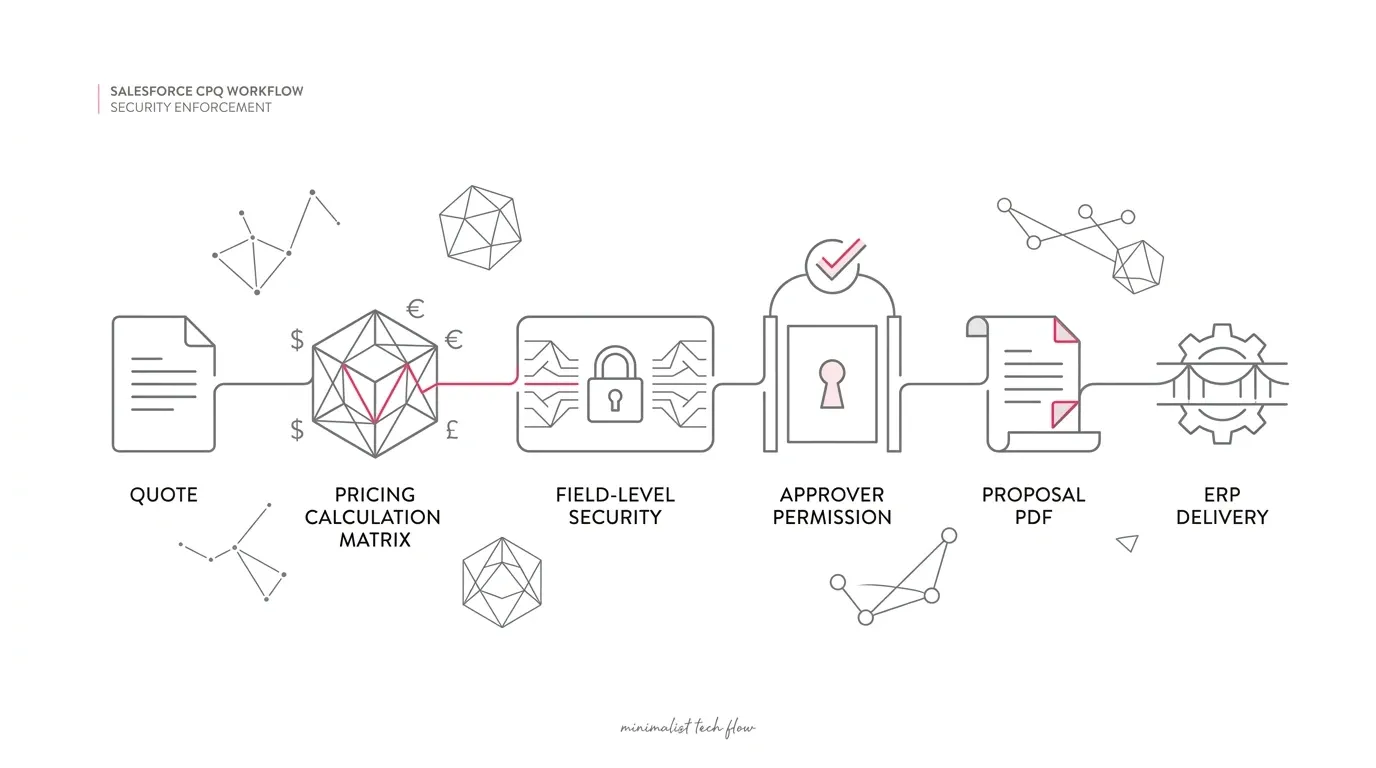
A quote can be technically correct and commercially ready, yet still sit idle because the approver cannot see a required field or complete the approval action.
That risk became more immediate on September 3, 2026, when Salesforce began rolling out security enhancements for the Salesforce CPQ and Advanced Approvals managed packages. The changes are intended to strengthen access control and browser safety. They can also expose permission gaps, unsupported integrations, and custom behavior that previously appeared to work.
Salesforce's guidance is direct: depending on the implementation, customers may need to upgrade a package, update permissions, migrate to a supported API, or modify customizations. For business and technology leaders, this is not merely a package-administration task. It is a revenue-process control issue.
The right response is not to grant broad access until the error disappears. It is to identify the affected path, provide the minimum legitimate access, and prove that the complete quote-to-approval workflow still works.
What changed in Salesforce CPQ?
Salesforce identifies four security enhancements that began rolling out on September 3:
- Advanced Approvals now enforces field-level security and record access. Approvers can retrieve only the fields and records they are permitted to access. Missing access can remove information from the approval page or prevent an approval action.
- Access to proposal PDF generation endpoints is restricted. Organizations using custom buttons, integrations, or automation around quote-document generation should determine whether those paths are affected and test them with their real running users.
- The CPQ OAuth setup API now requires administrative permission. Salesforce says a caller must have Customize Application; requests from users without it return an error.
- Product feature names and certain localized display strings are HTML encoded. Embedded HTML or script is displayed as plain text instead of executing in the browser.
These controls affect different surfaces, but they share one operational consequence: historical success is no longer sufficient evidence that a workflow is correctly authorized and supported.
Why Advanced Approvals deserves immediate attention
Approval logic sits at the intersection of pricing policy, delegation, record ownership, product data, and segregation of duties. It is common for an approver to need a narrow view of a quote while being intentionally restricted from other customer, margin, or commercial data.
The new enforcement makes those boundaries real at the point of action. A field referenced by an approval page, formula, automation, or customization may exist and contain a value, yet be unavailable to the running user. Likewise, an approver may have object access but lack access to the specific quote, approval record, related record, or field involved in the transaction.
That can produce several symptoms:
- A field expected on the approval page is blank or absent.
- An approver can open a record but cannot approve or reject it.
- The process works for an administrator but fails for a business approver.
- A delegated or substitute approver behaves differently from the original approver.
- One approval path works while another fails for a particular product, region, or business unit.
Those symptoms do not prove a Salesforce defect. They can result from field-level security, sharing, package permissions, custom automation, or data conditions. Salesforce's September 4 guidance specifically directs customers to review field access and sharing for affected fields, objects, records, and users.
Do not solve a permissions problem with blanket privilege
When a quote is blocked, the fastest apparent fix is often a powerful permission set. That can restore the workflow while creating a larger control problem.
Permissions such as Modify All Data or Customize Application have consequences far beyond a single approval. Salesforce explicitly says Customize Application should be granted only to trusted administrators who require it for the CPQ OAuth setup API. The same least-privilege principle should guide Advanced Approvals remediation.
Instead of asking, "Which broad permission makes the error go away?" ask four narrower questions:
- Which user is actually executing the failing step?
- Which object, record, and field does that step require?
- Is the access required to view data, update data, invoke an action, or administer configuration?
- Can the need be satisfied through a dedicated permission set and precise sharing rule?
This changes the outcome from an emergency workaround to a supportable access design.
A seven-step CPQ security and workflow audit
1. Establish whether the org is affected
Confirm that the organization uses the Salesforce CPQ managed package, Advanced Approvals, or custom components around quote PDF generation and CPQ setup. Record the installed package versions and the dates each sandbox and production org received the relevant changes.
Do not assume every symptom beginning in September has the same cause. Correlate the first observed failure with package changes, deployment history, permission changes, and the Salesforce rollout.
2. Inventory every approval persona
Create a list of the people and identities that participate in the process:
- Standard approvers
- Delegated and substitute approvers
- Deal desk and revenue operations users
- Sales managers acting across teams
- Integration users
- Automated processes and custom Apex running under a user context
- Administrators who configure CPQ but should not represent business-user behavior in testing
For each persona, document the permission sets, permission-set groups, licenses, role, sharing access, and expected approval authority. Test users should mirror the real persona; an administrator is a poor proxy for a restricted approver.
3. Trace the effective access path
For a failing scenario, identify the target quote, approval record, related account or opportunity, and every field the page or automation depends on. Then evaluate access at four levels:
- Object permission
- Field-level security
- Record-level sharing
- Package or feature permission
Include formula dependencies, lookup fields, approval variables, custom components, Flow, Apex, and fields used only for routing or validation. A user may not see a dependency on screen even though the approval action evaluates it.
4. Test representative deals, not a single happy path
Build a compact regression set covering the scenarios that carry the greatest commercial or control risk:
- Standard quote below an approval threshold
- Discount exception requiring one approver
- High-value or low-margin quote requiring sequential approval
- Multi-region or multi-business-unit quote
- Quote with a delegated approver
- Quote containing sensitive pricing or margin fields
- Amendment, renewal, or co-termed transaction
- Rejection, recall, resubmission, and reassignment
For each case, verify not only whether the button works, but whether the approver sees enough accurate context to make the decision and no more data than the role should access.
5. Inspect integrations and customizations
Search Apex, Flow, Lightning components, Visualforce, external middleware, scripts, and runbooks for dependencies on:
- CPQ proposal PDF generation endpoints
- The CPQ OAuth setup API
- Product feature names containing HTML or markup
- Assumptions that a user can access all fields or records involved in an approval
For OAuth setup API calls, verify the integration's purpose and whether an administrator identity is genuinely appropriate. If it is, constrain and monitor that identity. If it is not, redesign the process rather than quietly expanding privileges.
If product feature names were used to render formatting or executable behavior, move that behavior into a supported component or presentation mechanism. A data label should not be an execution surface.
6. Validate the whole revenue outcome
A successful click is not a complete test. Confirm that:
- Approval status is updated correctly.
- Subsequent approvers are assigned and notified.
- Quote totals and commercial terms remain unchanged unless intended.
- The final proposal document is generated correctly.
- E-signature, ERP, billing, tax, provisioning, and reporting integrations receive the expected data.
- Audit history identifies the correct actor and decision.
- Failed actions generate usable alerts and support evidence.
This is especially important in healthcare and insurance environments, where pricing, contracting, service commitments, and sensitive data access can cross multiple teams and systems. It is also relevant to nonprofits with membership, sponsorship, or complex service agreements, even when the commercial volume is lower.
7. Release with evidence and monitoring
Move remediation through a representative sandbox, user acceptance testing, and a controlled production release. Capture the before-and-after permission state, affected scenarios, expected results, test evidence, approvals, and rollback plan.
After release, monitor:
- Approval aging and queue volume
- Approval error rates
- Quotes stalled at each step
- PDF generation failures
- Integration-user authentication and authorization errors
- Emergency permission assignments
A drop in reported errors is useful, but it is not enough. A quote that silently disappears from an approver's view can look like success in an error dashboard while remaining a business failure.
What leaders should ask this week
CIOs and Salesforce leaders do not need to inspect every permission themselves. They do need clear answers to five governance questions:
- Do we know which production workflows depend on Salesforce CPQ and Advanced Approvals?
- Have we tested them as real approver personas since the September rollout?
- Did remediation add broad permissions, and if so, who accepted that risk and for how long?
- Can we demonstrate that quote documents and downstream integrations still complete correctly?
- Is this implementation stable enough to optimize, or does the incident reveal deeper CPQ technical debt?
The last question should inform, not force, a migration decision. Salesforce CPQ remains available to existing customers. A security remediation is necessary whether the organization plans to optimize CPQ, stage a transition, or eventually redesign on Revenue Management.
Turn the rollout into a controlled CPQ health check
The September changes are a useful test of how well an organization understands its revenue platform. If teams cannot quickly identify the running user, required data, customization, and downstream outcome for an approval, the underlying problem is broader than one permission.
Yuniq provides Salesforce consulting, CPQ optimization, customization, integration, migration, and managed support. A focused CPQ security and workflow assessment can map the affected approval personas, identify access and customization gaps, build representative regression tests, and produce a prioritized remediation plan without treating broad administrative access as the default answer.
** Explore Yuniq's Salesforce services to assess and stabilize your Salesforce CPQ approval and quote workflows.**
Frequently Asked Questions
What changed in Salesforce CPQ Advanced Approvals in September 2026?
Starting September 3, Advanced Approvals began enforcing field-level security and record-level access when retrieving data and processing approval actions. Users can see and act only on fields and records they are permitted to access.
Why are fields missing from the Advanced Approvals page?
Salesforce says missing field access can cause values not to appear. Review the approver's object permission, field-level security, record sharing, and relevant package permissions. Also inspect formulas, automation, and custom components that depend on the field.
Should we grant Modify All Data to fix an approval failure?
Not as a blanket remedy. First identify the exact record, field, and action the approver needs. Broad permissions can bypass important segregation-of-duties and data-access controls.
Does the rollout affect only approvals?
No. Salesforce also identifies changes involving proposal PDF generation endpoints, the CPQ OAuth setup API, and the rendering of product feature names and certain localized display strings.
Does this mean we must migrate off Salesforce CPQ?
No. The security rollout and the strategic CPQ-to-Revenue Management decision are separate. Existing Salesforce CPQ customers should remediate current workflows while evaluating any future migration on business, architecture, and cost evidence.
---