Connecting Salesforce to Microsoft Fabric is straightforward. Keeping the data synchronized accurately, efficiently, and recoverably is the real engineering challenge.
A full reload is often acceptable for an initial proof of concept or a small Salesforce object. At enterprise scale, repeatedly extracting and rewriting millions of rows creates avoidable API consumption, compute demand, longer refresh windows, and greater failure risk. The better pattern is to process only the records that changed—and to do so without losing late updates, duplicating data, or missing deletions.
This article builds on our architectural guide to three ways to integrate Salesforce with Microsoft Fabric . Here, we move from initial connectivity to production-grade incremental architecture.
You will learn how to design an incremental Salesforce ingestion framework using:
- Salesforce change timestamps and selective SOQL queries
- Microsoft Fabric Data Factory pipeline orchestration
- A Bronze landing layer in OneLake
- Fabric Spark notebooks and Delta MERGE operations
- Watermark control tables and closed-interval extraction
- Overlap windows and deterministic deduplication
- Explicit soft and physical delete handling
- Audit, reconciliation, monitoring, and safe retry controls
Product Architecture Note
Microsoft Fabric evolves rapidly. This design was reviewed against Microsoft documentation available on September 9, 2026. Validate connector options, destination write behavior, licensing, and preview status in your own tenant before implementation.
Why Full Reloads Stop Working at Scale
Imagine an Account object containing 20 million records. During an hourly sync cycle, perhaps only 8,000 records are inserted or modified. A full reload reads and processes the other 19,992,000 records again even though they have not changed.
That creates four fundamental operational problems:
- Salesforce API Pressure: Salesforce enforces daily API and Bulk API 2.0 concurrency limits. Wasteful reloads compete directly with operational CRM users and third-party integrations.
- Fabric Capacity Consumption: Every extra row must be transferred, written, transformed, and indexed downstream, burning through Fabric capacity units (CUs).
- Longer Data-Availability Windows: As objects grow, full reloads take longer. Eventually, one sync overlaps the next or misses business freshness SLAs entirely.
- Larger Failure Domains: When a full load fails near completion, the recovery cost equals the entire multi-hour run. Incremental loads isolate risk to small change batches.
Engineering Rule: The goal of incremental architecture is not merely to make ingestion faster. It is to create a repeatable state machine that knows exactly what it attempted, what it committed, and where to resume.
The Recommended Medallion Architecture
Use a Fabric Data Factory pipeline to coordinate the run and a Spark notebook to apply controlled Delta operations:
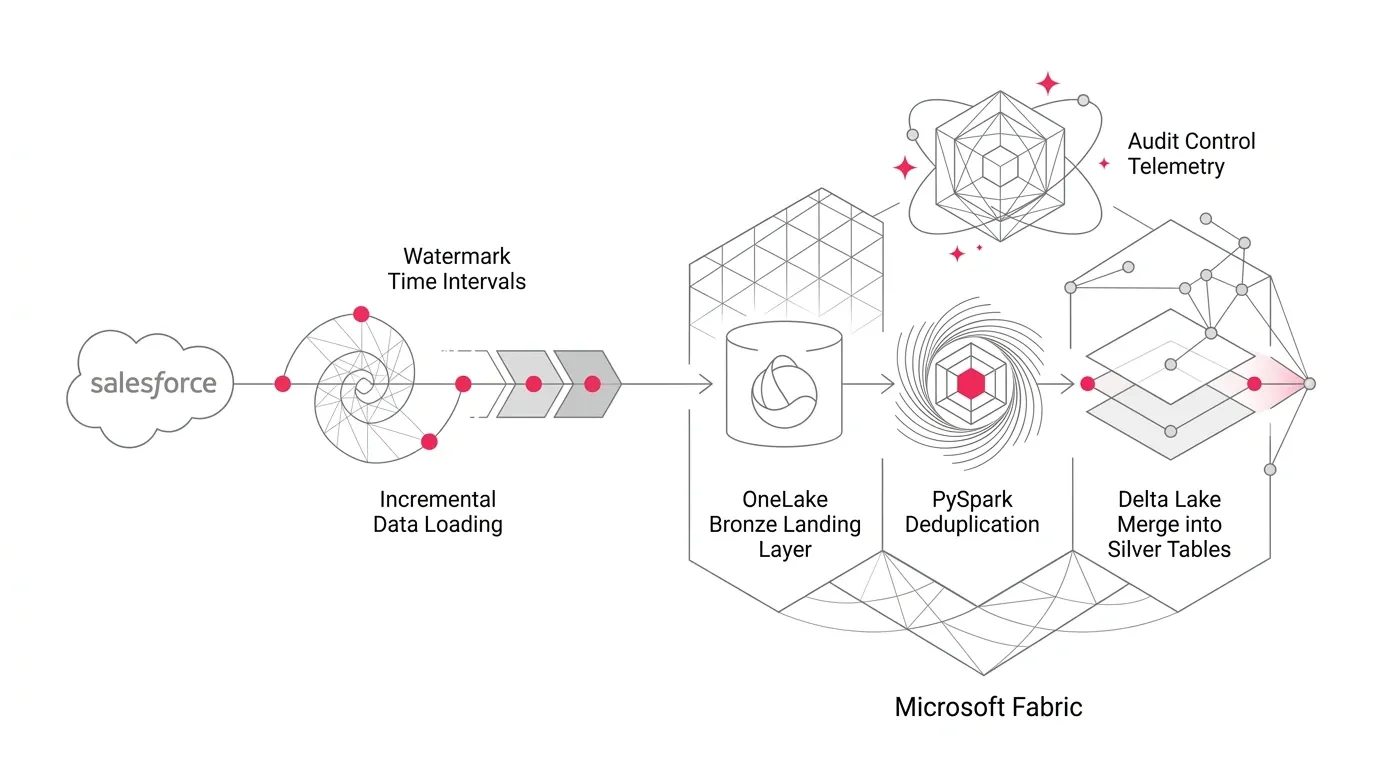
Salesforce (Selective SOQL) → Fabric Data Factory Pipeline → Bronze Landing in OneLake → PySpark Validation & Deduplication → Delta MERGE → Silver Current-State Table → Gold Semantic Models / Direct Lake Power BI
This architectural separation delivers crucial operational guarantees:
- Extraction retrieves source changes without applying business interpretation.
- Bronze preserves the raw change batch, payload headers, and run metadata immutably.
- Silver represents a cleansed, deduplicated current state.
- Gold exposes certified business-ready models, metrics, and semantic layers.
- The Control Plane tracks progress independently of business data.
If a downstream transformation fails after extraction, the Bronze batch can be replayed repeatedly without calling Salesforce APIs again.
Step-by-Step Production Implementation Guide
Step 1: Choose the Correct Change Field
For many Salesforce objects, SystemModstamp is the preferred starting point for incremental extraction because Salesforce maintains it for system-level changes and can optimize queries that use it. LastModifiedDate is also useful, but the two fields do not have identical semantics.
Validate that your watermark field changes for every relevant update, is available to the integration user, can be filtered efficiently via Bulk API 2.0, uses consistent UTC timestamps, and is never null.
Step 2: Use Two Boundaries (Closed Interval with Overlap)
Every extraction should use a lower and upper boundary rather than an open-ended timestamp query:
SELECT Id, Name, Type, SystemModstamp
FROM Account
WHERE SystemModstamp >= '2026-09-09T09:55:00Z'
  AND SystemModstamp < '2026-09-09T11:00:00Z'
ORDER BY SystemModstamp, Id
Why the upper boundary matters: If a query runs for several minutes without a fixed upper boundary, records can change while pages are being read. Capturing a fixed upper bound (extract_upper_bound) prevents a moving extraction window.
Why the lower boundary should overlap: Subtract a small safety interval (e.g., 5 to 15 minutes) from the last successful watermark: query_lower_bound = last_successful_watermark - overlap_interval. Downstream Delta MERGE makes rereading safe and prevents missing records due to clock skew or transaction commit lag.
Step 3: Build a Watermark Control Table
Do not store watermarks in notebook variables or hardcoded pipeline parameters. Use a durable Lakehouse control table.
| Column | Type | Purpose |
|---|---|---|
| source_system | STRING | Identifies Salesforce instance or CRM environment |
| source_object | STRING | Account, Contact, Opportunity, Case, etc. |
| target_table | STRING | Destination Silver table name in OneLake |
| watermark_column | STRING | e.g. SystemModstamp or LastModifiedDate |
| last_successful_watermark_utc | TIMESTAMP | Committed checkpoint timestamp |
| overlap_seconds | INT | Object-specific safety interval (e.g. 300s) |
| last_successful_run_id | STRING | UUID linking state to audit logs |
| is_active | BOOLEAN | Enables or pauses ingestion for the object |
Fundamental State Rule: Data commits first; checkpoint commits last. Advance the watermark only after Bronze landing, validation, Silver merge, and reconciliation succeed.
Step 4: Orchestrate the Run in a Fabric Pipeline
A metadata-driven pipeline sequence follows: Generate unique run_id → Capture fixed UTC upper bound → Read watermark & overlap from control table → Extract Salesforce batch into Bronze → Invoke validation and merge notebook → Reconcile counts → Advance watermark in control table.
Step 5: Land Immutable Bronze Batches
Bronze should preserve raw payloads with technical audit metadata: _ingestion_run_id, _ingested_at_utc, _source_object, _extract_lower_bound_utc, _extract_upper_bound_utc, and _source_system.
Step 6: Deduplicate the Overlap Window with PySpark
Because the overlap window intentionally rereads records, retain the latest version by Id using a deterministic window partition:
from pyspark.sql import functions as F
from pyspark.sql.window import Window

window_spec = (
    Window
    .partitionBy('Id')
    .orderBy(
        F.col('SystemModstamp').desc(),
        F.col('_ingested_at_utc').desc()
    )
)

updates = (
    bronze_df
    .withColumn('_row_number', F.row_number().over(window_spec))
    .filter(F.col('_row_number') == 1)
    .drop('_row_number')
)
Step 7: Merge Changes into the Silver Table
Perform an idempotent Delta MERGE into the Silver current-state table:
from delta.tables import DeltaTable

target = DeltaTable.forName(spark, 'silver.salesforce_account')

(
    target.alias('t')
    .merge(
        updates.alias('s'),
        't.Id = s.Id'
    )
    .whenMatchedUpdateAll(
        condition='s.SystemModstamp >= t.SystemModstamp'
    )
    .whenNotMatchedInsertAll()
    .execute()
)
For analytics, this creates a Type 1 current-state table. If business requirements require point-in-time state tracking, build a downstream Type 2 slowly changing dimension.
Step 8: Handle Salesforce Deletions Explicitly
Timestamp-based queries of active records do not detect deletions. Choose a deliberate delete strategy: Salesforce getDeleted REST API, the Fabric copy activity 'Include deleted objects' option, Salesforce Change Data Capture, or periodic full-key reconciliation. Use soft deletion (is_deleted = true) in Silver to preserve historical facts.
Step 9: Design for Schema Drift
Define an explicit schema drift policy (Strict, Additive, Quarantine, or Ignore). Maintain a versioned field manifest rather than relying on unconstrained schema inference.
Step 10: Reconcile Before Advancing the Watermark
Capture and verify extraction row counts against Bronze writes, deduplicated records, inserted/updated counts, and null key checks before updating the checkpoint.
Step 11: Make Retries Safe (Idempotency Matrix)
| Failure Point | Safe Recovery Behavior |
|---|---|
| Before Bronze Commit | Retry extraction using the same fixed boundaries. |
| After Bronze Commit, Before Merge | Reuse the existing Bronze batch; do not call Salesforce API again. |
| During Delta Merge | Rerun the idempotent merge from the deduplicated batch. |
| After Merge, Before Watermark Update | Reconcile and rerun safely; Delta MERGE guarantees zero duplicate records. |
| After Watermark Update | Run is complete; next scheduled cycle begins with overlap. |
Step 12: Secure the Integration
Use dedicated service principals with least-privilege access, Azure Key Vault / Fabric secure credentials, separate dev/test/prod environments, and sensitive field masking.
Pipeline vs. Managed Copy Job in Microsoft Fabric
Fabric Copy Job offers managed incremental copying for supported sources. Custom pipeline-plus-notebook architectures are ideal when you require custom overlap windows, independent Bronze replay, custom Delta merge logic, complex delete handling, and granular control plane telemetry.
Production Readiness Checklist & Common Pitfalls
Common mistakes to avoid in enterprise environments:
- Advancing the watermark at the start of the run (creates unrecoverable data gaps if downstream steps fail).
- Querying without an overlap window (risks missing records due to transaction commit lag).
- Appending incremental batches directly into current-state tables (creates duplicates).
- Treating zero extracted records as automatic success without connection health checks.
- Ignoring deletions until analytical reports drift out of sync with Salesforce.
- Collecting multi-gigabyte extracts into notebook driver memory using pandas.
- Allowing ungoverned automatic schema evolution across curated reporting layers.
Build Your Microsoft Fabric Foundation with YuniQ
YuniQ helps enterprises design, implement, and govern production Microsoft Fabric data platforms across Salesforce, PEGA, telephony, and legacy data lakes.
Need Enterprise-Grade Microsoft Fabric Engineering?
Turn fragmented Salesforce, PEGA, and operational data into governed OneLake data products. Talk to YuniQ's data architects.
Explore Microsoft Fabric ConsultingFrequently Asked Questions
Which Salesforce field should I use as a watermark?
SystemModstamp is often the strongest candidate because Salesforce indexes and maintains it for system-level mutations. Always validate field behavior and API permissions for your specific objects.
Why use an overlap window?
An overlap window rereads a brief interval before the last committed watermark to protect against transaction commit lag, API pagination latency, and clock skew. PySpark deduplication and Delta MERGE make this reread completely safe.
How should I capture deleted Salesforce records?
Use Salesforce getDeleted APIs, the Fabric copy activity 'Include deleted objects' option, Change Data Capture streams, or periodic reconciliation batches.
Should I append or merge Salesforce changes?
Append incoming batches into an immutable Bronze layer, and merge deduplicated changes into a Type 1 Silver current-state table.
When should the watermark be updated?
Only after extraction, Bronze landing, validation, Silver Delta merge, and reconciliation checks succeed. If any stage fails, the prior watermark is retained.