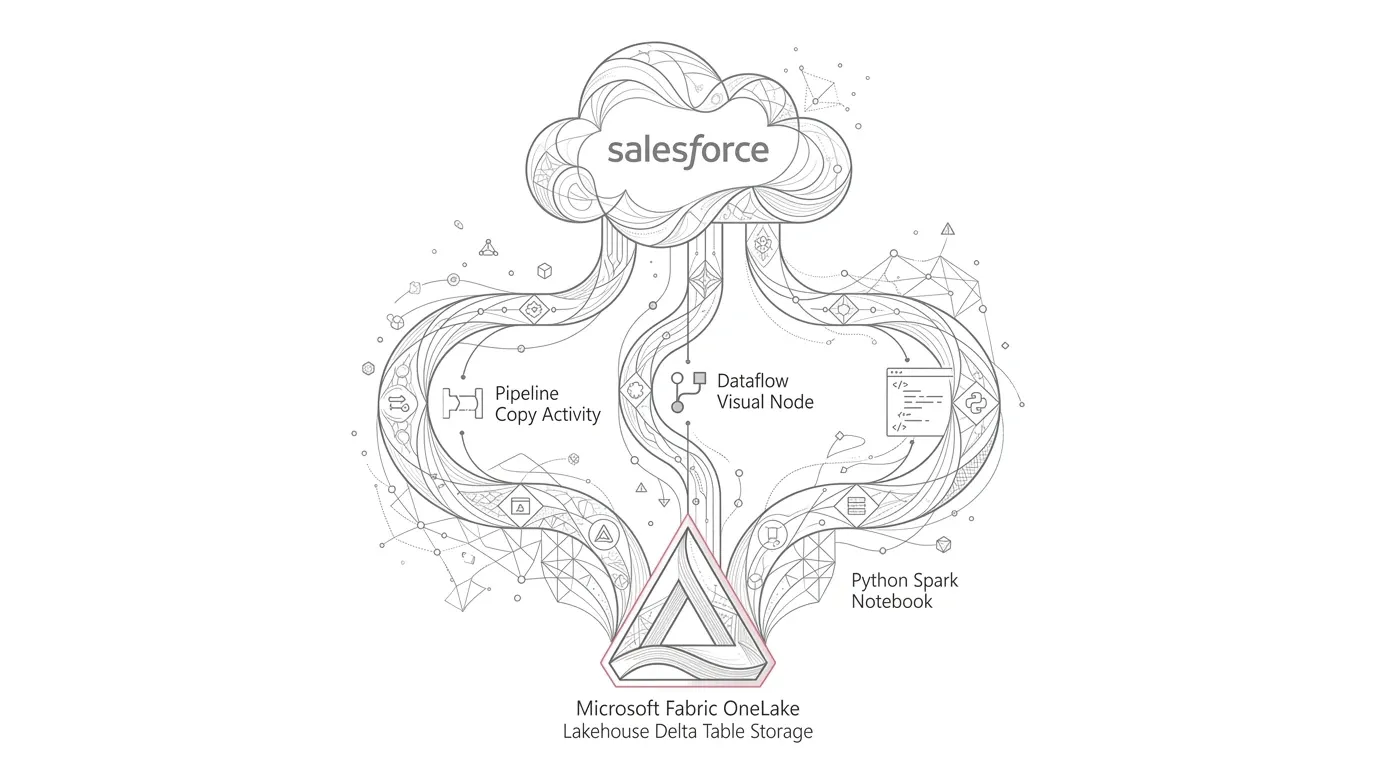
Salesforce holds some of an organization's most valuable business data: accounts, contacts, opportunities, cases, activities, service interactions, and custom objects that capture how the business operates. But Salesforce is a cloud application, not a database that analytics teams can simply query at the storage layer. Data is exposed through supported APIs and connectors.
Core Architecture Question: Which integration method gives us the right balance of simplicity, transformation capability, control, performance, and maintainability?
In our video demonstration, we explore three distinct integration patterns:
- Microsoft Fabric Data Factory pipelines (Copy Data activity)
- Dataflow Gen2 (Power Query low-code visual transformation)
- Fabric notebooks using Python, the simple-salesforce library, and Apache Spark
Each can move Salesforce data into Microsoft Fabric, but they are designed for different operational requirements and team skill sets. This article expands on the demonstration, explains the trade-offs, and adds production-focused guidance for choosing the right pattern.
Product Update Note
Microsoft Fabric and its connectors evolve rapidly. The implementation guidance below reflects Microsoft documentation available in September 2026. Validate connector behavior, destination write modes, licensing, and preview status in your own tenant before finalizing an architecture.
Why Bring Salesforce Data into Microsoft Fabric?
Salesforce is often only one part of the customer or operational journey. A complete view may also require data from PEGA case management, contact-center telephony platforms, billing systems, marketing tools, product applications, third-party services, and on-premises databases.
Bringing Salesforce data into Fabric makes it possible to combine these signals in OneLake and support use cases such as:
- Customer, member, or partner 360 analytics
- Sales pipeline, velocity, and forecast analysis
- Case volume, aging, escalation, and resolution trends
- Contact-center performance connected directly to CRM outcomes
- Campaign-to-opportunity attribution modeling
- Cross-channel journey analytics across disparate operational systems
- Operational alerts and automated exception monitoring
- Governed Power BI semantic models with Direct Lake performance
- Predictive analytics and agentic AI-ready data products
The integration mechanism matters because it influences refresh latency, API consumption, Fabric capacity usage, data quality, change handling, and long-term support effort.
The Three Methods at a Glance
| Method | Best suited for | Transformation experience | Engineering control | Relative complexity |
|---|---|---|---|---|
| Data Factory pipeline | Straightforward ingestion, scheduled copies, reusable orchestration | Mapping plus pipeline activities; deeper transformation in downstream layers | Moderate | Low |
| Dataflow Gen2 | Low-code preparation and analyst-friendly transformation | Visual Power Query experience | Moderate | Low to medium |
| Fabric notebook | Incremental logic, custom APIs, complex transformations, reusable frameworks | Python/PySpark and Delta operations | High | Medium to high |
There is no universally 'best' option. The best design is the simplest approach that meets the workload's requirements without creating avoidable cost or operational risk.
Option 1: Use a Data Factory Pipeline
Fabric Data Factory pipelines provide a visual orchestration experience and a native Salesforce connector. In the video, we use a Copy data activity to select a Salesforce object, preview its records, map its schema, and write the result to a Lakehouse table.
How the Pipeline Approach Works
- Open the required Fabric workspace.
- Select New, then create a Data pipeline under Data Factory.
- Give the pipeline a clear, environment-aware name.
- Add a Copy data activity to the canvas.
- Configure Salesforce as the source.
- Authenticate using an approved Salesforce connection.
- Select the required object or provide a query where supported.
- Preview the source data and confirm the expected fields.
- Select a Fabric Lakehouse table as the destination.
- Import and review the source-to-destination schema mapping.
- Validate, save, and run the pipeline.
- Add an appropriate schedule or event-based orchestration pattern.
Microsoft's connector supports selecting a Salesforce object, report, or SOQL query as a source. It also exposes options such as including deleted objects and automatic partition selection for applicable long-running copies.
Strengths of Pipelines
- Fast to configure for standard copy scenarios
- Minimal code required
- Familiar orchestration model for data engineering teams
- Built-in scheduling, monitoring, dependencies, and retry patterns
- Schema mapping can be reviewed and adjusted before loading
- Useful as part of a larger workflow containing notebooks, stored procedures, or validation steps
Watch-Outs and Caveats
Repeatedly overwriting a large destination when only a small number of Salesforce records have changed incurs unnecessary cost. A pipeline can extract Salesforce records efficiently, but the destination's supported write behavior determines how those records are applied. Do not confuse Salesforce upsert support when Salesforce is the destination with the behavior available when a Fabric Lakehouse or Warehouse is the destination.
- Full reloads consume unnecessary Salesforce API capacity, network bandwidth, Fabric compute, and processing time.
- Schema drift must be handled deliberately, especially with custom fields and changing object models.
- Deletes require an explicit strategy; a filter based only on SystemModstamp does not automatically remove deleted records from the analytical destination.
- Complex business transformations are usually better separated into a curated transformation layer rather than embedded in a simple copy.
- Copy parallelism should be tuned with Salesforce API limits and Fabric capacity in mind.
When to Choose Pipelines
Choose a pipeline when the primary need is dependable, scheduled movement of Salesforce data and the required transformation or merge logic can be handled cleanly by downstream activities or data layers (such as landing into Bronze before notebook processing).
Option 2: Use Dataflow Gen2
Dataflow Gen2 is a strong choice when the team wants a low-code ingestion and transformation experience based on Power Query. The video demonstrates selecting the Salesforce Objects connector, choosing the required object, previewing it, applying transformations, selecting a Lakehouse destination, publishing, and refreshing the dataflow.
How the Dataflow Gen2 Approach Works
- In the Fabric workspace, select New and create a Dataflow Gen2 item.
- Select Get data and locate the Salesforce Objects connector.
- Sign in through an approved organizational connection.
- Browse and select the Salesforce object or objects required.
- Preview the data before loading it into the Power Query editor.
- Apply transformations such as selecting columns, renaming fields, changing types, filtering records, or joining reference data.
- Configure the Lakehouse or other supported destination.
- Review schema and destination settings carefully.
- Publish and refresh the dataflow.
- Verify row counts, data types, rejected records, and refresh history.
Strengths of Dataflow Gen2
- Accessible to analysts and low-code developers
- Rich visual transformation experience through Power Query
- Excellent for repeatable shaping, cleansing, and standardization
- Data preview makes it easier to validate transformation steps
- Useful when business logic can be expressed clearly in Power Query
- Can be orchestrated and monitored as part of a wider Fabric solution
Watch-Outs and Caveats
- Dataflow Gen2 transformations use Power Query engine, not Spark notebooks.
- Destination write options vary by destination type and Fabric release; confirm whether the selected destination supports replace or append.
- Complex incremental change processing can become difficult to maintain in long visual query chains.
- Query folding and connector behavior affect performance; an un-folded transformation may retrieve more source data than expected.
- Refresh frequency must respect Salesforce API consumption limits.
When to Choose Dataflow Gen2
Choose Dataflow Gen2 when source data needs meaningful cleansing or reshaping and the team benefits from a visual, governed transformation experience maintained by analysts or BI developers.
Option 3: Use a Fabric Notebook with Python and Spark
The notebook approach offers the greatest architectural flexibility. In the demonstration, we configure a Fabric Environment, install the simple-salesforce package, create a notebook, connect to Salesforce, run a SOQL query, convert the result into a pandas DataFrame and then a Spark DataFrame, and write it to a Delta table in the Lakehouse.
Step 1: Create and Publish a Fabric Environment
Create an Environment under the Data Engineering experience. Add the required public Python package (simple-salesforce) and publish the Environment before attaching it to your notebook. Environments ensure reproducible dependencies, library version pinning, and environment-specific engineering standards across development and production.
Step 2: Connect, Query, and Convert to Spark DataFrames
Attach the published Environment to your notebook and select the target Lakehouse. Import simple-salesforce and pandas, authenticate using secure secrets, and query Salesforce records:
from simple_salesforce import Salesforce
import pandas as pd

# Retrieve credentials from Azure Key Vault / Fabric secure store
sf = Salesforce(
    username=salesforce_username,
    password=salesforce_password,
    security_token=salesforce_security_token,
)

# Incremental extraction using LastModifiedDate or SystemModstamp
result = sf.query_all("""
    SELECT Id, Name, LastModifiedDate
    FROM Account
    WHERE LastModifiedDate >= 2026-09-01T00:00:00Z
""")

rows = result['records']
pdf = pd.DataFrame(rows).drop(columns=['attributes'], errors='ignore')
sdf = spark.createDataFrame(pdf)
For production workloads, use query_all to handle API pagination automatically, and avoid collecting massive datasets into driver memory through pandas.
Step 3: Write or Merge into Lakehouse Delta Tables
For landing raw extracts into Bronze, a basic append pattern can be used:
(sdf.write
    .format('delta')
    .mode('append')
    .saveAsTable('bronze.salesforce_account'))
For mutating records, an idempotent Delta MERGE pattern updates existing rows and inserts new records without duplicates:
MERGE INTO silver.salesforce_account AS target
USING updates.salesforce_account AS source
ON target.Id = source.Id
WHEN MATCHED AND source.LastModifiedDate >= target.LastModifiedDate
  THEN UPDATE SET *
WHEN NOT MATCHED
  THEN INSERT *
Strengths of Notebooks
- Precise control over Salesforce queries and ingestion logic
- Ability to implement incremental extracts and Delta merge behavior
- Flexible data quality, logging, reconciliation, and exception handling
- Suitable for reusable metadata-driven frameworks across dozens of objects
- Supports sophisticated Python and PySpark transformations
- Easier to test and version control as code in Git
Watch-Outs and Caveats
- Requires software engineering discipline and code maintenance.
- Driver memory exhaustion if pandas is misused for multi-gigabyte extracts.
- Must handle pagination, API limits, retries, token refresh, and error recovery.
- Spark cluster initialization consumes capacity; tiny workloads may not justify overhead.
A Better Production Pattern: Combine the Methods
The three options do not need to be mutually exclusive. Many robust enterprise implementations combine them in a Medallion architecture:
- A Data Factory Pipeline orchestrates execution schedules, dependencies, retries, and monitoring.
- A Copy Data activity lands straightforward Salesforce objects quickly into Bronze tables or files.
- A Spark Notebook performs incremental merge, deletion handling, validation, and Bronze-to-Silver curation.
- A Dataflow Gen2 prepares well-scoped business datasets where Power Query improves maintainability for analysts.
- Curated Delta tables feed shared semantic models and Direct Lake Power BI reports.
10 Practical Tips for Production-Ready Salesforce Ingestion
- 1. Start with the change strategy: Determine how you will track inserts, updates, deletes, and restores using SystemModstamp or custom change flags.
- 2. Separate ingestion from curation: Land raw source data in Bronze before applying business logic in Silver and Gold layers.
- 3. Make every load idempotent: Ensure reruns do not produce duplicate records or corrupt current states.
- 4. Never hardcode credentials: Use Azure Key Vault, Fabric secure connections, or managed credentials.
- 5. Respect Salesforce API limits: Leverage selective SOQL queries, retrieve only required fields, and monitor Bulk API 2.0 daily limits.
- 6. Treat schema as a contract: Guard against breaking changes when Salesforce administrators add or modify custom fields.
- 7. Reconcile every load: Record extract timestamps, watermarks, row counts, rejected records, and run identifiers.
- 8. Tune for capacity: Balance API throughput, Spark session overhead, copy parallelism, and downstream Power BI refresh demand.
- 9. Plan for monitoring and support: Route alerting to operational owners with full run context.
- 10. Validate with a proof of value: Test with representative data volumes, real security models, and end-to-end latency checks.
Decision Guide: Which Method Should You Use?
| Scenario | Recommended Method | Rationale |
|---|---|---|
| Simple batch copy of standard objects | Data Factory Pipeline | Lowest code, built-in scheduling, minimal maintenance. |
| Business analyst-driven data shaping | Dataflow Gen2 | Visual Power Query experience, fast prototyping. |
| High-volume, incremental delta merges | Fabric Notebook (PySpark) | Fine-grained control over watermarks, pagination, and Delta MERGE. |
| Enterprise multi-source analytics | Hybrid Architecture | Pipelines for orchestration, notebooks for curation, dataflows for BI shaping. |
Frequently Asked Questions
Can Microsoft Fabric connect directly to Salesforce?
Yes. Fabric Data Factory provides native Salesforce connectors for pipeline copy activities and Dataflow Gen2. Notebooks can also connect via Salesforce REST or Bulk APIs using Python libraries like simple-salesforce.
Should I use a pipeline or Dataflow Gen2 for Salesforce data?
Use a pipeline when the main goal is reliable movement and orchestration into Lakehouse storage. Use Dataflow Gen2 when the data needs visual, Power Query-based preparation before reaching analytical tables.
When is a notebook the better option?
A notebook is better when the solution requires custom incremental extraction, Delta merge logic, complex transformations, metadata-driven processing, or specialized API error handling.
How do I avoid reloading an entire Salesforce object?
Design an incremental strategy using a reliable change field such as SystemModstamp, store the last successfully processed watermark, retrieve an overlap window to protect against late changes, and merge by Salesforce record ID.
Is it safe to place Salesforce credentials in a Fabric notebook?
No. Production credentials or tokens should never be hardcoded in notebook source code. Always use Azure Key Vault, Fabric secure connections, and role-based access control.
Ready to Unify Salesforce with Microsoft Fabric?
YuniQ helps organizations design, implement, and operationalize modern data platforms across Salesforce, PEGA, telephony, and legacy data lakes into Microsoft Fabric OneLake.
Explore Microsoft Fabric Consulting