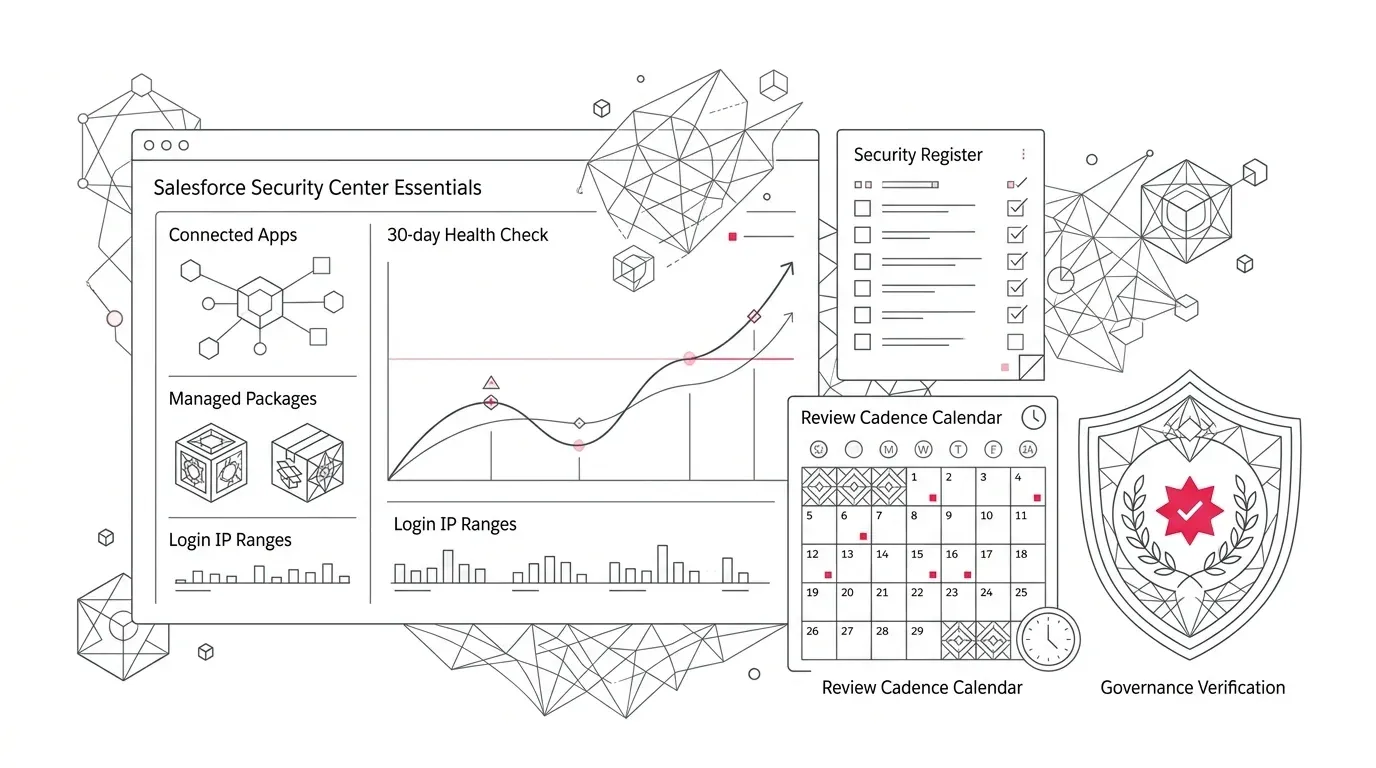
Salesforce has put a useful security dashboard inside every edition. Security Center Essentials is fully rolled out, costs no additional license fee, and brings Security Health Check, connected apps, installed packages, and network-access indicators into one place.
That removes a visibility problem. It does not remove the operating problem.
Security Center Essentials is a single-org dashboard. Salesforce says its dashboard data is collected automatically once a week and retained for 30 days, although an authorized user can request a manual refresh as often as hourly. It can show that a connected app, package, IP range, or baseline changed. It cannot decide whether the change was approved, determine the business risk, assign remediation, or preserve the evidence your organization may need over a longer period.
Core Governance Reality: A dashboard surfaces visibility, but not control. A Security Health Check score or inventory count cannot assign an accountable owner, explain whether an integration change was authorized, remediate a vulnerable configuration, or retain compliance evidence past 30 days.
For healthcare organizations, insurers, and nonprofit foundations, that distinction matters. Their Salesforce environments often connect sensitive data to portals, service tools, fundraising platforms, claims systems, electronic health record integrations, data warehouses, and other third parties. A dashboard becomes valuable only when the organization knows what 'normal' looks like and has a repeatable way to investigate exceptions.
Here is how to turn Security Center Essentials into that operating rhythm.
What Security Center Essentials Actually Gives You
Current Salesforce Help documentation lists seven fundamental metrics monitored within the dashboard:
- Connected apps: An inventory of applications using APIs or protocols such as OAuth, including details that can help identify who installed an app and when.
- Login IP ranges: Profile-level ranges that restrict where affected users can log in.
- Managed packages: Installed upgradeable packages, with details including version and security-review status where available.
- Security Health Check: A 30-day view of how settings compare with the Salesforce baseline or a selected custom baseline.
- Security Health Check baselines: Changes to the baselines used to calculate the score, including who changed them.
- Trusted IP ranges: Org-level ranges that influence login access and, depending on configuration, identity-verification behavior.
- Unmanaged packages: Installed packages that do not provide the vendor support or upgrade path of managed packages.
Essentials also provides a read-only Response Log for automated threat-containment actions that Salesforce Security performs on the organization's behalf.
This is a strong starting point because it consolidates several facts that administrators previously had to assemble from different Setup areas. It is not a complete security-control system. It does not replace least-privilege reviews, login and event analysis, data classification, backup, secure development, incident response, or legal and regulatory assessment.
Start With Expected State, Not the Score
The most tempting number in the dashboard is the Health Check score. Do not make 'reach 100' the program objective.
A baseline contains assumptions. Some Salesforce recommendations may be stricter or looser than a particular organization's approved architecture and working model. A lower score may reflect a documented business exception; a high score can coexist with an abandoned integration, an over-permissioned package, or a business owner who left the organization.
Salesforce's own product guidance says the score should begin a security review, not end it. The useful questions are:
- What should exist in this org?
- What should not exist?
- Who owns each connected app and package?
- Which data and business processes can it reach?
- What changed recently?
- Was that change expected and approved?
- What evidence supports the decision to accept or remediate it?
Document the answers in a lightweight security register. At minimum, record the asset or configuration, business purpose, technical owner, business owner, data classification, access method, last review date, disposition, and any approved exception.
Build the First Baseline in Four Passes
1. Inventory Connections and Packages
Export or record the connected apps, managed packages, and unmanaged packages shown in Essentials. Reconcile the list with integration documentation, vendor contracts, service accounts, and the knowledge of current administrators.
Prioritize anything that has no clear owner, has not been reviewed recently, reaches sensitive data, uses broad OAuth scopes, or supports a business process that has been retired. An item is not safe merely because it appears in a Salesforce dashboard or once passed an AppExchange security review. Salesforce Well-Architected guidance treats third-party applications and packages as part of the customer's trust boundary after installation.
Do not uninstall an unfamiliar package or revoke an app impulsively. First identify dependencies, active users, automated jobs, data flows, and rollback requirements. A hurried security cleanup can become a service outage.
2. Validate Network Ranges in Business Context
Review profile-level login IP ranges and org-level trusted IP ranges separately. Their names sound similar, but they do different jobs.
Compare them with the organization's current office networks, VPN or zero-trust access design, remote-work policy, integration endpoints, and disaster-recovery arrangements. Look for overly broad ranges, obsolete offices, former vendors, and entries nobody can explain. Then test proposed changes with the affected users and integrations before production enforcement.
3. Review the Health Check Baseline
Confirm whether the org uses the Salesforce baseline or a custom baseline. If it uses a custom baseline, identify who approved it, why each deviation exists, and when it must be reviewed again.
Treat changes to the baseline as governance events. Quietly weakening a baseline can improve the visible score without improving security. Conversely, tightening it without testing can disrupt legitimate access or automation.
4. Capture Decisions Outside the 30-Day Window
Thirty days of history is useful for recent drift, but it is a short institutional memory. Preserve review outputs in the organization's approved ticketing, governance, or evidence repository. Record the before state, decision, approver, implementation evidence, test result, and any follow-up date.
This is especially important when internal policy or an external obligation requires longer retention. Security Center Essentials can support a review; it should not be described as proof that a healthcare, insurance, privacy, or other compliance requirement has been satisfied.
Align Reviews With Real Operational Change
Salesforce automatically collects Essentials dashboard data weekly. That is a sensible default, but a useful review cadence should follow the way the org changes.
Create four distinct operational review triggers:
| Review Trigger | Cadence & Timing | Key Operational Focus & Actions |
|---|---|---|
| Weekly Operational Review | Weekly automated collection | Inspect unexpected additions, removals, and baseline drifts; assign immediate triage dispositions. |
| Release-Driven Review | Before & after deployments | Refresh dashboard around major production releases, package updates, and integration cutovers. |
| Monthly Governance Review | Monthly platform sync | Report unresolved exceptions, ownership gaps, aging remediation backlogs, and accepted risks. |
| Event-Driven Review | Ad-hoc on trigger events | Refresh immediately after admin departures, vendor transitions, security incidents, or new portal launches. |
The aim is not constant refreshing. It is to compare a known business event with an observed technical change. Unexpected activity outside the normal release window deserves attention because it lacks that context.
Use a Consistent Triage Path
When a metric changes, ask the same six questions every time:
- What changed? Identify the object, setting, app, package, range, or baseline and the observed date.
- Was it planned? Link the change to an approved release, request, incident, or vendor activity.
- Who owns it? Confirm both a technical owner and an accountable business owner.
- What can it affect? Assess data access, permissions, integrations, users, automations, and customer-facing processes.
- What action is proportionate? Accept with a documented rationale, restrict access, update the component, test a configuration change, disable it, or remove it through a controlled change.
- How will you verify the result? Refresh the metric when appropriate, test the business process, and retain evidence in the system of record.
This turns the dashboard from a passive snapshot into a queue of governed decisions.
Know When Essentials Is No Longer Enough
Security Center Essentials is deliberately focused. Consider the full licensed Security Center product or complementary enterprise security tooling when the operating need includes:
- Centralized oversight and aggregated reporting across multiple Salesforce production and sandbox orgs;
- More than 30 days of native metric history (the full product provides 6 months of retention);
- Automated custom alerts when critical metrics cross defined risk thresholds;
- Centrally defined security policies deployed across all tenant environments;
- Broader metric coverage, deep permission analysis, or advanced investigative telemetry; and
- A high change volume or audit evidence requirements that exceed what manual weekly review can support.
Also distinguish posture monitoring from threat monitoring. A weekly count of connected apps is useful for configuration governance; it is not the same as analyzing detailed user activity or blocking risky behavior in real time. Organizations may need Event Monitoring, transaction security policies, identity-provider telemetry, or SIEM integration based on their risk assessment.
Apply the Framework Across Regulated Sectors
Healthcare
Start with apps and packages that touch patient-service, care-management, provider, and integration workflows. Map technical findings to the organization's data classification and approved access model. Involve security, privacy, clinical operations, and integration owners before changing a component that could affect care or service continuity.
Insurance
Prioritize claims, policy, broker, document, payment, and customer-portal connections. Review whether ownership and network assumptions still match the current distribution model, vendors, and workforce. Test changes across both employee and external-user journeys.
Nonprofit Foundations
Focus on fundraising, grant-management, payment, email, event, and volunteer applications. Lean teams often accumulate packages and integrations through time-limited campaigns or staff transitions. A simple ownership register and monthly exception review can expose tools that are still connected after their business purpose has ended.
These steps support operational risk management. They are not legal, privacy, or compliance advice; qualified reviewers should determine the controls and evidence the organization requires.
Make the Free Visibility Count
Security Center Essentials lowers the cost of seeing important parts of a Salesforce org's security posture. Its real value comes from the decisions built around that visibility: a defined baseline, named owners, review triggers, controlled remediation, and durable evidence.
If your first review uncovers ownerless integrations, unexplained packages, outdated network ranges, or a Health Check baseline nobody can defend, treat that as useful information rather than a dashboard failure. It is the beginning of a prioritized improvement program.
YuniQ can help assess the current state of your Salesforce org, clarify ownership across configurations and integrations, prioritize remediation, and establish an ongoing review cadence through its certified Salesforce consulting and managed support services .
For organizations seeking to combine tight security posture with modernized service operations, connecting secure CRM foundations to intelligent customer care automation ensures high-volume service delivery without compromising compliance.
Establish Your Salesforce Security Operating Rhythm
Do not let a free dashboard sit unmonitored. Partner with YuniQ to baseline your connected apps, packages, and network ranges, eliminate integration blind spots, and establish a repeatable security governance cadence.
Explore Salesforce Security Services