Salesforce integration teams have three distinct deadlines to manage, not one simple migration date. Understanding the timeline and the underlying authentication mechanics is vital to preventing unexpected API outages across enterprise business workflows.
Core Integration Principle: The risk is not merely that a Connected App exists. The failure condition depends on how external workloads authenticate at runtime, whether the app is eligible for automated migration, and who controls the client code.
The Three Security Deadlines: November 2026 to Summer 2027
Salesforce Winter 27 documentation consolidates several major Identity and Access Management security updates into a critical enforcement window:
- November 30, 2026: Noncompliant OAuth device-flow implementations are blocked. The flow will only be permitted for local External Client Apps with a localhost callback URL and specified security constraints.
- February 20, 2027: Salesforce retires the OAuth username-password flow, user-agent flow, and hybrid user-agent flow for Connected Apps. Affected integrations will fail at runtime.
- Summer 27: Salesforce ends support for Connected Apps. Existing apps continue functioning, but Salesforce will no longer provide bug fixes or support for their integrations and authorization flows.
Why a Connected App Inventory Is Not Enough
App Manager can list existing Connected Apps in an org, but metadata alone does not reveal whether runtime authentication will survive the upcoming retirements.
Most critically, Salesforce automated migration tooling cannot detect usage of the username-password flow. External Client Apps (ECAs) do not support the username-password flow. A team can successfully convert metadata in the UI and still discover during deployment that client systems cannot authenticate.
| Assessment Dimension | Metadata Observation | Runtime Dependency Question |
|---|---|---|
| Authentication Flow | Connected App configured with OAuth | Does client script invoke username-password, client credentials, or JWT? |
| Credential Custody | Consumer Key & Secret generated | Which middleware, vault, or hardcoded script stores the secrets? |
| Service Identity | Assigned Integration User / Profile | What granular permission sets govern record- and field-level data access? |
| Client Ownership | Internal vs. Managed Package | Does an internal engineering team or third-party ISV vendor own code changes? |
| Execution Cadence | Login History frequency | Is the interface continuous, event-driven, or an annual financial close batch? |
Target Architecture: Selecting the Right Modern OAuth Pattern
Replacing legacy authentication requires deliberate architecture decisions tailored to workload context:
1. Server-to-Server Workloads (Background Daemons & Middleware)
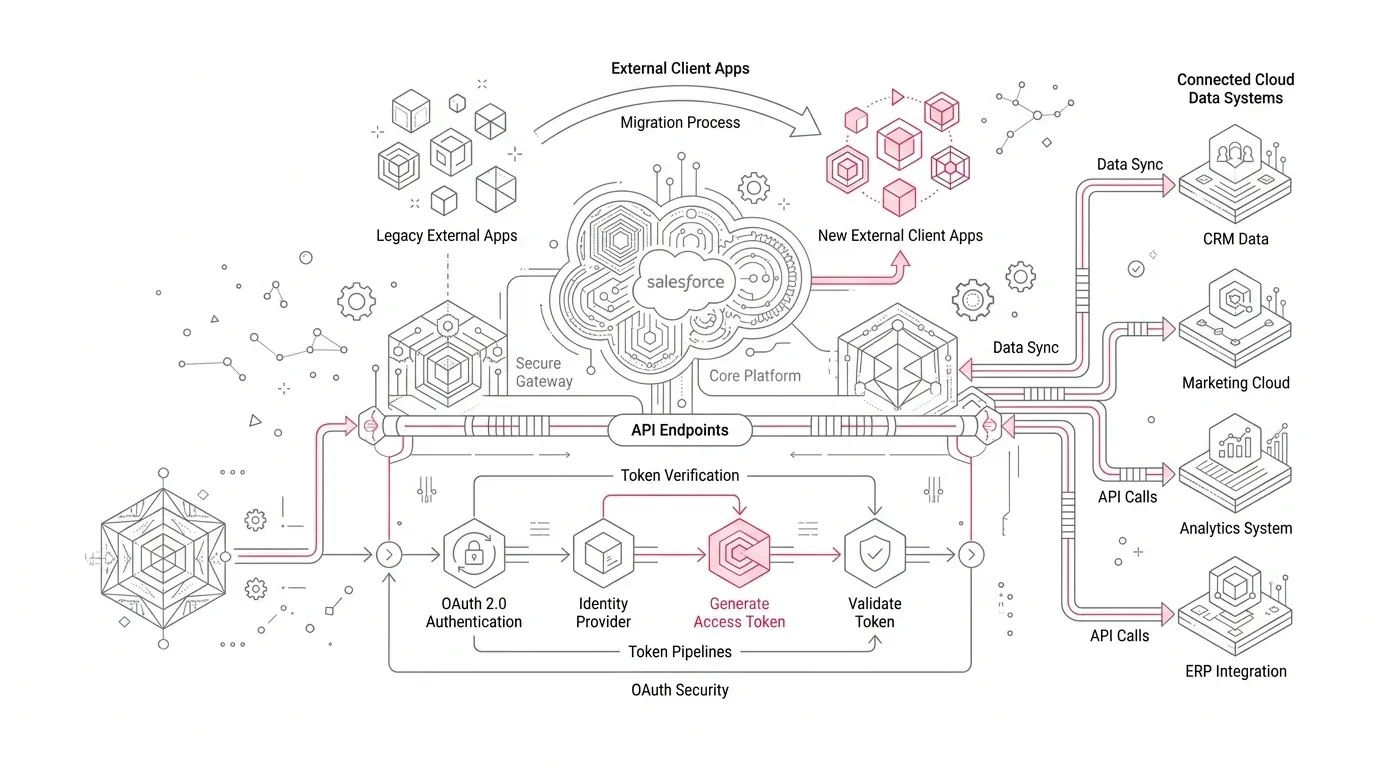
For non-interactive background services, Salesforce points to OAuth 2.0 Client Credentials Flow. The application authenticates directly with its client ID and client secret, executing under a dedicated, least-privileged integration execution user.
2. User-Facing Web, SPA, and Mobile Applications
For interactive applications where users authenticate directly, Salesforce requires the OAuth 2.0 Web Server Flow with Proof Key for Code Exchange (PKCE). This mitigates authorization code interception vulnerabilities on public and mobile clients.
3. Third-Party AppExchange & Managed Package Integrations
When a Connected App is part of a managed package, the ISV vendor is responsible for publishing an updated package version with migrated External Client Apps. Enterprise customers remain responsible for validating sandbox compatibility, updating IP allowlists, and executing cutover windows.
Automated Migration Eligibility & Roadblocks
Salesforce migration wizard can preserve consumer keys, consumer secrets, and existing refresh tokens for eligible apps. However, the Migrate to External Client App button will not appear if the app utilizes unsupported configurations:
- User provisioning or custom Apex OAuth handlers configured on the Connected App.
- Salesforce Canvas applications or dynamic client registration settings.
- Triple DES encryption within SAML identity provider configurations.
- Certain custom push notification endpoint subscriptions.
Ineligible apps require net-new External Client App creation with equivalent security scopes, followed by coordinated secret rotation and credential redistribution in client systems.
End-to-End Business Validation Beyond HTTP 200
A valid OAuth token response does not prove business continuity. Comprehensive pre-production test suites must validate actual functional transactions across nine key vectors:
- Authentication & Token Refresh: Validating initial token acquisition, lifecycle expiry, and silent token renewal.
- Transactional CRUD Operations: Ensuring required custom objects, fields, and child records read and write correctly.
- Permissions & Field-Level Security: Confirming least-privilege permission sets under the designated runtime execution user.
- Error Handling & Idempotency: Verifying retry backoff behavior, timeout handling, and duplicate payload prevention.
- Concurrency & Peak Throughput: Testing bulk API batch executions and event-driven peak transaction loads.
- Secrets & Certificate Lifecycle: Documenting rotation runbooks for client secrets and signing keys.
- Revocation & Failure Containment: Testing immediate session termination upon credential compromise or revocation.
- Operational Observability: Configuring real-time alerts for 401 Unauthorized spikes in Salesforce Event Monitoring and SIEM logs.
- Source-to-Destination Reconciliation: Verifying automated data integrity audits between Salesforce and external data stores.
Industry-Specific Integration Priorities
| Industry Sector | Mission-Critical Integrations | Operational Risk Focus |
|---|---|---|
| Healthcare & Health Plans | EHR interfaces, member eligibility checks, care coordination tasks, claims intake, and Health Cloud care plans | Authentication failures delay patient care decisions, trigger HIPAA compliance exposure, and generate massive manual triage backlogs. |
| Insurance Carriers | First notice of loss (FNOL), policy rating engines, automated billing, underwriting feeds, and broker portal APIs | Silent failures in overnight batch queues stall policy renewals and claims disbursements until front-office discovery. |
| Nonprofit Organizations | Donation processing gateways, recurring gift schedules, grant management disbursements, and constituent email platforms | Heavy reliance on third-party integration vendors requires extended lead times for coordinated package updates. |
Actionable 30-60-90 Day Migration Plan
Follow this structured timeline to mitigate risk and achieve complete release readiness well ahead of the 2026/2027 enforcement milestones:
- First 30 Days (Discover & Triage): Build the integration register from Login History and Named Credentials, identify active OAuth flows from client code, isolate device-flow dependencies for the Nov 30 deadline, and initiate vendor discovery.
- Days 31-60 (Design & Prove): Select target modern OAuth flows (Client Credentials / PKCE), create test External Client Apps in sandbox environments, update CI/CD pipelines, and execute the 9-point transactional test suite.
- Days 61-90 (Cutover & Govern): Execute staged production migrations in controlled risk waves, monitor real-time auth telemetry, safely decommission legacy credentials, and enforce External Client App architecture standards across new platform projects.
Secure Your Salesforce Integrations with YuniQ
YuniQ provides end-to-end Salesforce consulting, integration readiness audits, External Client App migrations, and enterprise managed support to ensure zero-downtime security upgrades.
Explore Salesforce Integration ServicesFrequently Asked Questions
Will Connected Apps stop working entirely when Summer 27 arrives?
No. Salesforce has announced that existing Connected Apps will continue functioning after Summer 27 end-of-support, but Salesforce will no longer provide fixes or technical support for their integrations and authorization flows.
Why is the Migrate to External Client App button missing in App Manager?
The migration button only appears for eligible apps. Connected Apps configured with user provisioning, custom Apex handlers, Canvas, dynamic client registration, or Triple DES SAML are ineligible and must be created manually as External Client Apps.
Does migrating to an External Client App preserve consumer secrets and tokens?
Yes. For eligible Connected Apps migrated via the Salesforce automated migration tool, the consumer key, consumer secret, and active refresh tokens are preserved, avoiding client-side credential churn.
Should server-to-server integrations use Client Credentials or JWT Bearer flow?
Salesforce officially recommends OAuth 2.0 Client Credentials Flow for server-to-server workloads on External Client Apps. JWT Bearer Flow remains fully supported for existing architectures with established certificate management lifecycles.