Salesforce is retiring the User Domains feature in Marketing Cloud Engagement on October 4, 2026 . If your account still relies on email-based verification to add a From address whose domain is not already verified, that path is closing.
The immediate consequence is specific: after the deadline, Marketing Cloud Engagement will no longer send a verification email for a new From address on an unverified domain. Instead, the user will see an error saying the From address must contain a verified domain.
That can turn a routine campaign change into a launch blocker. A nonprofit adds a new foundation-branded sender. A health system launches a program with a separate domain. An insurer adds a regional broker or acquired brand. A business unit creates a new executive sender. The email itself may be ready, but the sender identity cannot be added.
This is not, however, a reason to predict that every existing send will fail on October 4. Salesforce says existing From addresses require no action under this notice. The right response is a focused inventory and remediation exercise, not a panic-driven rebuild.
What Salesforce Is Actually Retiring
In Marketing Cloud Engagement, the visible From address combines a mailbox name with a domain, such as [email protected]. Historically, some accounts could add an individual From address from a domain that was not already verified for the account, then prove access by responding to a verification email. Salesforce labels these entries as User Domain in From Address Management.
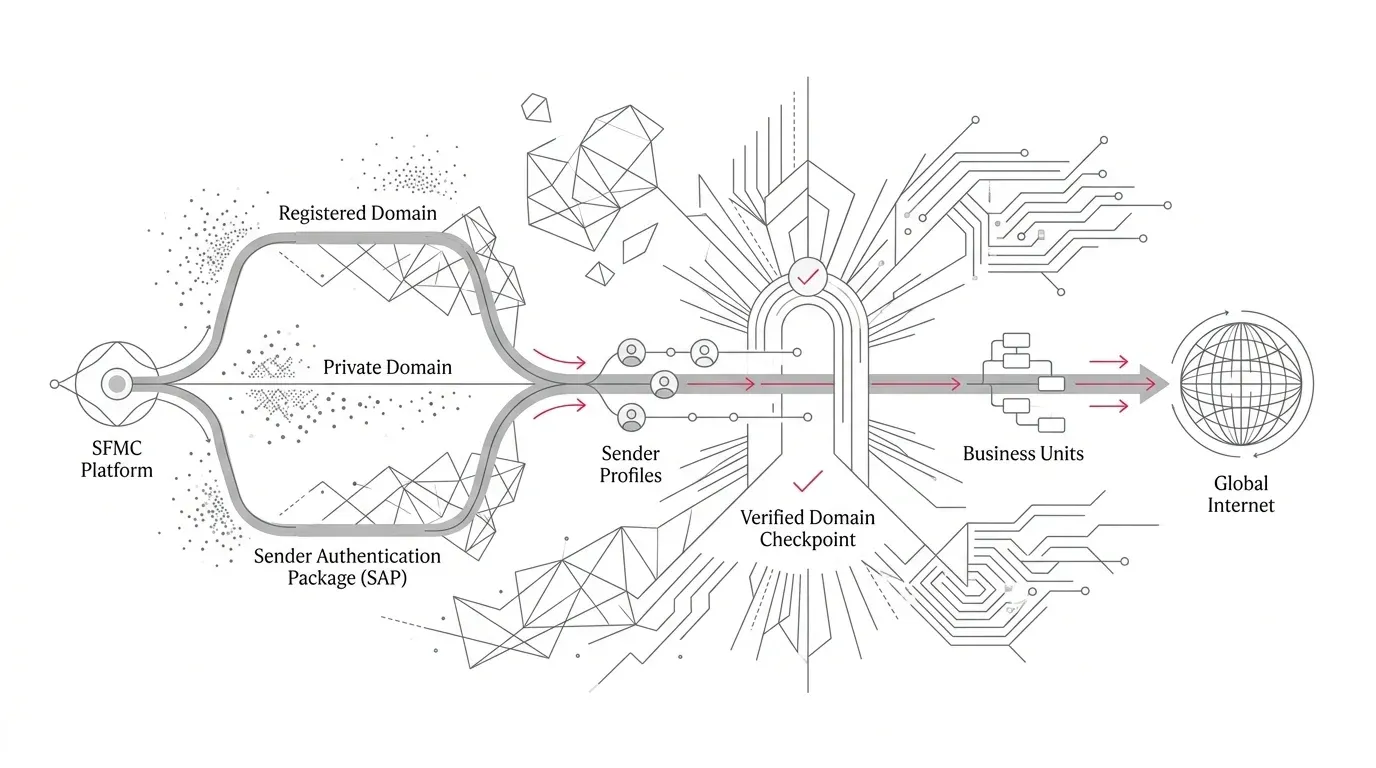
Salesforce is ending support for that User Domain path. From October 4, new From addresses must use a Verified Domain created through one of three methods:
- Sender Authentication Package (SAP);
- Private Domain; or
- Registered Domain.
Once the domain is verified, addresses using it can be added without individual inbox verification. That is the control-model shift: prove control of the domain , then manage the permitted sender addresses beneath it.
There are three boundaries leaders should communicate clearly:
- Platform boundary: this notice concerns Marketing Cloud Engagement. It should not be treated as a substitute for reviewing separate email-domain controls in the core Salesforce platform or Account Engagement.
- Legacy address preservation: Salesforce says existing From addresses require no action under this retirement notice. Teams should still inventory them, because the next personnel, brand, program, or regional change may require a new address.
- Verification versus authentication: verification and authentication are not the same. A Registered Domain proves control for From-address use in Marketing Cloud Engagement. Salesforce states that registration alone does not authenticate the email stream. SAP and Private Domain are the authenticated-domain options.
Where the Business Risk Appears
The technical error appears during sender setup, but the business disruption appears later, usually under deadline pressure.
For a nonprofit, decentralized fundraising teams may send under foundation, campaign, chapter, or executive domains. A new appeal can stall if the required sender domain was never registered or authenticated.
For healthcare organizations, distinct brands and programs can support patient education, provider outreach, member communications, or event campaigns. Domain ownership may sit with security or infrastructure teams, while sender setup sits with marketing operations. That handoff adds lead time. Email content and data use should also remain subject to the organization’s privacy, security, and communications review; domain verification is not a compliance assurance.
For insurers, business units may represent products, regions, brokers, member programs, or acquired entities. Dynamic sender profiles can make the exposure less visible because the From address may be populated from data or AMPscript at send time rather than selected manually.
Across all three sectors, acquisitions, rebrands, seasonal campaigns, staff turnover, and local autonomy create the same weakness: an address that worked yesterday does not prove that the next address can be added tomorrow.
Start With an Evidence-Based Sender Inventory
Do not limit the review to the list of current From addresses. Salesforce’s own checklist points to several configuration surfaces. Build an inventory that records the address, domain, verification type, business unit, use case, owner, send volume, reply path, and whether the value is static or dynamic.
Review at least these seven areas:
- From Address Management: export or record every domain and From address, including its type, status, and whether it is sendable. Flag anything marked User Domain.
- Account settings: confirm that the account email reply address is verified and that the displayed authenticated domains are accurate.
- Users: identify user addresses used in send flows or sender profiles. Check the reply address and whether the address is included in the From-name dropdown where required.
- Sender profiles and send classifications: find every specified From email, default, override, and reply configuration.
- Dynamic senders: trace AMPscript, data extensions, personalization logic, APIs, and automations that can populate a From address at run time. Compare the possible domain values with the verified-domain list.
- Business units: do not assume that a domain visible in a parent account is ready everywhere. Document where each domain must be available and test the actual child business units that send.
- Planned changes: ask marketing, fundraising, service, communications, and acquisition teams which new domains or sender identities they expect to introduce in the next 90 days.
This inventory changes the conversation from “Do we send email?” to “Can every approved sending identity be created, authenticated where required, and operated in the right business unit?”
| Option | Authentication Level (SPF/DKIM/DMARC) | Provisioning Time & Prerequisites | Dedicated IP & Link Branding | Best Operational Fit |
|---|---|---|---|---|
| Registered Domain | Domain control verification only (NOT authenticated) | Self-service TXT record (~24h propagation) | None (uses shared pool and standard link domains) | Rapid From-address verification where authentication is managed separately |
| Private Domain | Authenticated (applies DKIM, SPF, DMARC configuration) | Paid license; 2-5 days setup with Salesforce and DNS | None (authentication only; links and images use standard domains) | Secondary brands or product lines needing verified sender authentication |
| Sender Authentication Package (SAP) | Full authentication across sending, link, and image domains | Paid package; 2-5 business days + DNS delegation/records | Dedicated sending IP + fully branded links and image wrap URLs | Primary sending domain, high-volume senders (>250k/mo), or complete brand isolation |
Choose the Right Domain Path
Registered Domain
Domain Registration is the self-service path for proving ownership of a non-authenticated domain. An administrator generates a token in From Address Management, and the DNS owner adds it as a TXT record. Salesforce says DNS propagation can take up to 24 hours. After verification, addresses on that domain can be created without individual verification emails.
Use this path when the immediate requirement is From-address verification and the organization’s email-authentication architecture is addressed separately. Do not describe a Registered Domain as authenticated: Salesforce explicitly says registration does not supply email authentication .
Private Domain
Private Domain is a paid authentication option. Salesforce documentation says it applies DKIM, SPF, and DMARC-related configuration to a sending domain but does not include a dedicated IP or full branding of link and image domains. Salesforce positions it as suitable across send volumes and estimates two to five days for provisioning, although internal purchasing and DNS work can add time.
This can fit organizations that need authenticated sending for an additional brand or domain without the broader SAP package. Validate domain alignment, DNS ownership, reply handling, business-unit use, and any existing SAP relationship before choosing it.
Sender Authentication Package (SAP)
SAP combines a private sending domain with broader branding capabilities and a dedicated sending IP. Salesforce documentation says it supports branded links and image URLs , and its current email-settings guidance requires SAP for accounts sending more than 250,000 messages per month.
SAP is an architecture and operating-model decision, not merely a deadline workaround. Dedicated IP reputation, DNS delegation, reply management, link and image branding, certificate status, and warm-up planning can all matter. Engage the Salesforce account team and the organization’s email deliverability owner early.
A Practical Remediation Plan Before October 4
1. Freeze avoidable sender changes
Until the inventory is complete, require change review for new From addresses, domains, sender profiles, and dynamic-sender logic. This reduces the chance that a late change introduces an unverified domain days before a launch.
2. Classify every domain
For each domain, record whether Marketing Cloud Engagement shows it as User Domain, Registered, Private, or SAP. Also record whether the sending stream is expected to pass SPF, DKIM, and DMARC alignment. Do not infer authentication from the word “verified.”
3. Assign business and technical owners
Name one accountable owner for the sending use case and one for DNS or security changes. Add the Marketing Cloud administrator, email deliverability lead, brand owner, privacy or compliance reviewer where appropriate, and Salesforce account contact when a licensed product is involved.
4. Select the target state
Choose Registered Domain, Private Domain, or SAP based on the sender’s business criticality, volume, brand requirements, authentication needs, reply design, and existing infrastructure. Avoid buying a product solely because the deadline is close; avoid choosing registration alone if authenticated sending is a stated requirement.
5. Complete DNS and business-unit setup
For Registered Domain, generate the token, add the TXT record, wait for propagation, and verify in Marketing Cloud Engagement. For Enterprise accounts, copy the registered domain to the required existing business units. Salesforce documents copying up to 25 selected verified domains in one request .
For Private Domain or SAP, plan for licensing availability, the Salesforce setup process, DNS delegation or self-hosted records, validation, and an Active status. Salesforce says setup can take up to five business days after DNS changes are detected.
6. Recreate the real sending paths in testing
Test more than a one-off message from the parent account. Use representative business units, sender profiles, send classifications, journeys, automations, and dynamic values. Confirm that:
- the intended From name and address appear;
- the reply reaches the correct monitored destination;
- the send is accepted by Marketing Cloud Engagement;
- headers show the expected SPF, DKIM, and DMARC results where authentication is required;
- tracked links, images, and unsubscribe behavior remain correct;
- major recipient domains receive the message; and
- bounce and complaint monitoring still routes to the responsible team.
Salesforce warns that even authenticated configurations can encounter destination-specific failures caused by forwarding or recipient security controls . Test across internal and external destinations and retain the message headers as evidence.
7. Prove a future address can be added
The retirement concerns the creation of new addresses. Include that exact operation in acceptance testing: create a controlled new From address on the target verified domain, make it sendable, use it in the intended configuration, send a test, and then remove it if it was created only for validation.
What Not to Do
- Do not announce that all Marketing Cloud email will stop on October 4. Salesforce says existing From addresses require no action under this notice.
- Do not assume a successful verification-email click means the domain is authenticated.
- Do not register a domain without confirming that the organization owns it and that the DNS change is authorized.
- Do not focus only on visible dropdowns when AMPscript or integrations can create dynamic sender values.
- Do not test only from the parent business unit or only to the corporate inbox.
- Do not treat a green configuration status as proof of deliverability, reply routing, or compliance.
Turn the Deadline Into a Durable Sender-Control Process
The strongest response is not simply to clear the October 4 deadline. It is to establish a controlled sender registry covering domain ownership, approved From-address patterns, authentication status, business-unit availability, reply handling, renewal or license dependencies, monitoring, and change approval.
That registry should be reviewed when the organization adds a brand, opens a business unit, acquires an entity, launches a program, changes DNS providers, or introduces a dynamic sender. It should also connect Marketing Cloud operations with security and email deliverability teams, because the same word — domain — represents different controls to each group.
YuniQ provides comprehensive Salesforce consulting, implementation, customization, integration, migration, testing, and ongoing managed support . If your From-address estate spans multiple business units, brands, and dynamic sender rules, partnering on a focused configuration and release-readiness review ensures your team can launch new campaigns with complete deliverability confidence.
Audit & Secure Your Marketing Cloud Sender Architecture
Do not wait for a new campaign launch to fail on an unverified From address. Partner with YuniQ to audit business units, configure Registered Domains or SAP, and establish resilient email deliverability governance.
Explore Salesforce Consulting