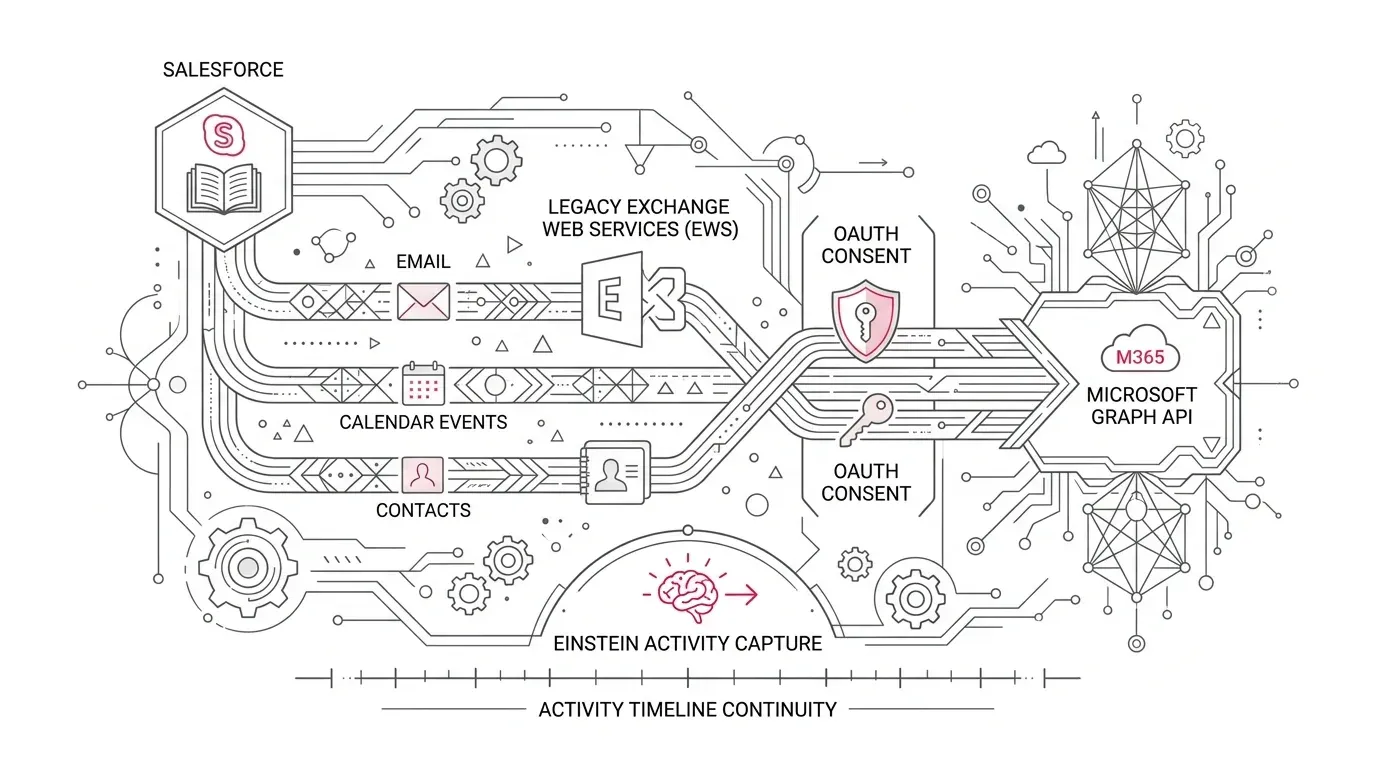
Microsoft has announced the phased disablement of Exchange Web Services (EWS) in Exchange Online beginning October 1, 2026, leading to complete shutdown in April 2027. Salesforce customers using older Einstein Activity Capture (EAC) or Lightning Sync configurations must migrate to Microsoft Graph to prevent silent failures in email, calendar, and contact synchronization.
Core Integration Risk: EWS deprecation is not just a protocol update. User-level EAC connections require individual user re-authentication, org-level upgrades require Microsoft admin consent without rollback, and Lightning Sync users need updated permissions.
Salesforce instructs organizations with EAC configurations created prior to Spring 26 to upgrade to Microsoft Graph by October 1, 2026 to ensure uninterrupted service across sales and service operations.
Identifying Your Salesforce & Microsoft 365 Integration Path
Determine your current connection architecture to plan the correct remediation route:
| Current Configuration | Authentication Protocol | Required Action & Deadline |
|---|---|---|
| EAC configured before Spring 26 | Legacy EWS | Upgrade to Microsoft Graph in Setup by October 1, 2026 |
| EAC configured Spring 26 or later | Microsoft Graph | Verify connection health and user reconnect status |
| Lightning Sync on Microsoft 365 | Legacy EWS | Upgrade connection to Graph temporarily, plan migration to EAC before April 2027 |
| Salesforce Inbox sharing EAC | Shared Connection | Coordinate Graph upgrade across Inbox users simultaneously |
Critical Migration Pitfalls to Avoid
A simple administrator setting change can still leave enterprise sync broken if five key dependencies are overlooked:
- User-Level Reconnection Gaps: For user-level auth, every user must re-authenticate. Users on leave or infrequent logins will stop syncing once EWS disables.
- Org-Level Consent & No-Rollback: Org-level upgrades require Microsoft tenant administrator consent and cannot be rolled back to EWS once completed.
- Missing EAC Permissions: Lightning Sync users transitioning to EAC require "Use Einstein Activity Capture" permission set assignments.
- Inbox Shared Dependency: Upgrading EAC affects Salesforce Inbox Outlook side-panel integrations.
- Validating Sync Outcomes: Green indicators only prove connectivity—event creation, edits, cancellations, and privacy flags must be verified in both directions.
An 8-Step Microsoft Graph Migration Plan
- Step 1 (Inventory Footprint): Document all EAC, Lightning Sync, and Inbox configurations, active user counts, and sync directions.
- Step 2 (Select Target State): Determine whether to upgrade EAC in-place or execute a full Lightning Sync-to-EAC product migration.
- Step 3 (Choose Auth Model): Evaluate user-level OAuth vs. org-level application/RBAC OAuth against security and support policies.
- Step 4 (Pre-Approve Consent & Permissions): Coordinate Microsoft Entra ID admin consent and assign Salesforce EAC permission sets in advance.
- Step 5 (Pilot Key Personas): Execute pilot testing across sales reps, executive assistants, mobile users, and recurring meeting organizers.
- Step 6 (Execute Cutover): Trigger the Graph migration in Setup, tracking user reconnection rosters for user-level connections.
- Step 7 (Validate End-to-End Records): Confirm bi-directional event syncing, attendee updates, email timeline logging, and reporting accuracy.
- Step 8 (Operationalize Monitoring): Establish regular audits of the EAC Status and Metrics page to catch disconnected accounts.
Industry-Specific Safeguards: Healthcare, Insurance, and Nonprofits
Operational validation criteria must address regulatory and relationship contexts:
- Healthcare Providers & Payers: Ensure test data excludes protected health information (PHI). Audit sensitive domain exclusions and activity sharing settings with compliance teams.
- Insurance Carriers: Verify that broker, adjuster, and agency meeting updates correctly associate with target Accounts, Policies, and Opportunities without duplicate event creation.
- Nonprofit Foundations: Track executive and major gift officer calendar syncs, accounting for low-frequency Salesforce users who may miss individual reconnection notices.
Looking Ahead: Spring 27 Activity 360 Retirement
In addition to the Graph protocol change, Salesforce has announced the retirement of Activity 360 Reporting and unified activity metrics in Spring 27 in favor of "Sync Email as Salesforce Activity" (standard Task and EmailMessage records). Organizations should incorporate this reporting shift into their multi-quarter roadmap.
Ensure Seamless Salesforce & Microsoft 365 Sync with YuniQ
YuniQ provides end-to-end integration readiness reviews, Microsoft Graph migrations, EAC permission modeling, and managed support to prevent activity sync outages.
Explore Salesforce Integration ServicesFrequently Asked Questions
Do users need to reconnect Einstein Activity Capture after upgrading to Microsoft Graph?
For user-level authentication connections, yes. Each user must click the reconnection banner in Salesforce to re-authenticate via Microsoft Graph. Org-level connections do not require individual user actions.
Can an org-level Microsoft Graph upgrade be rolled back to EWS?
No. Salesforce explicitly documents that once an org-level connection is upgraded to Microsoft Graph, it cannot be reverted to Exchange Web Services.
What happens to Lightning Sync when EWS is retired?
Lightning Sync connections using Microsoft 365 must be updated to Graph to function after October 2026. However, because Salesforce plans to retire Lightning Sync entirely in April 2027, organizations should migrate to Einstein Activity Capture.