A Salesforce user clicks Send. A Flow completes successfully. A case status changes and the expected automation runs. Yet the customer never receives the message—or it arrives from an unfamiliar address that no longer matches the organization brand.
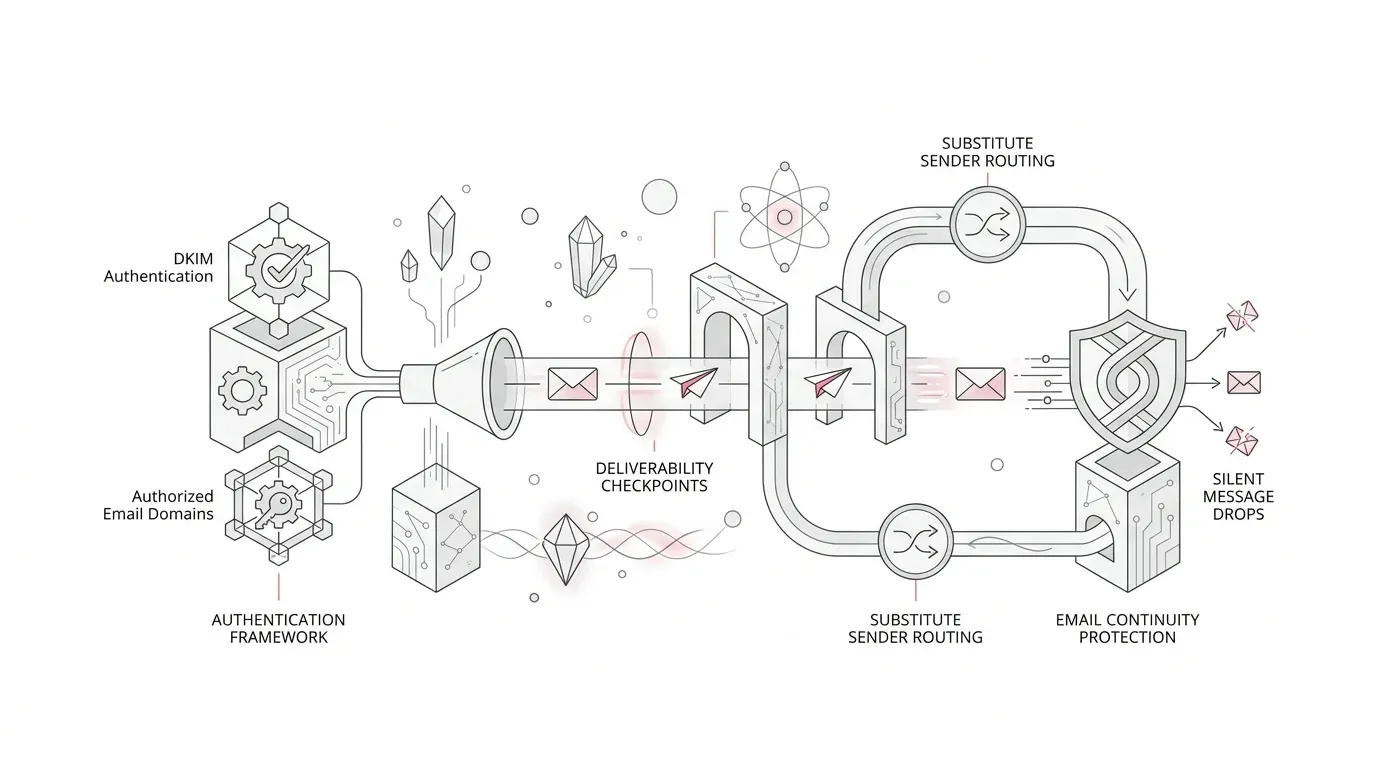
Core Deliverability Risk: When email is sent from an unverified domain, Salesforce can substitute the From address. If substitution is disabled, messages are dropped entirely without the sender realizing the email failed.
Salesforce has enforced domain-level verification for all email-sending domains. Each domain and subdomain must be verified through an active DKIM key or an Authorized Email Domain record.
Furthermore, Winter 27 introduces a critical deadline: on December 1, 2026, Salesforce will remove legacy domain allowlists for orgs where Support previously disabled user email verification. Those orgs must configure Authorized Email Domains to maintain that exception.
Three Salesforce Email Controls That Teams Conflate
Diagnosing email delivery issues requires separating three distinct security mechanisms:
| Control Mechanism | Scope & Purpose | Verification Method | Failure Consequence |
|---|---|---|---|
| Domain-Level Sending Verification | Proves ownership of outbound sending domains/subdomains | Active DKIM key or Authorized Email Domain DNS TXT record | From address substituted or message silently dropped |
| User-Level Email Verification | Verifies individual user mailbox ownership (SSO & return addresses) | User email verification link or Support-granted exception | User cannot send outbound email from their address |
| Substitute From Address | Fallback mechanism for unverified external/portal domains | Configured organization-wide verified email address | Reverts to sfcustomeremail.com or unmonitored mailbox |
Why "The Flow Succeeded" Is Not Proof of Delivery
Automation status in Salesforce only confirms that the platform executed the configured trigger. Comprehensive email continuity validation must verify four distinct checkpoints:
- Generation: Verifying that Flow, Apex, or approval automations trigger the message payload correctly.
- Dispatch: Ensuring Salesforce MTA accepts and sends the message rather than silently dropping unverified domains.
- Sender Identity: Inspecting the visible From and Reply-To headers received by the destination mailbox.
- Inbound Delivery: Confirming destination email gateways (M365, Google, Proofpoint) accept and thread messages.
Who Is Most Exposed to Email Failures?
The highest delivery risk exists in organizations with complex multi-domain footprints:
- Multi-brand and acquired enterprise subsidiaries using distinct subdomains for billing, support, or claims.
- Experience Cloud portals where customer, partner, or volunteer users trigger outbound communications.
- Managed package automations or Apex integrations that dynamically set From address headers.
- Sandbox environments refreshed without copied domain authorizations, breaking integration and UAT tests.
- Orgs relying on legacy Support exceptions that expire on December 1, 2026.
A Practical 7-Step Email Continuity Plan
- Step 1 (Check Applicable Deadlines): Review Release Updates for Maintain Your Email Verification Exception and inspect Deliverability settings.
- Step 2 (Build Service Inventory): Map all critical Service Cloud, Health Cloud, claims, billing, and portal notifications.
- Step 3 (Classify Domain Ownership): Distinguish owned domains (verify via DKIM/DNS) from third-party portal user domains (route through verified org-wide substitute).
- Step 4 (Configure DKIM & Authorized Domains): Deploy active DKIM keys for exact subdomains, leveraging Authorized Email Domains for sandbox portability.
- Step 5 (Design Substitute Sender Routing): Configure branded organization-wide substitute addresses to preserve recipient trust and reply routing.
- Step 6 (Execute Sender-by-Recipient Test Matrix): Test across corporate mailboxes, external consumer providers, and enterprise security gateways.
- Step 7 (Establish Governance Baseline): Implement change-control reviews for new brands, subdomains, and DKIM key rotation cycles.
Audit and Protect Your Salesforce Email Deliverability with YuniQ
YuniQ provides end-to-end Salesforce deliverability assessments, DKIM configuration, Authorized Email Domain migrations, and managed support to eliminate silent message failures.
Explore Salesforce ServicesFrequently Asked Questions
Does an active DKIM key satisfy Salesforce email domain verification?
Yes. Salesforce recommends active DKIM keys as the primary verification method. The key must be active and configured for the exact sending domain or subdomain in use.
What happens to Salesforce emails sent from unverified domains?
If substitute email address is enabled, Salesforce rewrites the From header to a verified org-wide address or an address on sfcustomeremail.com. If substitution is disabled, the message is permanently dropped.
Do Salesforce sandboxes require email domain verification?
Yes. All Salesforce environments, including sandboxes, enforce email domain verification. While DKIM keys cannot be copied into sandboxes, Authorized Email Domains can be imported directly from production.
What changes specifically on December 1, 2026?
Salesforce permanently removes legacy domain allowlists for orgs with past Support-granted user verification exceptions. Affected orgs must configure Authorized Email Domains before December 1, 2026 to maintain sending continuity.