Executive summary
Microsoft Fabric makes it easy for teams to create workspaces, lakehouses, pipelines, semantic models, and reports. That speed is valuable until a team experiment becomes an executive dependency without acquiring an accountable owner, security review, support model, release process, or retirement plan.
The enterprise problem is not simply a high workspace count. It is unmanaged promotion : content created for one person or team quietly becomes departmental or enterprise infrastructure while retaining sandbox-level controls. The result is duplicated data, conflicting metrics, unclear access, orphaned assets, unnecessary capacity consumption, and fragile reporting.
The answer is neither unrestricted self-service nor centralized approval for every change. It is a federated operating model that applies controls in proportion to audience, sensitivity, and business criticality. Microsoft Fabric provides the building blocks: tenant settings, domains and subdomains, workspace boundaries, the OneLake catalog, tags, endorsement, sensitivity labels, lineage, metadata scanning, deployment pipelines, and retention controls. The missing layer is the enterprise decision system that connects those capabilities.
This article presents that system. It shows how to:
- classify work into sandbox, team, managed, and enterprise tiers;
- use domains to delegate governance without confusing organization with authorization;
- require explicit promotion gates before a data product gains a wider audience;
- create an inventory and control loop using Fabric metadata; and
- preserve self-service speed while reducing operational, security, and cost risk.
The enterprise problem: self-service succeeds faster than governance
Workspace sprawl is often described as a housekeeping issue. That understates the risk.
A workspace is simultaneously a collaboration area, a security boundary, a lifecycle boundary, and a container for items that may consume shared capacity. Its contents can feed downstream models and reports across other workspaces. When workspace creation is disconnected from ownership, domain design, support expectations, and product criticality, the estate becomes difficult to reason about.
Microsoft's Fabric adoption guidance explicitly identifies sprawl of data and reports, duplicated effort, fragmented data, missing lineage, and unclear ownership as governance challenges. It also argues that governance should balance user empowerment with compliance and internal requirements, and that the lightest model capable of meeting the objective should be used. That is the right starting point: govern according to risk, not merely according to item count.
This matters now because Fabric unifies many previously separate activities. A self-service workspace may contain ingestion, transformation, storage, machine learning, semantic modeling, and reporting. A local choice can therefore become an end-to-end production dependency much faster than in a traditional, centrally queued data platform.
Representative enterprise scenario
This is a representative scenario, not a YuniQ customer case or a claim about measured results.
A multinational services organization enables Fabric for finance, sales, operations, and customer-service teams. The central platform group establishes capacity and baseline tenant settings, but it does not define a workspace lifecycle.
Within months, the estate begins to drift:
- analysts create separate workspaces for pilots, monthly reporting, and one-off reconciliations;
- multiple teams ingest the same CRM and operational data with different filters and refresh schedules;
- a finance semantic model becomes widely reused, although its owner is a single employee and its calculation logic is undocumented;
- a customer-service report expands from a team audience to senior executives without a formal security or data-quality review;
- test notebooks and abandoned lakehouses remain on production capacity;
- users cannot distinguish an authoritative asset from a plausible-looking copy; and
- the platform team can list workspaces but cannot quickly state which ones are critical, sensitive, supported, or safe to retire.
Nothing failed at creation time. The failure occurred when usage, risk, and dependency grew without a corresponding change in governance.
Root causes and consequences
1. Workspace creation is treated as the whole lifecycle
Restricting who can create a workspace can reduce noise, but it does not answer what happens afterward. An enterprise also needs rules for assignment, ownership, promotion, support, recovery, and retirement.
2. Technical containers do not map to business accountability
Workspace names often reflect a project, team, or tool rather than an enduring business domain or data product. When the project closes or a person leaves, no durable owner remains. Fabric administrators can identify an orphaned workspace as one with no admin, but an active workspace with an unengaged or inappropriate admin can still be operationally orphaned.
3. Sharing grows without a promotion event
Microsoft distinguishes personal, team, departmental, and enterprise delivery scopes . As reach expands, needs for content management, security, information protection, change management, documentation, support, and licensing also change. If the platform does not detect and govern that transition, a team solution can become enterprise-critical by accident.
4. Discovery signals are inconsistent
Names such as final, gold, or prod are not evidence of trust. Without consistent domains, descriptions, tags, contacts, sensitivity labels, and endorsement, consumers must rely on familiarity or word of mouth.
5. Governance is centralized at the wrong level
A small tenant team cannot understand every business definition or approve every domain-specific choice. Conversely, unrestricted local administration produces inconsistent standards. The operating model needs central invariants and delegated domain decisions.
The consequences are linked:
- Decision risk: competing semantic models produce different answers to the same executive question.
- Security and compliance risk: audience growth can outpace access review, classification, and data-handling controls.
- Reliability risk: critical workflows depend on personal knowledge, manual changes, or a single owner.
- Cost risk: duplicated ingestion, storage, refreshes, and compute compete on capacity without clear attribution.
- Change risk: teams cannot see downstream dependencies before modifying or retiring assets.
- Adoption risk: users lose trust in the catalog and build another copy instead of reusing an existing product.
Why common approaches fall short
“Only IT can create workspaces”
This reduces creation volume but often moves experimentation into personal workspaces, local files, or unsanctioned tools. It also makes the platform team a ticket queue. Creation control is useful, but only as part of a fast, transparent provisioning process.
“Let every team govern itself”
Business teams know their data, but local optimization can create conflicting tags, definitions, security practices, and certification criteria. Enterprise-wide rules are still needed for identity, sensitivity, external sharing, minimum ownership, criticality, and lifecycle evidence.
“Use a naming convention”
Names help people scan an estate, but they are not a control plane. They do not prove who owns an item, whether it is sensitive, which consumers depend on it, or whether it has passed production checks.
“Put everything in one workspace per department”
This creates a broad collaboration and permission boundary, mixes development with production, and couples unrelated lifecycles. A domain can group multiple fit-for-purpose workspaces; it need not collapse them into one.
“Certify the important reports”
Certification improves trust and discovery, but it should be the result of a review process, not the process itself. A badge cannot replace data-quality evidence, ownership, access testing, lineage review, support readiness, or change control.
“Clean up once a year”
Annual cleanup treats drift as an event rather than a continuous condition. By then, dependencies are hard to reconstruct and owners may have moved on. Inventory, exceptions, usage, and ownership need recurring review.
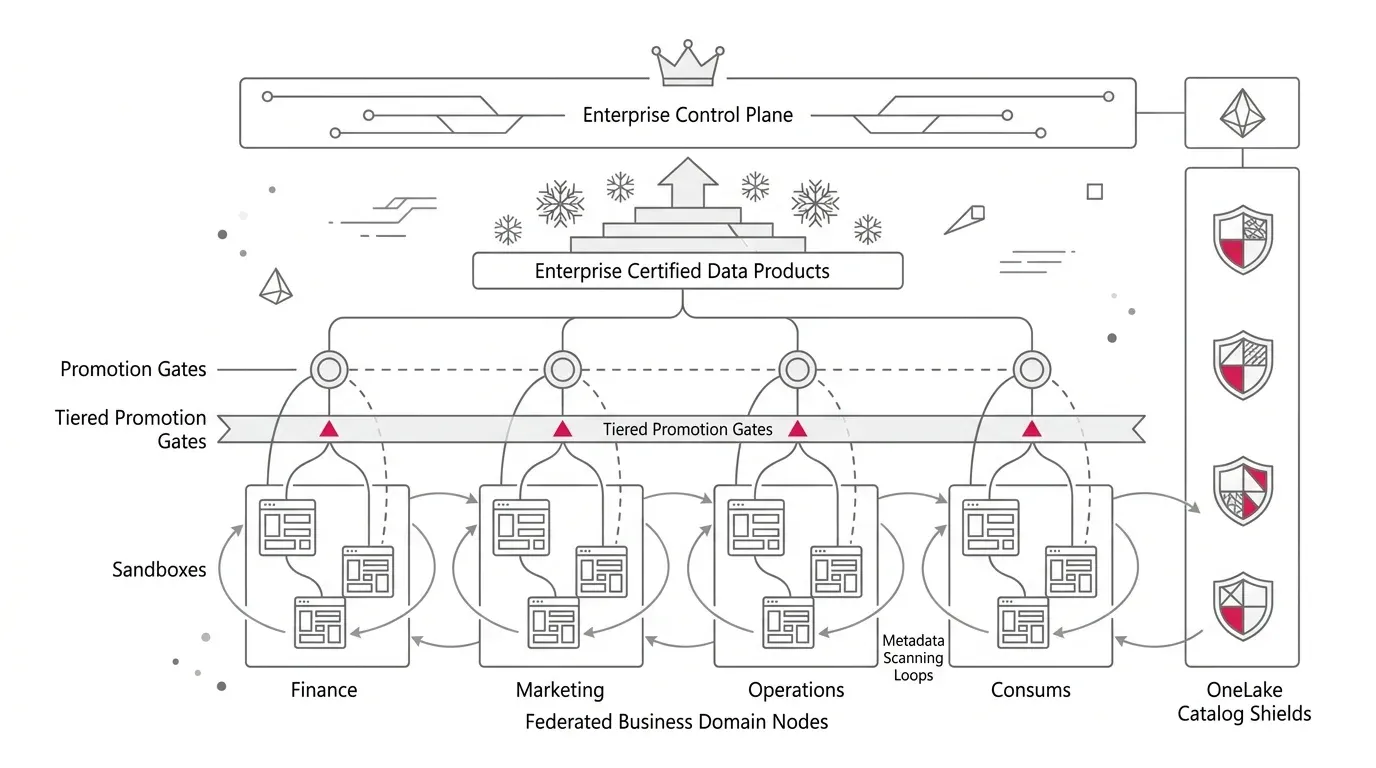
The Microsoft Fabric solution: four governance planes
The following architecture is a recommended operating model. It uses documented Fabric capabilities, but the tier definitions and promotion gates are organizational design choices.
Enterprise control plane
  Tenant settings | creation policy | identity baseline | capacity policy
  Metadata inventory | audit | universal tags | lifecycle standards
                               |
                               v
Federated domain plane
  Business domains/subdomains | domain admins | domain tags
  Delegated settings | domain certifiers | stewardship decisions
                               |
                               v
Data-product plane
  Purpose-built workspaces | Dev/Test/Prod | accountable owner + backup
  Lakehouse/warehouse/pipelines | quality tests | lineage | runbooks
                               |
                               v
Consumption plane
  OneLake catalog | endorsed assets | master data | certified semantic models
  Reports, apps, analytics, AI consumers | feedback and usage signals

Continuous control loop: scan -> classify -> remediate -> promote/retire -> verify
Plane 1: establish enterprise invariants
The tenant-level team should own the few rules that must be consistent everywhere:
- who can create workspaces and through which request path;
- minimum owner and backup-owner requirements;
- approved identity patterns and prohibited use of employee credentials for production processes;
- sensitivity-label and external-sharing policy;
- production capacity and environment-separation rules;
- mandatory metadata, criticality categories, and lifecycle states;
- required evidence for certification and production promotion; and
- inventory, review, exception, retention, and retirement cadence.
Fabric tenant settings can restrict workspace creation to designated security groups. Use that capability to route creation through a lightweight provisioning workflow, not to eliminate self-service. A good workflow can create the workspace, assign security groups, set contacts, apply baseline tags, associate a domain, select the appropriate capacity, and record the owner and expiry or review date.
Plane 2: use domains for federated accountability
Fabric domains logically group data by business area. Workspaces are associated with domains, and their items receive the domain attribute in metadata. Domains also support federated governance by allowing certain tenant settings to be delegated to domain administration.
Build the domain model around stable accountability, not the latest organization chart. Finance, Customer, Workforce, Product, and Supply Chain are often more durable than project names. Use subdomains only when the additional level clarifies ownership or policy.
Domain administrators should be business or designated technical experts who understand relevant data and restrictions. They can manage domain descriptions and contributors, associate workspaces, and configure supported delegated settings. Fabric also supports default domains, allowing new or unassigned workspaces created by specified users or groups to be assigned automatically.
One crucial distinction: domain assignment does not grant access to an item . Microsoft documents that visibility and access depend on workspace roles and item permissions, not domain assignment. Treat domains as organization, discovery, and delegated-governance constructs; continue to design authorization separately.
Plane 3: make the data product the unit of operation
A workspace should have a clear purpose and lifecycle. For production data products, prefer workspace boundaries that align to:
- a coherent product or capability;
- one accountable owner and stewardship group;
- a consistent audience and sensitivity profile;
- a common deployment and support lifecycle; and
- a capacity and cost-accountability model.
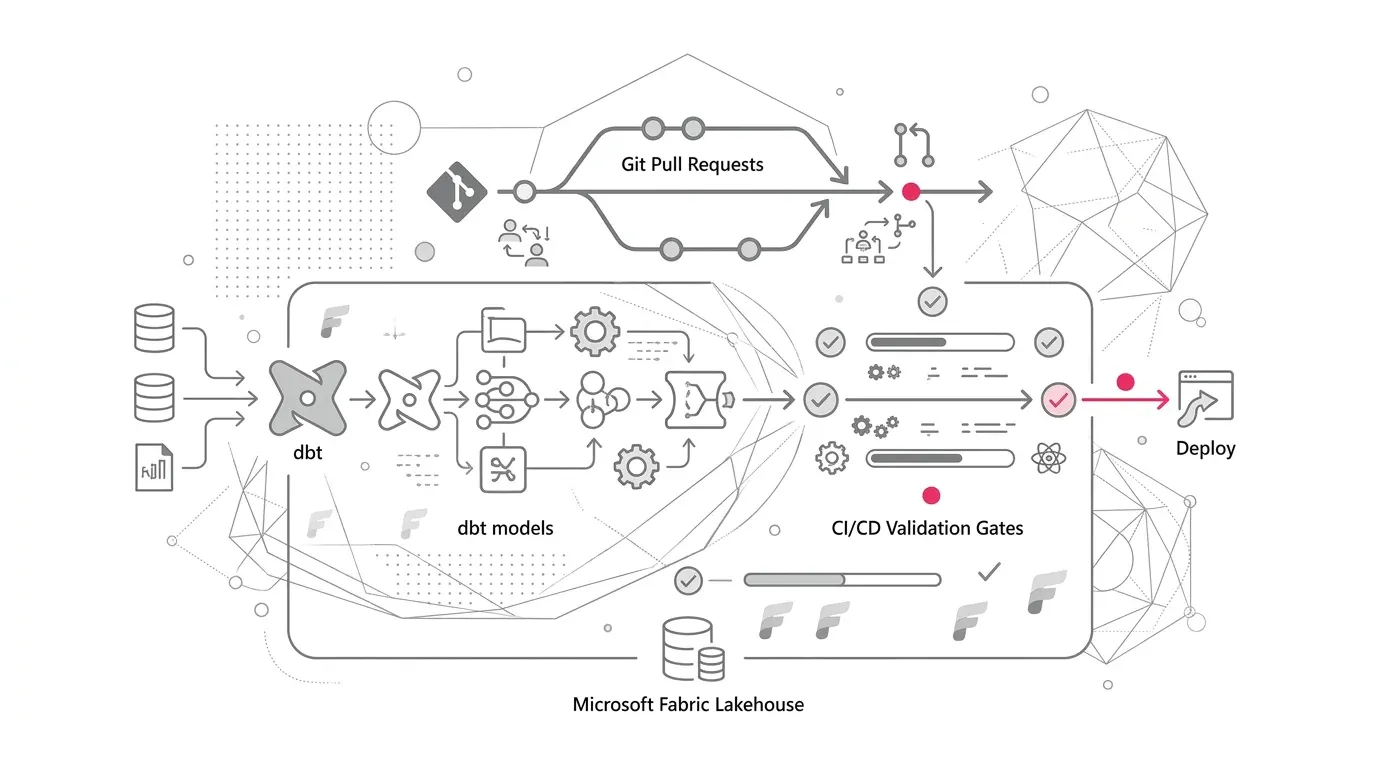
Do not force every asset into an identical topology. A simple departmental report may need fewer workspaces than a critical data product with separate development, test, and production stages. Microsoft Fabric CI/CD supports Git integration and deployment pipelines ; Microsoft describes deployment pipelines as a way to promote content across environments with repeatable delivery. Confirm current support for each Fabric item type before making it part of the release design because some CI/CD capabilities or supported items can be in preview.
Plane 4: make trusted reuse easier than reinvention
The OneLake catalog becomes useful only when metadata conveys meaning. Use several signals together:
- Domain: who is accountable for the business area?
- Description and contacts: what does the product provide, and who supports it?
- Tags: what are its lifecycle, criticality, cost center, or approved-use attributes?
- Sensitivity label: how must the data be handled and protected?
- Endorsement: is it promoted, certified, or designated as master data?
- Lineage: what feeds it, and what depends on it?
Fabric supports tenant-level and domain-level tags on workspaces and items. Microsoft notes that scanner APIs can retrieve tag associations at scale. Tags are useful metadata, but they should not be mistaken for access controls. Likewise, endorsement communicates trust: promoted content is owner-recommended, certified content has passed an organization-defined review, and master-data endorsement identifies a core authoritative data source. Certification and master-data endorsement must be enabled by a Fabric administrator, and certification can be delegated by domain.
A tiered lifecycle for self-service content
Use one visible lifecycle model across the tenant. The labels below are recommendations, not built-in Fabric states.
| Tier | Intended Use | Typical Control Level | Exit Condition |
|---|---|---|---|
| Sandbox | Individual exploration, learning, short-lived proof | Named creator, expiry/review date, no enterprise dependency, restricted sensitive data | Retire, remain personal, or request team promotion |
| Team | Collaboration within a bounded team | Workspace owner and backup, domain assignment, basic documentation, approved groups, capacity guardrail | Retire or request managed promotion when reach/criticality grows |
| Managed | Departmental reuse or important operational decision support | Steward, classification, quality checks, lineage review, support contact, controlled release, usage monitoring | Maintain, retire, or request enterprise certification |
| Enterprise | Cross-domain, executive, regulatory, or mission-critical use | Formal service owner, Dev/Test/Prod as appropriate, CI/CD, access testing, recovery plan, SLOs, change control, certification | Continuous assurance and periodic recertification |
Trigger a review when objective signals change, for example:
- audience expands beyond the originating team;
- another workspace depends on the asset;
- executive, regulatory, financial-close, or customer-facing decisions rely on it;
- sensitive or regulated data is introduced;
- usage, refresh frequency, or capacity consumption crosses an agreed threshold;
- the creator changes role or leaves; or
- an item is proposed as a reusable enterprise source or AI grounding asset.
Promotion gates: turn growth into an explicit decision
Before a team asset becomes managed or enterprise content, require evidence in five areas.
| Gate | Questions to Answer | Evidence Examples |
|---|---|---|
| Value and scope | Which decision or process does this support? Who consumes it? How critical is it? | Product brief, audience, criticality tier, named sponsor |
| Ownership and support | Who is accountable? Who is the backup? Who handles incidents and change requests? | Owner groups, contacts, support hours, runbook |
| Data trust | Are sources, transformations, definitions, and quality expectations understood? | Lineage review, business glossary links, tests, reconciliation results |
| Security and compliance | Is access least-privilege? Is sensitivity classified? Are sharing and export paths acceptable? | Group-based access, label, access tests, exception approvals |
| Operability and economics | Can it be released, monitored, recovered, scaled, and retired predictably? | Deployment path, monitoring, recovery test, capacity estimate, retirement plan |
Certification should occur only after the required evidence is approved. Domain-specific certifiers can assess business meaning, while central security, platform, or compliance teams retain approval where enterprise policy requires it.
Create an inventory and continuous control loop
Governance cannot depend on a spreadsheet that owners update voluntarily. Build a Fabric estate inventory from administrative metadata and augment it with operating-model fields.
Microsoft's metadata scanning APIs are designed to catalog and report on Fabric item metadata. Use them, together with relevant administrative and activity data, to maintain a control table containing at least:
- workspace and item identifiers, type, state, domain, and capacity;
- owner, backup owner, contacts, and last ownership attestation;
- lifecycle tier, criticality, sensitivity, endorsement, and tags;
- creation, last modification, and last meaningful use dates where available;
- upstream and downstream dependencies where discoverable;
- release method, monitoring status, and recovery classification; and
- exception status, expiry date, and remediation owner.
Then operate a recurring five-step control loop:
- Scan: refresh the inventory and identify new, changed, orphaned, unassigned, inactive, or high-growth workspaces.
- Classify: determine lifecycle tier, business domain, sensitivity, criticality, and owner.
- Remediate: fix access, metadata, ownership, environment, quality, or support gaps.
- Decide: promote, certify, consolidate, quarantine, archive, or retire.
- Verify: rescan and confirm that the intended state is reflected in Fabric and the governance register.
Do not automate deletion from inactivity alone. Low-use assets may be essential for month-end, annual, audit, or incident workflows. Require owner confirmation and dependency review before retirement.
Phased implementation roadmap
Phase 1: discover and contain immediate risk
- Inventory workspaces, items, admins, capacities, domains, labels, endorsements, and known dependencies.
- Identify orphaned workspaces, personal workspaces used for broad distribution, production items with single-person ownership, and sensitive content without clear accountability.
- Freeze only the highest-risk creation or sharing patterns while the target model is designed.
- Establish an executive sponsor, platform owner, and cross-functional working group.
Deliverable: a risk-ranked estate baseline and immediate remediation backlog.
Phase 2: design the operating model
- Define stable domains and domain owners.
- Agree the four lifecycle tiers, promotion triggers, and minimum evidence.
- Define central versus delegated decisions using a responsibility matrix.
- Standardize workspace purpose, naming, contacts, tags, capacity placement, and review dates.
- Document the exception and escalation process.
Deliverable: a governance charter, domain map, workspace standard, and promotion policy.
Phase 3: pilot one high-value domain
- Select a domain with visible reuse and a committed business owner.
- Assign existing workspaces, implement domain tags, and establish domain certifiers.
- Triage assets into retire, sandbox, team, managed, and enterprise categories.
- Take one important product through the complete promotion gate, including access and recovery testing.
- Measure lead time and owner effort so the process can be simplified before scale-out.
Deliverable: a working federated pattern and reusable evidence pack.
Phase 4: automate provisioning and assurance
- Route workspace creation through a service workflow with group-based ownership and baseline metadata.
- Schedule metadata scans and publish exception dashboards for tenant and domain owners.
- Add reminders and escalation for missing owners, expired exceptions, and overdue attestations.
- Integrate production promotion with source control and deployment pipelines where item support and risk justify it.
Deliverable: a measurable control loop instead of periodic manual cleanup.
Phase 5: scale by risk, not by workspace count
- Onboard domains in waves, prioritizing sensitive and business-critical workloads.
- Train domain administrators, certifiers, stewards, and workspace owners for their specific decisions.
- Review thresholds quarterly and remove controls that create effort without reducing risk.
- Expand trusted reusable data products before asking teams to retire duplicates.
Deliverable: a sustainable federated operating model with improving reuse and trust.
Risks, security, adoption, and cost considerations
Governance risks
An over-designed domain hierarchy becomes another taxonomy to maintain. Begin with accountable business areas and add subdomains only when they change ownership, discovery, or policy. Also avoid using domain assignment as proof that a workspace is compliant; it is only one metadata and delegation signal.
Security risks
Keep authorization independent from organization. Use Microsoft Entra ID groups, least-privilege workspace and item permissions, and documented access tests. Apply Purview sensitivity labels according to organizational policy. Microsoft notes that sensitivity labels support classification and protection, while some Purview capabilities require additional licensing; validate entitlements and feature behavior for the target tenant.
Test CI/CD identities as carefully as human users. A release that succeeds technically can still apply unintended permissions or omit environment-specific security configuration. Review current feature limitations, especially where protection policies and CI/CD interact.
Adoption risks
If promotion takes weeks, users will avoid it. Publish service targets for provisioning, certification, and exceptions. Provide templates, office hours, and domain champions. Most importantly, make governed assets easier to find and reuse than ungoverned copies.
Cost risks
Workspace count is not a billable unit, so reducing count alone is a poor financial objective. Track the activities that consume resources: duplicated ingestion, Spark and SQL execution, semantic-model refresh, real-time processing, storage, and concurrency. Use tags or other inventory attributes for cost ownership, and separate workloads or environments when isolation and chargeback justify it.
Retirement also needs recovery planning. Fabric provides configurable retention for collaborative workspaces and supported items, but retention is not a complete business continuity strategy. Microsoft currently documents a default seven-day collaborative workspace retention period , configurable from 7 to 90 days, and item recovery enabled by default for supported items with a default three-day period, configurable from 3 to 90 days. Validate current settings, supported item types, dependencies, and restore procedures before any cleanup wave.
Success metrics
Use a balanced scorecard. A falling workspace count can hide lost experimentation; a rising count can reflect healthy adoption. Measure control, trust, speed, reuse, reliability, and economics together.
| Outcome | Example Metric |
|---|---|
| Accountability | Percentage of active workspaces with an accountable owner, backup, domain, and current attestation |
| Trust | Percentage of enterprise-tier products with completed certification evidence and defined data-quality checks |
| Security | Percentage of sensitive products passing access tests; overdue high-risk exceptions |
| Reuse | Consumers per certified data product; duplicate products retired after a trusted replacement is available |
| Delivery speed | Median time to provision a compliant workspace; median promotion-cycle time by tier |
| Reliability | Enterprise products with tested runbooks, monitoring, recovery procedures, and defined service objectives |
| Lifecycle health | Orphaned, unassigned, inactive, or overdue-for-review workspaces; time to resolve each exception |
| Cost discipline | Capacity consumption attributable to owned products; duplicated workload consumption removed; utilization by environment |
Set targets only after the baseline is measured. Otherwise, arbitrary percentages can encourage teams to label or certify assets without improving the underlying controls.
How YuniQ can help
YuniQ's Microsoft Fabric consulting practice directly supports this operating model. Its Fabric Strategy & Readiness service includes current-state diagnostics, capacity planning, workspace topology, and security, governance, and operating-model design. Its OneLake & Data Architecture capability includes domain workspaces, medallion layers, OneLake architecture, and reusable semantic models. Its Governance, Security & DevOps capability includes least-privilege role design, Microsoft Purview integration, sensitivity labels, lineage, Dev/Test/Prod separation, Git and deployment pipelines, monitoring, and capacity alerts.
For an enterprise already experiencing sprawl, a practical engagement would begin by inventorying the estate and selecting one business domain. YuniQ's published delivery framework then maps naturally to the required work: discover the current environment, architect the target topology and standards, prove the model with a focused use case, build and migrate iteratively, validate access and reconciliation, and optimize as new domains are onboarded.
This connection is specific: the aim is not a generic governance assessment. It is an implementable workspace and data-product lifecycle with assigned decision rights, configured Fabric controls, automated evidence, and a repeatable path from self-service idea to trusted production product.
Control Fabric Sprawl & Establish Federated Governance
Stop unmanaged workspace proliferation, redundant pipelines, and metric divergence. Partner with YuniQ to implement domain boundaries, automated promotion gates, and enterprise OneLake governance.
Explore Fabric ConsultingPractical next steps
Start with a two-week evidence exercise rather than a tenant-wide reorganization:
- Export or scan the current workspace and item inventory.
- Select 20 to 30 workspaces across one material business domain.
- Identify owner, audience, sensitivity, criticality, dependencies, capacity, and last meaningful use for each.
- Classify each workspace as sandbox, team, managed, enterprise, or candidate for retirement.
- Take one widely reused product through the proposed promotion gates.
- Record every point of friction and simplify the standard before expanding it.
The key executive decision is simple: what evidence must change when an analytics asset moves from local usefulness to shared organizational dependency? Once that decision is explicit, Fabric’s governance capabilities can support it. Without it, the platform will continue to scale content faster than trust.