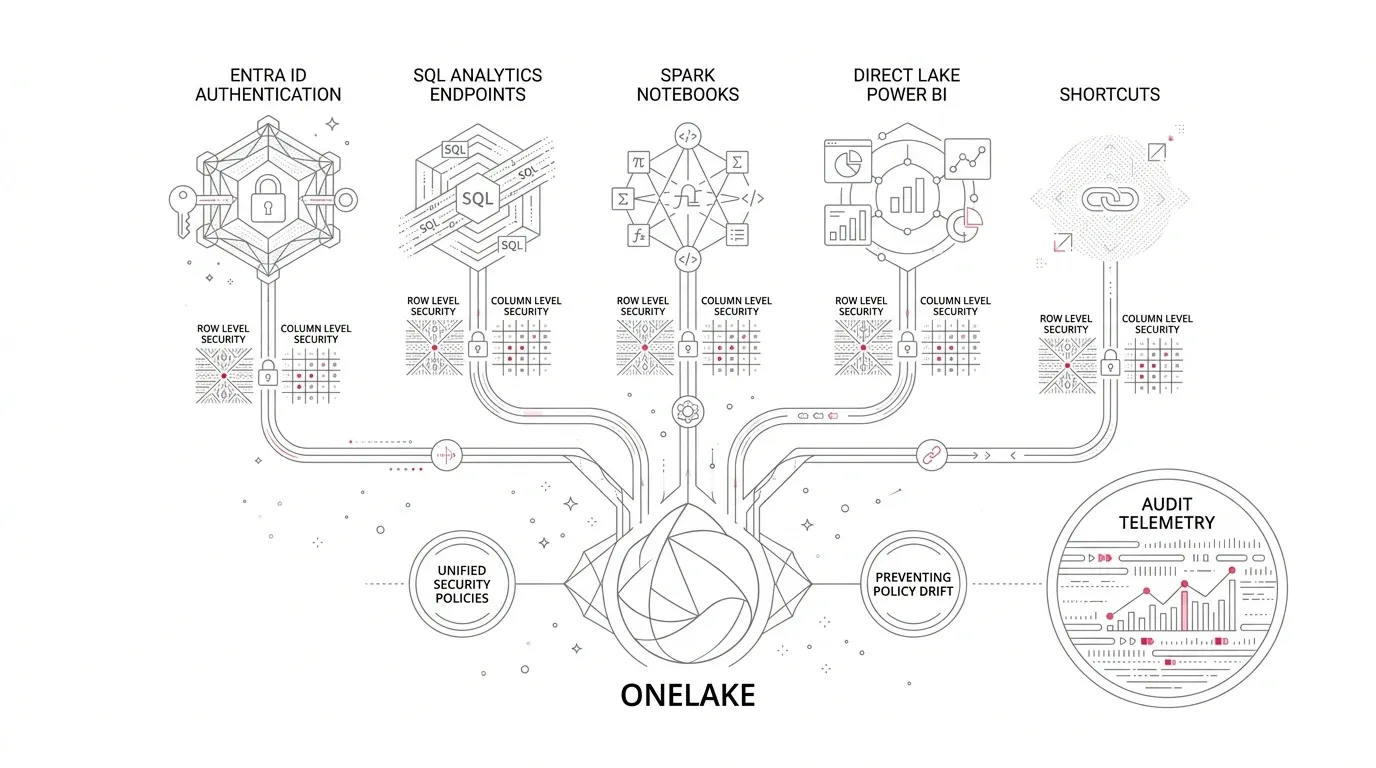
An enterprise can store one copy of a customer, finance, or clinical dataset in Microsoft OneLake and still expose different slices of it through a Spark notebook, a SQL analytics endpoint, a shortcut, and a Power BI semantic model. That flexibility creates a consequential control problem: which security policy is actually authoritative on each access path?
Microsoft Fabric now supports generally available row-level (RLS) and column-level (CLS) filtering through OneLake security for lakehouses, Spark notebooks, SQL analytics endpoints in user-identity mode, and semantic models using Direct Lake on OneLake. But consistency is not automatic. Workspace roles, item permissions, SQL endpoint access modes, semantic-model identity, shortcut authentication, default roles, and overlapping group memberships all affect the result.
Core Security Principle: Centralized OneLake security is an end-to-end identity path, not a component-level feature. A policy is only as secure as the weakest identity hop between the user and the storage layer.
The practical answer is to design security as an end-to-end identity path:
- Keep fine-grained policy with the producer-owned data item.
- Separate build privileges from consumption privileges.
- Carry the user's Microsoft Entra identity through every supported query path.
- Treat shortcuts and semantic models as governed access paths, not security boundaries of their own.
- Test effective access by persona, engine, and environment before every production release.
- Monitor control changes, data access, and capacity impact as separate operational concerns.
The Enterprise Problem: One Dataset, Several Enforcement Paths
OneLake is designed as a unified logical data lake . Fabric workloads use the same underlying data without creating physical copies.
The storage may be unified, but access is evaluated through multiple distinct layers:
- Control plane: Workspace roles and item permissions determine who can manage, share, or connect to an item.
- Data plane: OneLake security determines which folders, tables, rows, and columns a consumer may read or write.
- Compute layer: SQL or semantic-model rules apply when access is routed through those engines.
- Identity path: The engine evaluates either the signed-in Entra user or a delegated/fixed service identity.
- Shortcut path: Access depends on both shortcut location and target, plus authentication mode (passthrough vs. delegated).
Policy drift occurs when approved rules and effective rules diverge across tools—producing excessive access, inconsistent reports, failed audits, and expensive duplicate data products created only to impose separate security boundaries.
Why This Matters Now
Microsoft's current documentation lists OneLake RLS and CLS filtering as generally available for lakehouses, Spark notebooks, SQL analytics endpoints in user-identity mode, and Direct Lake on OneLake semantic models.
This establishes centralized security as a credible production standard. Enterprises can no longer stop at 'the report has RLS.' They must prove that the same user receives identical effective access across Spark, T-SQL, Direct Lake, and shortcuts.
Illustrative Scenario: The Four-Persona Gold Lakehouse
Consider a Gold customer-operations lakehouse containing customer identity, revenue measures, case outcomes, and sensitive attributes accessed by four personas:
| Persona | Required Data Scope | Primary Query Path |
|---|---|---|
| Regional Operations Manager | Rows for assigned regions; direct identifiers masked | Power BI Direct Lake |
| Finance Analyst | All regions; revenue columns; contact details excluded | SQL Analytics Endpoint |
| Data Scientist | Pseudonymized feature tables for approved ML models | Spark Notebook |
| Customer Service App | Operating region records and operational attributes only | Governed API / Shortcut |
Without centralized architecture, common defects emerge: Contributors bypass lakehouse RLS, SQL endpoints remain in delegated identity mode using legacy SQL grants, and additive OneLake roles expand visibility unexpectedly.
Root Causes and Fallacies in OneLake Security
- 1. Workspace roles used as audience groups: Admin, Member, and Contributor roles already have read access to OneLake data and bypass fine-grained OneLake roles. Fine-grained roles mainly govern Viewers.
- 2. Security designed inside one engine: SQL endpoints start in delegated identity mode. OneLake enforcement requires switching to user-identity mode.
- 3. Direct Lake vs. Semantic-Model RLS: Semantic-model rules do not protect lakehouse, notebook, or SQL access.
- 4. Additive roles mistaken for Deny rules: OneLake security uses Grant roles. Across multiple roles, effective access unions and row predicates combine with OR.
- 5. Sensitivity labels confused with authorization: Sensitivity labels classify and protect downstream exports, but do not authorize table data access.
A Practical Microsoft Fabric Access Architecture
Place authoritative fine-grained policy on the curated data item owned by the producing domain. Let consuming engines enforce that policy using the effective user identity wherever supported:
Microsoft Entra Groups → Producer Gold Lakehouse (OneLake OLS / RLS / CLS) → [Spark / Lakehouse (User Identity) + SQL Analytics Endpoint (User-Identity Mode) + Direct Lake Semantic Model (SSO) + Same-Tenant Shortcut (Passthrough)]
Step 1: Build an Access Contract Before Configuring Roles
Document data owner, policy owner, approved personas, permitted objects, row predicates, column masking, allowed engines, and test evidence for every data product.
Step 2: Separate Builders from Consumers
Use dedicated Entra groups. Give consumers the Viewer role or item Read permission, then assign OneLake roles. Inspect DefaultReader to prevent unintended access.
Step 3: Model OneLake Roles Around Coherent Personas
Create persona roles (e.g. RegionalOperations, FinanceAnalyst, DataSciencePseudonymized) where object, row, and column rules belong together. Avoid fragmented roles that union unexpectedly.
Step 4: Switch SQL Analytics Endpoints to User-Identity Mode
Switching SQL analytics endpoints to user's identity mode makes OneLake authoritative for table data, synchronizing rules within 5 minutes.
Step 5: Configure Power BI Direct Lake Single Sign-On
Enable Microsoft Entra single sign-on (SSO) for Direct Lake on OneLake models. For report-only users who must not access the lakehouse, use fixed identity semantic-model RLS.
Step 6: Govern Shortcuts as Dependency Edges
Use passthrough authentication for same-tenant shortcuts to preserve end-user identity. Maintain a shortcut registry tracking authentication mode and target dependencies.
Step 7: Add Catalog Metadata, Ownership, and Diagnostics
Leverage OneLake catalog for domain governance and stream OneLake diagnostics to monitor data access and audit policy updates.
Persona-by-Engine Release Gate Matrix
| Test Scenario | Regional Manager | Finance Analyst | Data Scientist | Unentitled User |
|---|---|---|---|---|
| Read Permitted Table | Pass | Pass | Pass | Deny |
| Read Out-of-Region Rows | Deny | Pass (if approved) | Per Contract | Deny |
| Read Direct PII Identifiers | Deny | Deny | Deny | Deny |
| Query via SQL Endpoint | OneLake RLS applied | OneLake CLS applied | Per Contract | Deny |
| Query via Spark Notebook | OneLake RLS applied | Per Contract | OneLake CLS applied | Deny |
| Query via Direct Lake Power BI | OneLake RLS applied | OneLake CLS applied | Per Contract | Deny |
| Query via OneLake Shortcut | Target RLS applied | Target CLS applied | Per Contract | Deny |
Phased Implementation Roadmap
Phase 1: Discover & Contain (weeks 1-2) → Phase 2: Design Control Model (weeks 2-4) → Phase 3: Prove One Product End-to-End (weeks 4-7) → Phase 4: Industrialize (weeks 7-12) → Phase 5: Operate & Expand (ongoing).
Capacity & Performance Engineering: Observe capacity-unit consumption in the Fabric Capacity Metrics app , benchmark Direct Lake queries, and guard against DirectQuery fallback.
Architect a Unified OneLake Security Foundation with YuniQ
YuniQ helps enterprises design, implement, and validate production-ready Microsoft Fabric security architectures with Entra ID role mapping, Direct Lake SSO, and automated cross-engine test suites.
Explore Microsoft Fabric ConsultingFrequently Asked Questions
Does OneLake security apply to SQL endpoints automatically?
No. SQL analytics endpoints start in delegated identity mode. To enforce OneLake security roles on T-SQL queries, the endpoint must be switched to user's identity access mode.
Why do workspace Contributors bypass OneLake security roles?
Workspace Admin, Member, and Contributor roles are collaboration roles with broad data-plane permissions. OneLake security roles restrict Viewers and users with item Read permissions.
How do multiple OneLake roles combine for a user?
OneLake security roles are grant-based and additive. If a user belongs to multiple roles, effective permissions union and row filters combine with OR logic.
Does Direct Lake support OneLake security with Single Sign-On?
Yes. Semantic models using Direct Lake on OneLake with Microsoft Entra single sign-on enforce OneLake row- and column-level security directly at query time.