The consequential enterprise problem is not simply that Microsoft Fabric can communicate over public endpoints. It is that teams often treat network isolation as a single platform-wide toggle. Enabling Private Link or blocking public access without a dependency model breaks pipeline sources, Spark package installations, semantic model refreshes, and cross-workspace shortcuts.
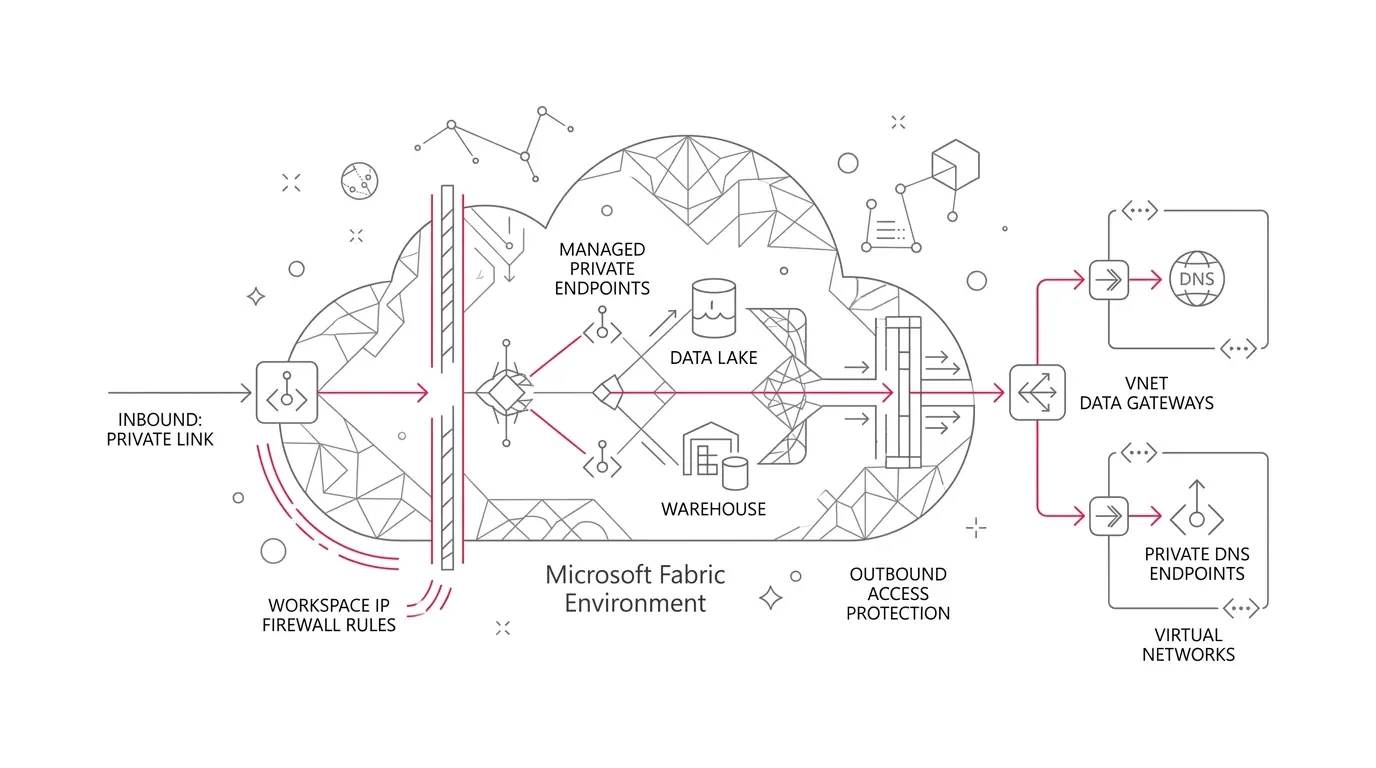
Core Network Architecture Principle: Inbound protection and outbound protection are completely separate controls. Private Link secures traffic entering Fabric; it does not govern which external destinations Fabric items can call. A zero-trust analytics architecture requires workload-aware, workspace-level boundaries.
Microsoft Fabric provides a granular matrix of network controls: tenant-level and workspace-level Private Link, workspace IP firewall rules, workspace outbound access protection, managed private endpoints, data connection rules, virtual network data gateways, and trusted workspace access.
The Enterprise Challenge: Private Networking Without a Dependency Model
Fabric unifies data engineering, integration, warehousing, real-time analytics, data science, and Power BI. That consolidation creates a complex communications graph:
- Inbound Client Access: Users, IDEs, APIs, and CI/CD deployment agents connecting into Fabric workspaces.
- Outbound Data Movement: Pipelines, dataflows, notebooks, and semantic models reaching out to on-premises databases, cloud warehouses, and SaaS endpoints.
- Cross-Workspace Traffic: OneLake shortcuts and direct lake queries referencing items across distinct workspace network boundaries.
- Private DNS Resolution: Ensuring client connection strings resolve to private endpoint IPs rather than public service endpoints.
Control Decision Matrix: Matching Workload Requirements to Network Controls
| Security Requirement | Recommended Primary Control | What It Does NOT Solve | Critical Validation Gate |
|---|---|---|---|
| Restrict Users & Clients by Identity/Device | Microsoft Entra Conditional Access | Does not enforce private network routing or Fabric egress limits | Test mobile users, service principals, and break-glass admin accounts |
| Enforce Private Inbound Network Paths | Workspace-level or Tenant-level Private Link | Does not restrict outbound egress calls from Fabric to external sources | Verify Power BI web portal, Fabric REST APIs, SQL endpoints, and private DNS |
| Restrict Inbound Access to Known Public Egress IPs | Workspace IP Firewall Rules | Does not provide private transport or govern outbound connections | Audit office gateways, VPN pools, partner IPs, and dual-stack IPv4/IPv6 |
| Deny Unapproved Spark & Lakehouse Egress | Outbound Access Protection + Managed Private Endpoints | Does not apply to Data Factory pipeline connectors | Ensure private package repository mirrors are configured for pip install |
| Deny Unapproved Pipeline & Dataflow Egress | Outbound Access Protection + Data Connection Rules | Does not cover Data Engineering managed private endpoints | Test each connector endpoint, gateway rule, and target workspace |
| Secure Firewall-Enabled ADLS Gen2 Storage | Trusted Workspace Access with Workspace Identity | Does not apply to non-Azure storage or unsupported Spark patterns | Verify Azure Storage Resource Instance Rules and Fabric F-SKU requirements |
| Reach Private On-Premises / VNet Sources | Virtual Network (VNet) Data Gateway | Does not support all Fabric item types; introduces compute uptime cost | Benchmark gateway concurrency, subnet sizing, and idle timeout policies |
Five Core Design Principles for Zero-Trust Fabric Networking
1. Classify Workspaces by Security Tier
Group Fabric items into distinct workspace security classes: Restricted Production (deny-by-default inbound/outbound), Controlled Production (identity-first inbound with private gateways), Engineering/Sandbox (private package mirrors without production secrets), and Broad-Consumption BI.
2. Build an End-to-End Communication Register
Map every critical data product flow: source item, destination hostname, protocol, subresource (e.g., both blob and dfs endpoints for ADLS Gen2), runtime identity, and required network rule.
3. Make Runtime Identity Explicit
Network reachability does not equal authorization. Leverage Fabric Workspace Identities for target Azure RBAC authentication and Trusted Workspace Access.
4. Host Private Package Repositories for Spark
In outbound-protected workspaces, direct pip install to public PyPI repositories is blocked. Host vetted wheel files or private package mirrors reachable via managed private endpoints.
5. Audit Network Policies via Administrative APIs
Utilize Fabric networking-policy administrative REST APIs to monitor tenant-wide workspace communication policies and detect unauthorized egress rules or public path openings.
Phased 5-Stage Implementation Roadmap
- Phase 1 (Discover & Classify): Catalog all workspaces, capacities, data flows, and external dependencies; assign workspace security tiers.
- Phase 2 (Establish Platform Guardrails): Define approval runbooks for private endpoints, DNS zones, and VNet gateways; deploy policy audit scripts.
- Phase 3 (Prove One Critical Service): Build and validate a production-grade pilot with complete positive and negative network enforcement tests.
- Phase 4 (Migrate by Workspace Class): Execute phased domain migrations using canary workspaces, observation windows, and rollback triggers.
- Phase 5 (Operate as a Product): Implement continuous synthetic health tests and automated alerts for DNS drift, gateway saturation, or orphaned endpoints.
Design Resilient Zero-Trust Fabric Architecture with YuniQ
YuniQ provides end-to-end Microsoft Fabric security readiness assessments, private networking architecture, VNet gateway optimization, and 24/7 managed governance.
Explore Microsoft Fabric ConsultingFrequently Asked Questions
Does enabling Private Link in Microsoft Fabric automatically block outbound data egress?
No. Private Link only governs inbound traffic entering Microsoft Fabric. Outbound data egress to external databases, lakes, and APIs must be secured separately using Workspace Outbound Access Protection, managed private endpoints, and data connection rules.
Why do Spark notebooks fail to install Python packages in outbound-protected workspaces?
When outbound access protection is enabled, direct internet access to public package registries like PyPI is blocked. Organizations must pre-upload package wheels to environment artifacts or configure managed private endpoints to private package mirrors.
What is the difference between Managed Private Endpoints and Data Connection Rules in Fabric?
Managed Private Endpoints are used by Data Engineering (Spark, Lakehouse) to communicate with private Azure resources. Data Connection Rules are the allow-list mechanism used by Data Factory (Pipelines, Dataflows) to reach approved cloud and gateway connections.