Microsoft Fabric can geo-replicate OneLake data to a paired Azure region, but enabling disaster recovery at the capacity level does not make an entire analytics platform recoverable. During a regional failover, Power BI content can remain available for reading, while many engineering, integration, data science, real-time, and administrative functions are unavailable or require customer-led reconstruction. Some definitions, settings, histories, and data are not replicated at all.
That distinction matters because an enterprise analytics service is more than stored files. It is also pipelines, notebooks, schemas, semantic models, credentials, access rules, schedules, event subscriptions, monitoring, downstream endpoints, and the people and procedures needed to restore them in the correct order.
Core Architecture Principle: Treat Microsoft Fabric disaster recovery as an end-to-end business continuity design exercise, not a single platform toggle. Replicated storage without working orchestration, metadata, and security controls cannot restore business decisions.
Technology leaders should establish a defensible business continuity framework built on five pillars:
- Define recovery time (RTO) and recovery point objectives (RPO) for business flows, not just technical components.
- Map every critical Fabric item and dependency to its actual recovery mechanism.
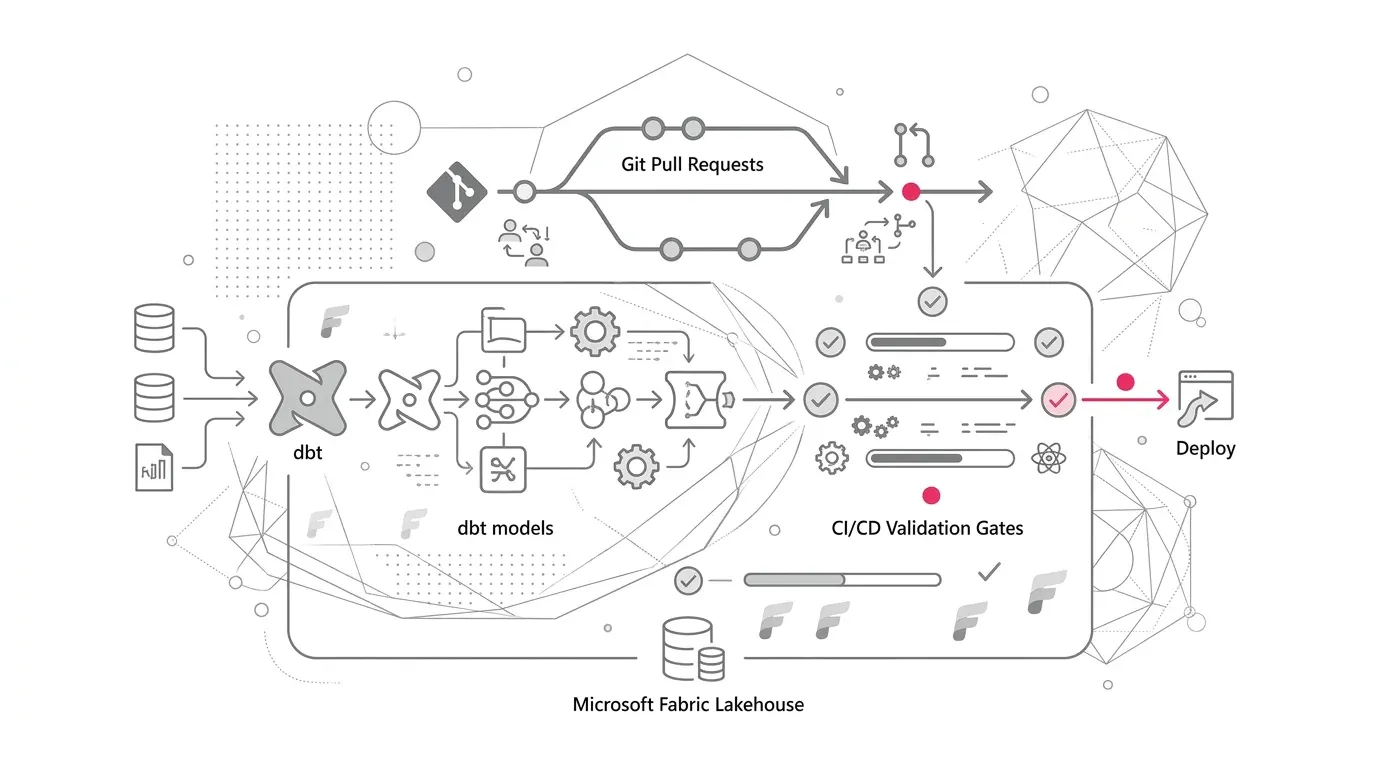
- Keep recoverable definitions and configuration outside the affected Fabric region using Git and CI/CD.
- Use warm standby or active/active patterns only where the business impact warrants the cost.
- Prove the plan with timed, end-to-end recovery drills and automated data reconciliation.
The Enterprise Problem: Replicated Data Is Not a Recovered Service
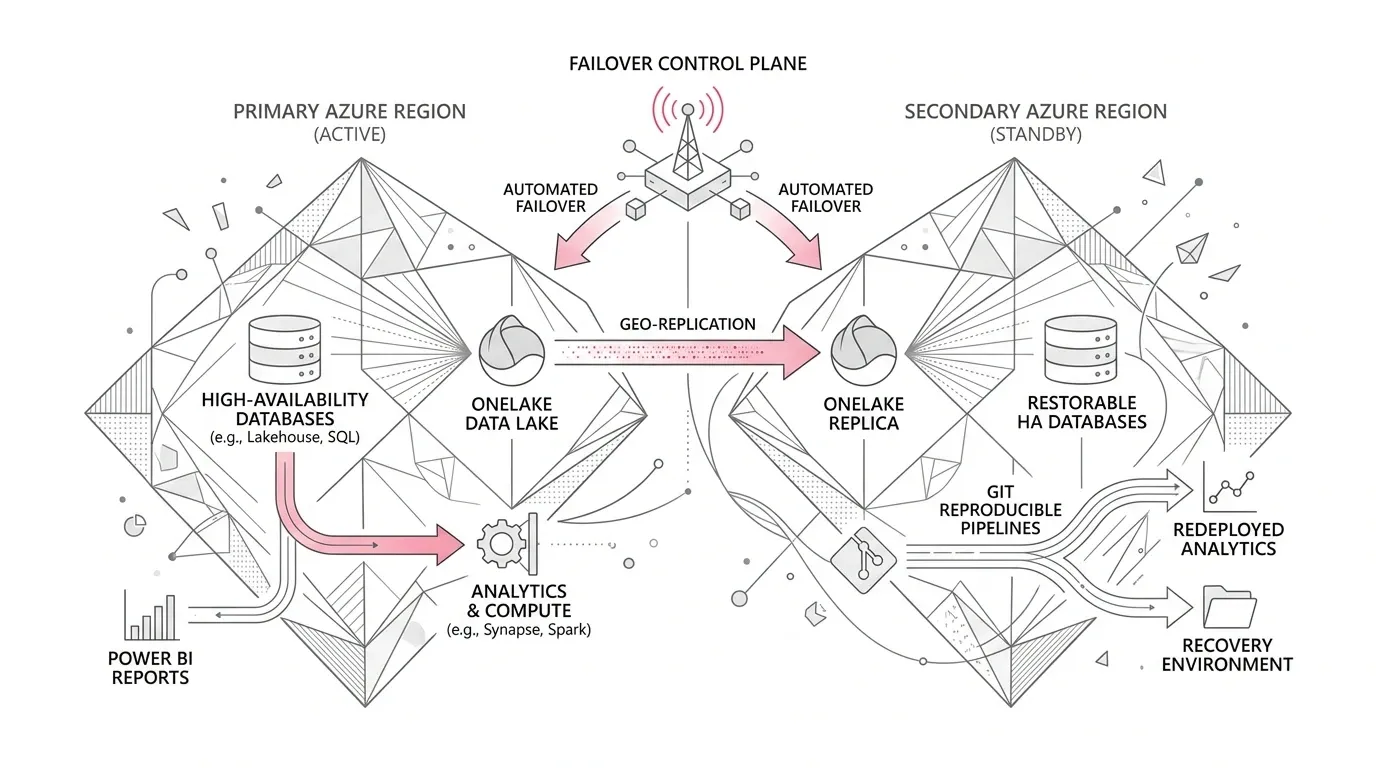
Fabric reduces infrastructure overhead as a SaaS analytics platform. It uses Azure availability zones for supported items and data, and OneLake disaster recovery can copy data to a paired region. However, Microsoft explicitly describes disaster recovery as a shared responsibility model . Fabric's DR switch applies at the capacity level, covers OneLake data (lakehouse and warehouse), does not protect data held outside OneLake, and enforces a 30-day lock before changes can be made again.
The recovery experience differs sharply across Fabric workloads:
- Power BI: Reports, dashboards, and semantic models continue in read-only mode after failover, but scheduled refresh, publishing, and metadata edits stop.
- Lakehouses & Warehouses: Items cannot be opened directly in the Fabric portal during failover, though replicated OneLake data can be accessed via APIs and external tools.
- Notebooks: Notebook code does not replicate to the secondary region; code must be restored from Git repositories.
- Data Factory Pipelines: Pipeline configurations do not replicate; multi-region workspaces must be maintained for critical pipelines.
- KQL Databases: Stored outside OneLake and require an independent multi-region design with parallel ingestion.
- Control Plane Telemetry: Monitoring histories, schedules, endpoint bindings, credentials, and access rules must be recreated or rebound.
Why Business Continuity Matters Now
As Fabric becomes the shared backbone for executive reporting, operational analytics, real-time alerts, and agentic AI grounding, an outage can freeze regulatory feeds, halt automated triggers, strand machine learning pipelines, and leave reports increasingly stale.
Two foundational metrics anchor the reliability architecture:
- Recovery Time Objective (RTO): The maximum acceptable duration a business flow can remain unavailable after an incident.
- Recovery Point Objective (RPO): The maximum acceptable duration of data loss measured backward from the incident.
Illustrative Scenario: The False Comfort of Storage Replication
Consider an enterprise using Microsoft Fabric across three flows: Executive reporting (Direct Lake semantic models), operational case escalations (Data Factory pipelines, Activator alerts with 1-hour RTO and 15-min RPO), and regulatory analytics (Warehouse and Spark notebooks with 8-hour RTO).
The platform team toggles OneLake disaster recovery and marks DR complete. Months later, a tabletop failover drill exposes critical operational gaps: uncommitted notebook changes lost, pipelines missing in the recovery region, undocumented Activator event subscriptions, and manual workspace role bindings. Data protection existed; business continuity did not.
Root Causes and Fallacies in Fabric Disaster Recovery
- Fallacy 1: 'We enabled the DR switch' - Replicates OneLake files but does not duplicate item definitions, pipelines, or non-OneLake stores into a writable secondary environment.
- Fallacy 2: 'Power BI still opens, so the platform is up' - Read-only dashboards render, but refreshes stop and operational writebacks remain completely broken.
- Fallacy 3: 'Git is our complete backup' - Git versions code and supported item schemas, but does not back up data, credentials, run histories, or lakehouse bindings.
- Fallacy 4: 'We will rebuild manually if needed' - High pressure manual reconstruction leads to security errors, lost private network routes, and missed SLAs.
- Fallacy 5: 'Everything should be active/active' - Duplicates capacity and ingestion costs exponentially; should be reserved strictly for Tier-0 real-time flows.
A Practical Microsoft Fabric Continuity Architecture
The target architecture separates four concerns: business criticality, data protection, recoverable control plane definitions, and runtime restoration.
Business Flows & Agreed RTO/RPO → Workload Tiering → (OneLake Data Plane + Git Recoverable Control Plane + External Dependencies) → Recovery Capacity & Workspaces → Restore, Rebind, Secure, Reconcile → Resumed Priority Business Decisions
Step 1: Define Service Tiers Around Business Flows
| Tier | Example Business Flow | Indicative Architecture Pattern | Design Intent |
|---|---|---|---|
| Tier 0 | Safety, regulatory, or revenue-critical operational actions | Active/active or pre-provisioned warm standby capacity | Minimize manual build steps; prove sub-hour failover. |
| Tier 1 | Executive & operational reporting with tight freshness SLAs | OneLake DR + Git recoverable definitions + warm workspace | Restore controlled write operations quickly while maintaining read-only reporting. |
| Tier 2 | Daily analytics and non-interactive data products | OneLake DR + scripted rebuild scripts | Accept longer RTO in exchange for lower standing infrastructure costs. |
| Tier 3 | Development sandboxes, experiments, and staging | Git repository recreation; DR disabled | Avoid paying for business continuity that the workload does not require. |
Step 2: Build a Component Recovery Coverage Matrix
| Fabric Component | Platform Behavior During Failover | Enterprise Preparation Required |
|---|---|---|
| OneLake Lakehouse Data | Geo-replicated asynchronously when capacity DR is enabled | Confirm paired-region support; define acceptable RPO; script table recovery. |
| Warehouse | Data recoverable through interim lakehouse; SQL code not replicated | Store schemas, views, stored procs, and permissions in Git; automate redeployment. |
| Notebooks | Notebook code is NOT replicated to secondary region | Commit all code to Git; document lakehouse and environment rebinding. |
| Data Factory Pipelines | Pipeline configurations do NOT replicate | Deploy equivalent pipelines across multi-region workspaces; externalize variables. |
| Dataflows Gen2 | Can be recreated from exported Power Query templates | Export .pqt templates on a controlled cadence and test automated import. |
| Power BI | Existing reports & semantic models readable; refreshes stop | Define acceptable staleness; preserve model definitions; script refresh restart. |
| KQL Databases | NOT covered by OneLake geo-replication | Deploy independent regional KQL databases; ingest streams in parallel. |
| Activator & Eventstreams | Event subscriptions & bindings require reconstruction | Version event definitions in Git; inventory publishers, consumers, and endpoints. |
| Security & Workspace RBAC | Item permissions and bindings need reapplication | Maintain approved Entra ID role matrices and deployment scripts; validate least privilege. |
Step 3: Make Definitions and Configuration Reproducible
Connect workspaces to Git and enforce commit discipline. Externalize workspace IDs, lakehouse IDs, connection names, and endpoints into environment parameters. Test CI/CD network security and private endpoint compatibility.
Step 4: Design Restoration Order Around Dependencies
- Confirm Microsoft-declared failover status and paired region availability.
- Provision or activate recovery capacity in the secondary region.
- Create governed recovery workspaces with domain boundaries.
- Restore base storage: OneLake tables, warehouse data, regional KQL copies.
- Deploy item definitions from Git repositories.
- Rebind lakehouses, warehouses, environments, gateways, credentials, and variables.
- Reapply and verify Entra ID roles, item permissions, and sensitivity labels.
- Restart ingestion pipelines and transformations in dependency order.
- Reconcile record counts, control totals, Delta versions, and freshness timestamps.
- Resume semantic-model refreshes, Direct Lake reports, alerts, and downstream APIs.
Step 5: Add Operational Telemetry & Reconciliation
Use Fabric Capacity Metrics app and independent health probes for source arrival, pipeline completion, table freshness, and API responses.
Governance, Security, and Cost Optimization
Governance: Assign accountable business owners to recovery tiers and technical owners to critical items. Use Fabric domains to align recovery boundaries.
Security: Recovery must never bypass access controls, private endpoints, or sensitivity labels. Avoid granting broad emergency admin roles during failover.
Cost Modeling: BCDR storage and DR operations consume additional capacity units (CUs). Tier workloads so you only pay DR premiums on critical business data.
Build a Recoverable Microsoft Fabric Architecture with YuniQ
YuniQ helps enterprises design, implement, and validate production-ready Microsoft Fabric platforms with automated Git CI/CD, cross-region resilience, and end-to-end data reconciliation.
Explore Microsoft Fabric ConsultingFrequently Asked Questions
Does OneLake disaster recovery back up notebook code and pipelines?
No. OneLake geo-replication only covers data stored in OneLake (lakehouses and warehouses). Notebook code, pipeline JSON definitions, and KQL databases are not replicated and must be maintained in Git or multi-region workspaces.
What happens to Power BI reports during a Microsoft Fabric failover?
Power BI reports and Direct Lake semantic models remain accessible in read-only mode, but scheduled refreshes, data modeling updates, and publishing stop until the capacity and workspace are restored.
How is OneLake disaster recovery billed?
OneLake DR is billed under BCDR storage rates and consumes additional capacity units for geo-replication write operations. Cost should be managed by enabling DR only on critical production capacities.
Can we test Microsoft Fabric disaster recovery without an actual outage?
Yes. Organizations can conduct nonproduction recovery drills by provisioning secondary capacities, deploying items from Git, pointing to replicated data, and measuring end-to-end RTO and reconciliation accuracy.