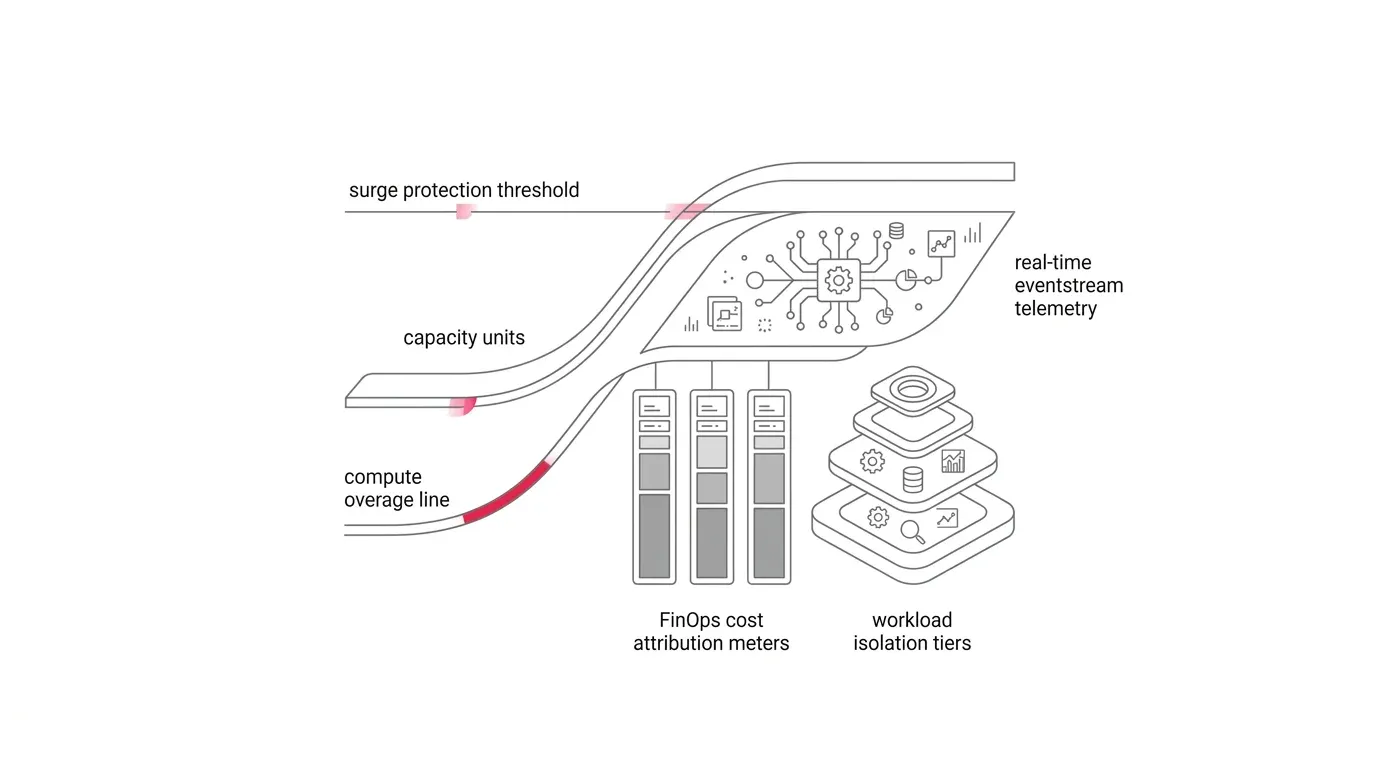
Microsoft Fabric capacity overage, currently documented as a preview feature, gives enterprises a new way to preserve service continuity when demand exceeds an F SKU available Capacity Units (CUs). Instead of allowing Fabric to delay or reject work after smoothing thresholds are crossed, overage pays down excess consumption and bills the additional CU hours to Azure.
Core Architectural Principle: Capacity overage does not add memory or make workloads run faster; it prevents throttling. It operates at 3x pay-as-you-go rates, making it an emergency circuit bridge for continuity rather than an elastic scaling tier.
Overage can protect an executive dashboard, revenue meeting, or critical data pipeline from a visible outage. However, without strict governance, it can also mask underlying compute inefficiencies until an unexpected cloud invoice arrives.
The Enterprise Problem: Availability Protection vs. Cost Governance
Fabric capacities are shared compute pools. Power BI Direct Lake queries, semantic model refreshes, Spark notebooks, data factory pipelines, and warehouses draw from the same capacity units.
When usage exceeds smoothing policies, Fabric enforces throttling in progressive stages: interactive delays after 10 minutes of future consumption, interactive rejections after 60 minutes, and complete request rejections after 24 hours. Capacity overage intervenes at the throttling threshold by billing excess CU hours to keep the capacity non-throttled.
| Control Mechanism | Trigger Condition | Operational Impact | Billing Behavior |
|---|---|---|---|
| Standard Smoothing | Temporary bursting above SKU baseline | Future capacity consumed; no user disruption | Included in base F SKU rate |
| Capacity Throttling | Future consumption > 10m / 60m / 24h | Interactive delays, job rejections | No additional bill; degraded service |
| Capacity Overage | Throttling threshold crossed | Work continues without rejection | Billed at 3x PAYG rate on separate Azure meter |
| Surge Protection | Capacity / Workspace threshold reached | Proactively rejects non-critical background jobs | Prevents deep throttling and overage spend |
Architectural Control Pattern: Six Pillars of Capacity Governance
1. Workload Tiering & Capacity Isolation
Classify workspaces into three tiers: Tier 1 (Executive/Mission Critical, isolated capacity with bounded overage), Tier 2 (Departmental Analytics, shared capacity with surge protection), and Tier 3 (Development/Exploratory, separate dev capacity with strict limits).
2. Pairing Overage with Surge Protection
Enable capacity-level surge protection to reject non-critical background jobs before deep throttling occurs, and apply workspace-level surge protection to prevent single runaway notebooks from exhausting the shared pool.
3. Real-Time Capacity Telemetry Path
Stream 30-second capacity overview events and granular per-operation capacity events via Real-Time Hub into an Eventhouse or monitoring workspace to immediately identify workspaces, items, operations, and users driving consumption spikes.
4. Structured Incident Workflow for Overage Activations
Treat every overage activation as an operational incident. Follow a strict decision tree: diagnose retry loops -> optimize inefficient queries/models -> sequence concurrent jobs -> re-tier workspaces -> scale SKU if demand is permanent and legitimate.
5. FinOps Cost Attribution and Showback
Track the dedicated Capacity Overage Capacity Usage CU meter in Azure Cost Management. Reconcile technical CU consumption with business domain owners using showback reports before enforcing chargeback policies.
Phased Implementation Roadmap
- Phase 1 (Baseline & Classify, Weeks 1-2): Inventory capacities, SKUs, and workspaces; analyze 14-day history in Fabric Capacity Metrics app; establish Tier 1/2/3 classifications.
- Phase 2 (Design & Prove Controls, Weeks 3-4): Configure bounded rolling overage limits (kept below 1/3 daily CU hours); implement capacity and workspace surge protection; stream Real-Time Hub telemetry.
- Phase 3 (Production Rollout, Weeks 5-8): Apply controls to production F capacities; isolate Tier 1 executive reporting; configure automated Activator cost alerts and Azure Cost Management showback.
- Phase 4 (Continuous Optimization, Ongoing): Conduct monthly capacity reviews, optimize top CU-consuming items, track overage avoided, and adjust SKU allocations.
Optimize Microsoft Fabric Performance and Costs with YuniQ
YuniQ delivers expert Fabric capacity planning, F-SKU sizing, query optimization, and 24/7 managed FinOps monitoring to prevent throttling while controlling cloud expenditure.
Explore Fabric Consulting ServicesFrequently Asked Questions
Does capacity overage make Fabric queries and pipelines run faster?
No. Capacity overage does not increase compute memory, CPU cores, or execution speed. It prevents throttling and rejection by paying down accumulated consumption at a 3x premium rate.
How is capacity overage billed in Microsoft Fabric?
Overage is billed to the associated Azure subscription under a separate Capacity Overage Capacity Usage CU meter at three times the standard pay-as-you-go capacity unit hourly rate.
What is the recommended limit for capacity overage?
Microsoft recommends configuring a rolling 24-hour overage limit below one-third of the SKU daily CU capacity, as exceeding that threshold reaches cost parity with scaling up to the next F SKU size.
Can surge protection prevent capacity overage charges?
Yes. Capacity-level and workspace-level surge protection proactively reject non-critical background jobs when consumption spikes, preserving capacity headroom and preventing unwanted overage billing.