Executive summary
Microsoft Fabric Core MCP Server lets an MCP-compatible AI agent manage Fabric through natural-language requests. That can shorten routine platform work, but it also changes the control surface. An agent can discover workspaces, create or update items, alter workspace roles, and delete resources using the signed-in user's existing permissions. Microsoft explicitly warns that autonomous or misconfigured clients may perform destructive actions.
The enterprise problem is therefore not whether the agent has its own mysterious new authority. It does not. The problem is that broad, standing human privileges become easier to exercise at machine speed through a probabilistic interface. A vague prompt, an incorrect workspace match, an overprivileged account, or a weak client approval setting can turn an apparently helpful interaction into an access change or destructive operation.
The right response is not a blanket ban. It is an operating model that separates discovery from change, development from production, and low-risk actions from privileged actions. Start with read-only discovery in isolated workspaces. Use Microsoft Entra ID groups, least-privilege Fabric roles, Conditional Access, just-in-time privileged group membership, explicit approval for every state-changing tool call, and Microsoft Purview audit evidence. Keep production configuration under Git and deployment controls where supported, and test restoration before broadening access.
This article explains how to build that model and how to measure whether it is working.
The enterprise problem: natural language has reached the Fabric control plane
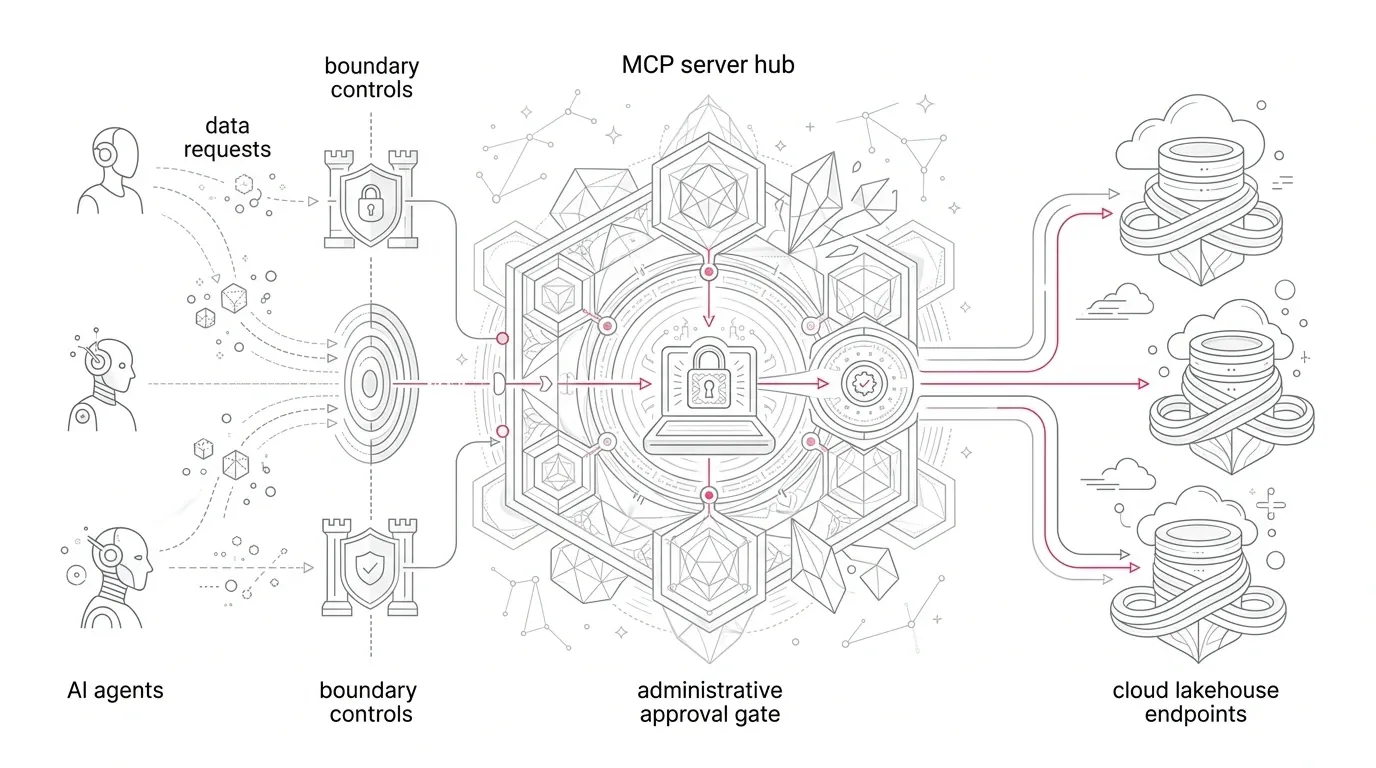
Model Context Protocol (MCP) is an open standard that lets an AI agent discover and call external tools. Fabric Core MCP Server is Microsoft's remote MCP endpoint for supported Fabric resource-management operations. The agent interprets a prompt, selects a typed tool, authenticates the request, and calls the Fabric REST API on behalf of the signed-in identity.
This is more than conversational assistance. The current tool set includes operations to:
- Search the OneLake catalog and list workspaces and items.
- Create, update, and delete workspaces.
- Create, update, delete, and retrieve definitions for Fabric items.
- Add, update, list, and remove workspace role assignments.
- Create and reorganize folders.
- List capacities and check long-running operation status.
The endpoint uses OAuth 2.0 with Microsoft Entra ID. Fabric role-based access control still applies, and connecting the server does not itself grant more permission. That is an important protection, but it is not a complete control model. Fabric workspace roles give Contributors create, modify, and delete rights over many supported items; Members can add users at the same or lower role; and Admins can update or delete the workspace and manage other administrators. The Core MCP tools reference states that workspace deletion permanently removes its items and cannot be undone.
This creates an enterprise risk with four interacting parts:
- Authority: the signed-in identity may already have broad standing privileges.
- Interpretation: the model decides which tool and parameters best match a natural-language request.
- Execution: the client may allow the proposed call automatically or after a lightweight confirmation.
- Evidence: Fabric records supported operations, but complete investigation also depends on the MCP client's own prompt, approval, and tool-call records.
An organization that governs only the Fabric endpoint controls the last API call, not the whole decision chain.
Why this matters now
Microsoft's September 2026 Fabric update lists Fabric Core MCP Server as generally available. However, the Microsoft Fabric MCP overview , also updated on September 23, still labels it preview. Treat that documentation mismatch as a release-management signal: verify the status, supported clients, tool inventory, and tenant behavior in your own environment before approving production use. Do not base a control decision on a release label alone.
The practical urgency comes from capability, not nomenclature. The remote endpoint is simple to add to a compatible client, authenticates with an employee's Entra account, and exposes real resource-management operations. Adoption can therefore begin outside a centrally designed automation program.
Representative enterprise scenario
*The following scenario is representative, not a YuniQ customer case.*
A multinational services company operates several hundred Fabric workspaces across finance, customer operations, analytics engineering, and regional teams. Platform engineers have Admin access to shared development workspaces and elevated access to production during releases. Analysts are Contributors in departmental workspaces.
An engineer connects an approved coding assistant to Fabric Core MCP Server to accelerate workspace setup. The first use case is sensible: create a development workspace, add a lakehouse, and assign the engineering group. Within days, teams also use the agent to rename items, alter access, and clean up old resources.
The company then discovers three control gaps:
- The same identities are privileged in both development and production.
- The client can execute some state-changing calls without a fresh human approval.
- Fabric audit records show the executing user and operation, but the security team cannot always reconstruct the prompt, the model's proposed tool call, the approval decision, and the business ticket that authorized it.
No breach is required for this to become an executive issue. The organization cannot demonstrate that production changes are authorized, reproducible, or recoverable. Its speed gain has created an evidence gap.
Root causes and business consequences
Standing access becomes machine-exercisable access
Many Fabric estates already carry accumulated Admin, Member, and Contributor assignments. MCP does not create that privilege, but it reduces the friction required to use it. A permission that was previously exercised through several portal screens can now be invoked through one request.
The business consequence is a larger operational blast radius for the same identity. Erroneous deletion, unwanted role elevation, or unauthorized item modification can interrupt reporting, expose sensitive content, consume engineering time, and undermine audit confidence.
Workspace roles are broad by design
Fabric workspaces are security and collaboration containers, but their standard roles bundle many capabilities. Contributors can create, edit, and delete supported content. Members can add users with equal or lower permissions. Admins control the workspace itself. A role that is appropriate for interactive development may be too broad for an agent-mediated production session.
Client approval is not a Fabric permission
Microsoft advises reviewing agent-generated tool calls and client approval settings before allowing create, modify, delete, or permission-changing operations. These safeguards live in the MCP client or host, and destructive-operation flags are not standardized across all clients. An organization's control design must therefore assess the client, the model provider, token handling, and data-processing terms as well as Fabric.
Auditability is distributed
Fabric records supported Core operations using the identity that executes them. Microsoft Purview audit search can filter Fabric activities by user, activity, date, and resource. But the Fabric record alone may not explain why the agent chose an operation or who approved the call in the client. The full chain of evidence spans:
- Business request or change ticket.
- User prompt and relevant conversation context.
- Proposed MCP tool, parameters, and target identifiers.
- Human approval or automated policy decision.
- Fabric operation and result.
- Post-change validation and, when needed, rollback.
Recovery assumptions are dangerously uneven
Some Fabric items and configurations can be represented in Git or recovered through platform features, but coverage is not universal. Data, workspace membership, runtime settings, external connections, secrets, schedules, and item definitions have different protection boundaries. The Core MCP tools documentation is explicit that deleting a workspace is irreversible through that operation. A generic statement such as "we have source control" is therefore not a recovery plan.
Why common approaches fall short
"Fabric RBAC already handles security"
RBAC is necessary, but it answers whether an identity *may* perform an operation. It does not determine whether a particular prompt was authorized, whether the selected target was correct, whether the client should require approval, or whether the resulting change passed validation.
"Require confirmation for delete"
Deletion is not the only high-risk action. Adding an Admin, changing an item definition, removing access, or moving resources can be consequential. Approval rules should be based on operation, environment, data classification, and target criticality, not on the word "delete" appearing in a prompt.
"Give the agent a shared admin account so activity is easy to find"
A shared identity weakens individual accountability and increases credential risk. Core MCP uses the authenticated identity's permissions and records supported operations under that identity. Named users with time-bound group membership provide a clearer accountability path for interactive administration.
"Pilot directly in production because the API enforces permissions"
Production is the wrong place to discover how a client renders parameters, caches consent, handles ambiguous names, preserves conversation context, or records approvals. Those behaviors must be tested with representative but non-production resources first.
"Audit after an incident"
Audit capability that has not been tested is only an assumption. Organizations need known operation-to-event mappings, retention appropriate to policy, regular retrieval tests, and correlation between client and Fabric records before the control is relied upon.
A governed Microsoft Fabric Core MCP architecture
The target design should put deterministic controls around the agent's probabilistic interpretation.
Approved user on managed device
        |
        | Entra ID authentication + Conditional Access
        v
Approved MCP client and model
        |
        | prompt, tool proposal, parameters, human approval
        v
Fabric Core MCP Server
        |
        | authenticated user's current Fabric permissions
        v
Environment boundary
  +-------------------+--------------------+
  | Discovery zone    | Change zone        |
  | Viewer/read path  | JIT Member/Admin   |
  | no state change   | explicit approval  |
  +-------------------+--------------------+
        |
        v
Fabric audit events + client logs + change ticket + validation evidence
Build an operation and risk catalogue
Inventory the current Core MCP tools rather than approving "MCP" as one capability. For each tool, record:
- Read or write behavior.
- Required Fabric role.
- Eligible environments and workspace tiers.
- Maximum plausible impact.
- Human approval requirement.
- Required business evidence.
- Validation and rollback method.
- Expected audit event.
A practical classification is:
| Risk class | Example operations | Default handling |
|---|---|---|
| R0: discovery | Search catalog, list workspaces, list items | Allowed for approved users within existing read scope |
| R1: reversible non-production change | Create a dev folder, rename a dev item | Per-session approval with automated validation |
| R2: privileged change | Create workspaces, update item definitions, add or change roles | Per-call approval, ticket reference, just-in-time role, two-person review for sensitive targets |
| R3: destructive or production-critical | Delete workspace or item, revoke production access | Deny through MCP by default; use a controlled administrative procedure when exceptionally approved |
This is a recommended control model, not a Microsoft product default.
Separate discovery identities from change authority
Most value begins with finding workspaces, items, definitions, and capacity information. Make that a distinct read path. Use Viewer where it provides sufficient metadata access and grant broader roles only to the people and workspaces that need to change resources.
Assign workspace roles to Entra security groups rather than directly to individuals where practical. Review inherited and nested group effects because Fabric applies the highest permission a user receives through their memberships.
For privileged operations, use a dedicated privileged group and Microsoft Entra Privileged Identity Management for Groups where it fits the organization's licensing and identity design. Require time-bound activation, justification, approval, and strong authentication. The objective is to prevent a routine MCP session from inheriting permanent production administration rights.
Put production behind a different operating path
Use separate development, test, and production workspaces. Restrict who can create workspaces and Fabric items through tenant and capacity settings , using approved security groups. Keep agent-assisted experimentation in designated capacities and workspaces.
For production, prefer reviewed Git and deployment workflows for supported item definitions. MCP can help inspect or prepare changes in development, but promotion should remain deterministic, reviewed, and reproducible. Track the gaps: Git does not protect every resource, setting, permission, connection, or data object.
Enforce identity and device conditions
Fabric supports Microsoft Entra Conditional Access . Policies can require MFA, compliant devices, and permitted locations. Microsoft recommends considering the connected Fabric resources together, including Power BI Service, Azure Data Explorer, Azure SQL Database, Azure Storage, and Azure Cosmos DB, because an incomplete policy can disrupt dependent features.
Roll out Conditional Access in report-only mode, validate normal and failure paths, preserve emergency access procedures, and then enforce. For privileged MCP use, consider phishing-resistant authentication strength according to the organization's broader Entra policy.
Make approval contextual and visible
Configure the MCP client so state-changing operations always display the exact tool, target workspace and item identifiers, role assignment, and parameters before execution. Do not rely only on resource display names; Microsoft troubleshooting guidance recommends using workspace UUIDs for subsequent operations after discovery.
Require a fresh approval for each privileged call. Do not treat approval to create a workspace as approval to add members or delete an old workspace. For R2 changes, capture a ticket or request identifier. For R3 operations, remove the tool from the approved workflow where the client supports it, or prohibit the activity by operating procedure and retain the actual destructive change in a separately controlled interface. This is consistent with the NIST Generative AI Profile , which says generative AI use may require additional human review, tracking, documentation, and management oversight.
Correlate evidence across systems
Use Microsoft Purview audit search for Fabric activities and validate which Core operations appear in the operation list. Retain client-side records of prompts, proposed calls, approvals, timestamps, and results according to legal and privacy requirements. Link both sides to the same change record.
Alert on patterns such as:
- Workspace deletion or repeated delete attempts.
- New Admin or Member assignments in production.
- Role changes outside approved windows.
- High-volume item updates by one identity.
- Privileged activity without a matching change record.
- Tool calls from unmanaged clients or unexpected locations, where identity telemetry supports detection.
Audit logs are detective controls. They do not replace least privilege and approval, but they make misuse and control failure observable.
Design recovery per resource type
For each allowed write operation, document the restoration unit and owner:
- Workspace definition and assignment.
- Item definition in Git, where supported.
- Data in OneLake or external source systems.
- Workspace roles and item permissions.
- Connections, credentials, schedules, and gateway mappings.
- Capacity and environment-specific configuration.
Test recovery in dependency order. Restoring an item definition is not success if its permissions, connection, schedule, or downstream consumer remains broken. Because Core MCP workspace deletion is documented as irreversible, the safest default is to exclude it from ordinary agent-assisted administration.
Phased implementation roadmap
Phase 1: Discover and constrain, weeks 1-2
- Inventory MCP clients already in use and identify connected Fabric identities.
- Export workspace role assignments and find standing Admin, Member, and Contributor access.
- Catalogue Core MCP tools and map each to risk classes R0-R3.
- Select one low-sensitivity development workspace and a named pilot group.
- Define approved client, model, data-handling, logging, and retention requirements.
Exit gate: security, Fabric platform, identity, compliance, and data owners agree on the pilot boundary and prohibited operations.
Phase 2: Prove the controls, weeks 3-5
- Enable read-only discovery first.
- Configure Conditional Access and test both permitted and blocked scenarios.
- Introduce just-in-time group membership for privileged non-production changes.
- Require per-call approval and capture exact tool parameters.
- Execute positive and negative tests, including ambiguous workspace names, stale context, insufficient privilege, rejected approvals, and attempted destructive actions.
- Confirm Fabric events can be found in Purview and correlated to client evidence.
Exit gate: every permitted operation has a known identity, approval rule, expected audit trail, validation step, and recovery procedure.
Phase 3: Add controlled change, weeks 6-9
- Allow selected R1 operations in development.
- Permit a narrow set of R2 operations with tickets and just-in-time roles.
- Keep R3 operations denied.
- Route supported item changes through Git review and deployment gates.
- Measure error, rejection, validation, and recovery performance.
Exit gate: the pilot meets agreed thresholds without privilege expansion or unresolved evidence gaps.
Phase 4: Scale by workspace tier, weeks 10+
- Onboard teams by sensitivity and business criticality, not by demand order.
- Reassess tools when Microsoft changes the server's operation set or status.
- Review privileged group eligibility and client registrations regularly.
- Run quarterly destructive-action and recovery exercises in non-production.
- Treat production enablement as a separate risk acceptance, not an automatic result of pilot success.
Governance, security, adoption, and cost considerations
Governance
Name owners for the Fabric platform, approved MCP clients, identity groups, audit evidence, and each production workspace. Publish an operation policy that users can understand: which tools are allowed, where, under what approval, and with what record. Review the policy when the Core tool inventory changes.
Security and compliance
Microsoft notes that an MCP client or model may process information outside Fabric's compliance boundary. Review the chosen provider's terms, retention, geographic processing, and training settings. Apply data minimization to prompts and tool results. Do not assume that a locally running MCP server or client means the model processes data locally.
Adoption
Train users to treat an agent proposal as an untrusted change request. Good training is operational: verify IDs, inspect role values, recognize destructive tools, reject bundled changes, and report unexpected behavior. Separate user enablement for discovery from authorization for resource administration.
Cost
Core governance has direct and indirect cost components: Entra and Purview licensing where applicable, security engineering, log storage, client licensing, pilot capacity, control maintenance, and recovery exercises. The benefit case should measure saved administration effort and faster environment setup against review effort, failed changes, incident exposure, and governance overhead. Do not count an automated action as a saving if a human must later reconstruct or repair it.
Success metrics
Use a balanced scorecard rather than a raw count of agent interactions.
| Outcome | Suggested measure |
|---|---|
| Least privilege | Percentage of MCP-enabled users with standing production Member or Admin access |
| Controlled execution | Percentage of R1-R2 tool calls with required approval and change reference |
| Evidence completeness | Percentage of sampled changes linked across client record, Fabric audit event, and validation result |
| Safety | Count of prohibited R3 attempts executed; target zero |
| Accuracy | Percentage of state-changing calls applied to the intended workspace and item ID |
| Recoverability | Percentage of permitted write operations with a tested recovery procedure |
| Operational value | Median time to complete approved workspace or item administration tasks |
| Adoption quality | Percentage of trained users passing scenario-based control checks |
| Control responsiveness | Time from a new or changed MCP tool appearing to risk review and policy update |
Set thresholds by workspace tier. A development sandbox and a regulated production workspace should not share the same tolerance.
How YuniQ can help
YuniQ's published Microsoft Fabric services align with the work required to make agent-assisted administration governable. Its Fabric Strategy & Readiness offering includes current-state platform diagnostics, workspace topology, capacity planning, and security, governance, and operating-model design. Those capabilities can support an MCP readiness assessment and a risk-tiered pilot boundary.
YuniQ also describes Microsoft Entra ID least-privilege role design, Purview integration, auditable logging, development/test/production separation, Git integration, CI/CD deployment pipelines, and automated monitoring within its Governance, Security & DevOps capability. These are the same foundations needed to constrain Core MCP operations and preserve an evidence-backed route to production.
For implementation, YuniQ's delivery framework moves from discovery and architecture through a focused proof of value, iterative build, validation, launch, and ongoing optimization. Applied to this problem, that means proving controls with real Fabric identities and workspaces before scaling, then incorporating access tests, change evidence, recovery exercises, and operational monitoring into the platform lifecycle.
This is a specific use of YuniQ's stated Fabric architecture, governance, security, DevOps, validation, and managed-service capabilities. It is not a claim that YuniQ has delivered a Fabric Core MCP engagement unless separately evidenced.
Practical next steps
- Ask the Fabric administrator for a current export of workspace roles and tenant settings.
- Identify whether employees have already configured Fabric Core or local MCP servers in approved or unapproved clients.
- Block ordinary production use until the organization has classified the current tool set.
- Choose one non-production workspace and enable discovery-only use for a small named group.
- Test identity, approval, audit, denial, and recovery paths with scripted scenarios.
- Decide which state-changing operations, if any, produce enough business value to justify controlled enablement.
- Reassess release status and tool coverage directly in Microsoft documentation before each expansion wave.
The central principle is simple: an AI agent should never be easier to authorize than the change it is being asked to make. Fabric Core MCP Server can accelerate administration, but only when identity, approval, evidence, and recovery remain more deterministic than the prompt.