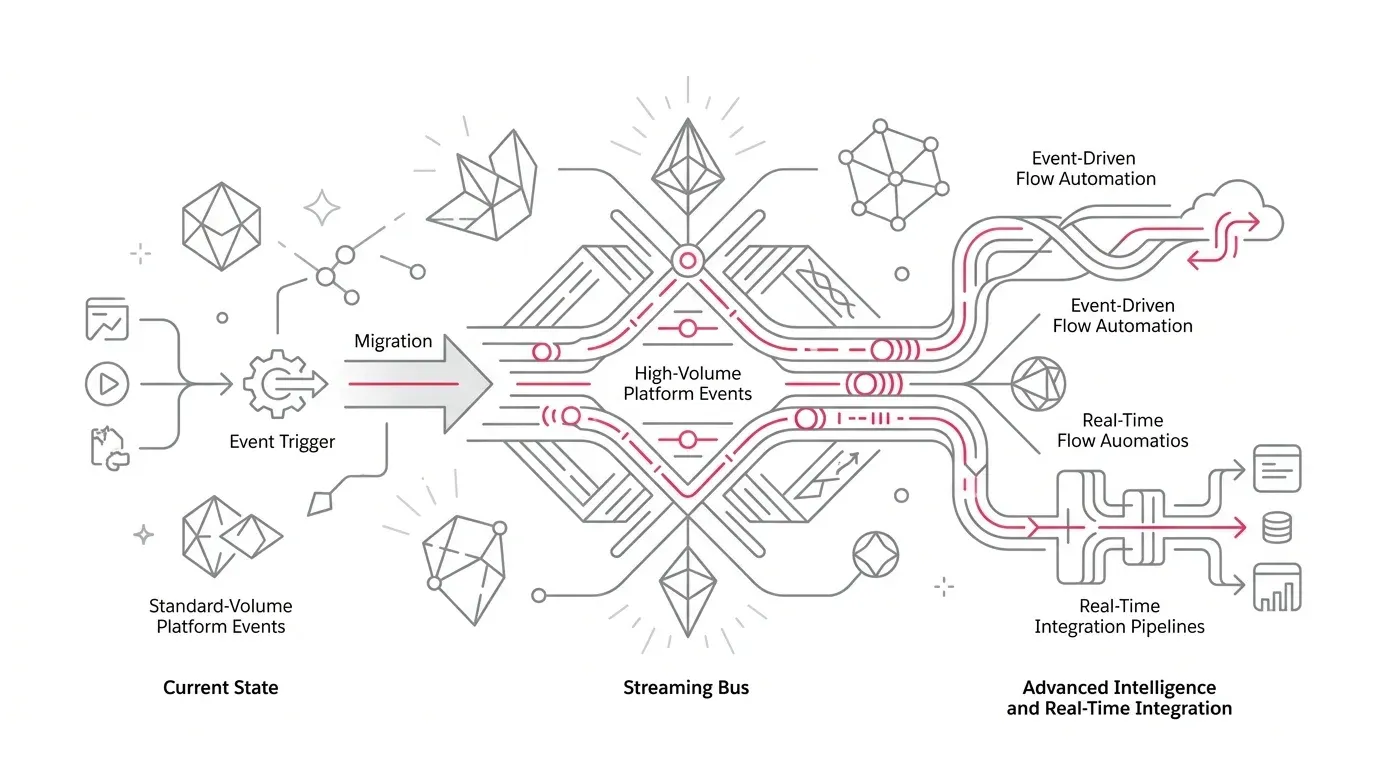
Salesforce has set December 15, 2026 as the end-of-life date for standard-volume Platform Events. After that date, organizations can no longer publish or subscribe to those legacy custom events, according to Salesforce official retirement notice .
Executive Takeaway: Determine exposure now. If standard-volume events exist, choose the migration path based on dependency complexity and acceptable downtime, not on how easy the Winter 27 button looks.
For an org that has none, this is a quick inventory check. For an org that still has one or more, it is an integration-continuity project with a fixed deadline. The object conversion is only one step. A Platform Event may connect Flows, Apex triggers, middleware, external applications, and managed packages.
What Salesforce Is Retiring: The End of Legacy Custom Events
Standard-volume Platform Events are legacy custom events. Salesforce deprecated them in Spring 19 and stopped allowing customers to define new ones. New custom Platform Events have been high-volume by default for years.
The deadline changes the operational position. Salesforce says that on December 15, 2026, publishing and subscribing to standard-volume Platform Events will no longer work. Its retirement guidance states that legacy events are already unsupported: customers may continue using them before end of life, but Salesforce will not provide troubleshooting or bug fixes.
Why This Is an Integration Risk, Not Just a Metadata Task
A Platform Event is useful because it decouples systems. That same decoupling can obscure runtime ownership across complex architectures:
- Salesforce producers, including Apex classes, Flows, or packaged automation.
- External publishers calling Salesforce REST, SOAP, or legacy streaming endpoints.
- Salesforce subscribers, such as platform-event-triggered Flows or asynchronous Apex triggers.
- External subscribers using Streaming API, CometD clients, or enterprise middleware (MuleSoft, Boomi, Kafka).
- Monitoring, replay, retry, and dead-letter queues outside Salesforce.
- Permission sets, integration users, and deployment pipelines carrying event definitions.
| Integration Component | Standard-Volume Behavior | High-Volume Target Requirement |
|---|---|---|
| Event Definition | Legacy standard-volume schema | Migrated high-volume custom event schema |
| Publish API | Restricted legacy endpoints | Pub/Sub API or standard REST/SOAP/Apex publish |
| Subscription Replay | CometD / Streaming API replay | 24-hour / 72-hour event bus replay window |
| Flow / Trigger Execution | Synchronous / Asynchronous handlers | Drained and reactivated platform-event triggers |
| Maintenance Window | Continuous operation | Mandatory quiescence pause during conversion |
Two Supported Salesforce Migration Paths
Option 1: Winter 27 Self-Service UI Migration
The recommended self-service option appears on the Platform Events page after Winter 27 reaches the org. It converts all standard-volume Platform Events to high-volume events in one coordinated step.
This suits orgs with a small, well-understood event estate and one acceptable maintenance window. Its main tradeoff is shared blast radius: all affected events and dependencies must be ready simultaneously.
Option 2: Metadata API PlatformEventMigration
The PlatformEventMigration Metadata API type operates one event at a time. This route adds deployment discipline, enabling phased rollouts across separate business domains and third-party vendor applications.
Designing the Quiescence Window Before Migration
Salesforce instructs teams to stop publishing and allow subscribers, including triggers and Flows, to finish processing before migration begins. During migration, publishing is unavailable and teams cannot create new triggers or Flows. A migration typically takes 15 minutes per event, but can take up to 24 hours in rare edge cases.
- Stop External & Internal Publishers: Verify all API clients and scheduled batch jobs pause publishing.
- Drain In-Flight Event Subscriptions: Confirm that all Apex triggers, Flows, and CometD clients complete pending message processing.
- Execute Migration Tool / API: Convert the event definition and monitor completion in Setup.
- Validate End-to-End Business Workflows: Perform test publishes and verify downstream record updates.
- Resume Production Publishing: Reactivate integrations and monitor real-time event logs.
Actionable 30-Day Migration Roadmap
- Days 1-5 (Exposure & Ownership): Audit Setup > Platform Events, identify all standard-volume custom events, and assign technical and business owners.
- Days 6-12 (Dependency Mapping): Document all publisher APIs, subscriber triggers, middleware connections, and vendor managed packages.
- Days 13-20 (Sandbox Rehearsal): Execute the migration in a full sandbox, benchmark conversion duration, and validate replay and error-handling behavior.
- Days 21-25 (Runbook Approval): Secure change-board approval, establish fallback procedures, and freeze unrelated code modifications.
- Days 26-30 (Production Cutover & Observability): Execute during a planned change window, verify business records, and monitor Pub/Sub API and Event Monitoring logs.
Safeguard Your Salesforce Integrations with YuniQ
YuniQ provides end-to-end Salesforce event architecture assessments, migration execution runbooks, and managed support to ensure zero-downtime platform transitions.
Explore Salesforce ServicesFrequently Asked Questions
What happens if we do not migrate standard-volume Platform Events before December 15, 2026?
After December 15, 2026, Salesforce will permanently disable publishing and subscribing for all remaining standard-volume Platform Events. Any integration attempting to publish or subscribe will encounter runtime API errors.
Can we migrate Platform Events individually instead of all at once?
Yes. While the Winter 27 Setup UI converts all standard-volume events simultaneously, teams can use the PlatformEventMigration Metadata API to migrate events individually across phased maintenance windows.
Does Pub/Sub API support standard-volume Platform Events?
No. Salesforce modern Pub/Sub API only supports high-volume Platform Events and Change Data Capture events. Migrating to high-volume events allows external clients to upgrade to gRPC-based Pub/Sub API.